Part 6 of 13 in Meeting the DfE digital and technology standards.
Wi-Fi is the part of a school network everyone notices and nobody can see. When a class of thirty opens the same site and half the screens hang, the fix is rarely as simple as buying a stronger box.
In short: The DfE wireless network standard is one of the six core standards schools and colleges should be working towards meeting by 2030. It applies "when you need to upgrade an underperforming or unsupported solution". At that point the DfE asks for Wi-Fi 7 (802.11be) as a minimum, coverage planned with heat mapping and up to one access point per classroom, a central management tool that applies security updates automatically, and security features including WPA3, segregated guest access and multi-factor authentication for anyone with admin rights. The first step is to find out whether your current system is still supported, because that decides whether the trigger has already been pulled.
What does the standard actually ask for?
The wireless network core standard asks you to "use the latest wireless network standards for performance, coverage, management and security in your school or college". It sets out four requirements, in the DfE's own words and order:
- "Use the latest wireless network standards"
- "Have a fully functional signal from your wireless network throughout the school or college buildings and externally where required"
- "Have a solution that can centrally manage the wireless network"
- "Install security features to stop unauthorised access"
The wording for all four is "should", in keeping with the 2030 target that runs across the six core standards we cover in our DfE digital standards guide. The DfE does not ask you to rip out a working network. It asks you to specify the next one properly.
When does the trigger apply?
Get this right before anyone talks about products. For the first three requirements the DfE's timing is identical: "you should meet the standard when you need to upgrade an underperforming or unsupported solution". The security requirement adds one more trigger: "or following a scheduled maintenance or configuration review".
That gives you three honest questions to put to your IT support or supplier:
- Is it underperforming? Can a full class use their devices at the same time in every room? The DfE's own test is that the network "should support concurrent logon and use of all devices".
- Is it unsupported? Does the manufacturer still issue security and firmware updates for the access points and the controller? If not, the trigger has already been pulled whether or not the Wi-Fi feels fine.
- When was the last configuration review? If nobody can remember, the security requirement applies now.
The pattern we see in most estates is a wireless system that works well enough to avoid complaints, is past the end of its support, and has never had its configuration reviewed since installation. That is an unsupported solution in the DfE's terms, and the sensible response is a planned upgrade in a holiday rather than an emergency one in term time.

Wi-Fi 7 and the numbers behind the access points
The DfE is specific on the generation. "When you need an upgrade, the wireless network should use the latest standard approved by the Wi-Fi Alliance, Wi-Fi 7 (802.11be)." The how-to text is equally direct: ask "your supplier or IT support to provide a wireless solution that uses, at a minimum, the Wi-Fi 7 standard".
It then adds a detail that is easy to miss: schools should also review the network interface speeds of the access points, which the guidance says "will typically be 1Gbps, 2.5Gbps and 5Gbps or 10Gbps." An access point is only as fast as the cable and switch port behind it, so the uplink speed decides whether Wi-Fi 7 delivers anything the old system did not.
The DfE also says the wireless network "should be configured to support network segregation and QoS". In plain terms, staff, student and guest traffic should be kept apart, and video calls should not be squeezed out by a bulk download in the next classroom. Both are configuration items, not purchases, and both belong in the specification.
Coverage is a planning exercise, not a purchase
The second requirement asks for "a fully functional signal from your wireless network throughout the school or college buildings and externally where required". The DfE's guidance on how to get there is practical.
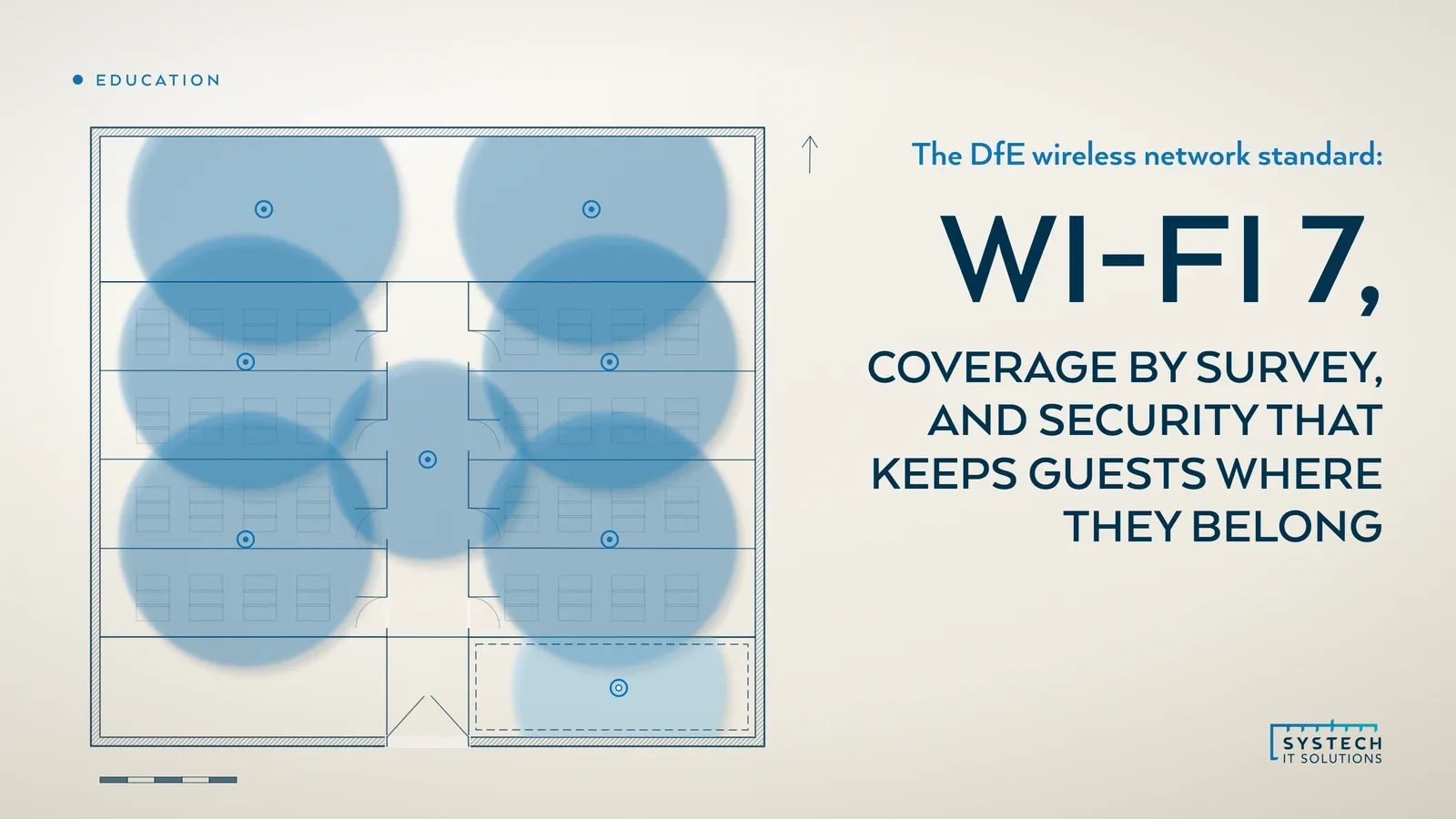
- "You should have wireless access points installed across the site. This could be up to one per classroom, with higher-specification units in high-capacity areas such as halls."
- "Ensure that the number of access points provides coverage in each space that is in line with the planned occupation level. This is to support simultaneous use without reducing the performance."
- "This should include using wireless heat mapping as part of initial planning and ensuring that impact from building management systems and other networks is minimised."
The important word is "planned". A heat map survey tells you where signal actually reaches, where thick walls and steel frames kill it, and where a hall or dining room needs a higher-specification unit because two hundred devices will arrive at once. Buying access points before the survey usually means buying the wrong number in the wrong places.
"Wi-Fi that works in an empty classroom has not been tested. Wi-Fi that works with thirty devices in it has."
Central management and what to ask the supplier for
The third requirement is "a solution that can centrally manage the wireless network". The DfE says the provider or IT support "should provide a central management tool that can be used to configure the wireless access points, monitor performance and provide alerts in the event of a failure". It also says the tool "should have the functionality to deliver software security updates automatically as soon as they are available", with manual checks undertaken as well.
The technical requirements read like a checklist for the quote. The DfE says the supplier should ensure the solution will:
- Provide active signal management and load balancing, with tools to configure, monitor and alert.
- "Include a manufacturer warranty and support arrangements including licences, software enhancements, and security and firmware updates."
- "Include a system administrator training package, that is manufacturer approved and that covers all security elements for the solution."
- Be scalable for future higher bandwidth.
- "Be capable of providing a configuration file that allows the solution to be reset to the original configuration for the school."
That last item is the one most often missing. A configuration reset file is what lets you recover from a bad change, a failed controller or a departing technician without rebuilding the network from memory. It costs nothing to ask for and a great deal to go without.
Security features to stop unauthorised access
The fourth requirement is where the wireless standard meets the cyber security standard, and the DfE says so: "the security of your wireless connection may be affected by other cyber security factors". The core expectation is that "users must not be able to access the network without appropriate authorisation and authentication methods", and that "any administrative accounts that have access to make configuration changes must be secure and fully documented".

The DfE then lists what you may need to achieve that:
- VLANs and access control lists (ACLs) to keep staff, student, guest and building-system traffic apart.
- Secure segregated guest access, so visitors never touch the school network.
- "The latest authentication protocols (WPA3)" rather than a shared password pinned to the staffroom noticeboard.
- Wireless intrusion protection (WIPS) to detect rogue access points and attacks.
- Certificate-based authentication, so managed devices join automatically and unmanaged ones do not.
- "Multi-factor authentication (MFA) for privileged users and technical support staff."
For a Microsoft school, certificate-based authentication and MFA for administrators are largely configuration of things you already license. Devices enrolled through Intune can carry the certificate that gets them onto the network, which our Intune device management checklist walks through, and the admin accounts for the wireless controller can be protected with the same MFA as the rest of your tenant.
The cabling and switching dependency
The DfE repeats one sentence under three of the four requirements: "the speed of your wireless connection may be affected by your internal network cabling and switches". It is the most practical line on the page.
A Wi-Fi 7 access point with a 2.5Gbps, 5Gbps or 10Gbps interface plugged into an old switch port over old cable runs at the speed of the weakest link. The network switching standard asks for multi-gigabit ports for access points and for switches that can power them. The network cabling standard asks for cabling that can carry those speeds.
If either is missing, the wireless upgrade needs to be sequenced after them, or designed with them in the same plan. So the honest first step is not a wireless quote but a short survey of the cabinet and the runs to each classroom, so the upgrade you budget for is the one you get.
Where Systech fits
We are a small team of specialists rather than a wireless vendor, so we do not tie you to one manufacturer. We assess whether your current system is underperforming or unsupported in the DfE's terms, commission the heat map survey, and write the specification so that every quote answers the standard line by line: Wi-Fi 7, uplink speeds, central management, warranty, training and the configuration reset file.
We check the cabling and switching behind it before anything is ordered. We do not install cabling ourselves; we design, specify and verify it and manage the installers. Then we configure WPA3, VLANs, guest segregation, certificate authentication and MFA for administrators, and give you the evidence in writing. Our networking services and education IT services cover the whole sequence.
If you want to know whether the trigger has already been pulled on your wireless network, book a free DfE standards baseline. It is a 60-minute conversation across all twelve standards, the six core ones first, and the findings are yours whether or not you go further with us.
Frequently asked
Does the DfE require schools to have Wi-Fi 7?
Only when you upgrade. The DfE wireless network standard says you should meet it when you need to upgrade an underperforming or unsupported solution. At that point the DfE says you should ask your supplier or IT support to provide a wireless solution that uses, at a minimum, the Wi-Fi 7 standard, which it describes as the latest standard approved by the Wi-Fi Alliance, Wi-Fi 7 (802.11be). The standard is one of the six core standards schools and colleges should be working towards meeting by 2030. A working, supported Wi-Fi 6 network does not need to be replaced tomorrow on this wording, but the next replacement should not be specified at anything below Wi-Fi 7, and the cabling and switches behind it need to be able to carry the access points' uplink speeds.
How many wireless access points does a school need?
The DfE does not give a single number, because it depends on the building and how each room is used. Its wireless network standard says access points should be installed across the site, and that this could be up to one per classroom, with higher-specification units in high-capacity areas such as halls. The test the DfE sets is that the number of access points provides coverage in each space in line with the planned occupation level, so that everyone in the room can use a device at the same time without performance dropping. It also says wireless heat mapping should be used as part of initial planning, and that interference from building management systems and other networks should be minimised. A heat map survey is the honest way to get the number for your site.
What security does the DfE expect on a school wireless network?
The DfE wireless network standard says users must not be able to access the network without appropriate authorisation and authentication, that authorised devices and guest users should be securely authenticated individually, and that traffic should be protected from external and unauthorised internal interception. To achieve that it lists the measures you may need: VLANs, access control lists, secure segregated guest access, the latest authentication protocols (WPA3), wireless intrusion protection (WIPS), certificate-based authentication, and multi-factor authentication for privileged users and technical support staff. It also says any administrative accounts that can change the configuration must be secure and fully documented. The DfE notes that wireless security is affected by other cyber security factors, which its cyber security standard covers.
What should a school ask a Wi-Fi supplier for to meet the DfE standard?
The DfE wireless network standard lists what the supplier should ensure the solution provides. A central management tool to configure access points, monitor performance and alert on failures, with the ability to deliver software security updates automatically as soon as they are available. Active signal management and load balancing. A manufacturer warranty and support arrangement covering licences, software enhancements, and security and firmware updates. A system administrator training package that is manufacturer approved and covers all security elements of the solution. Scalability for future higher bandwidth. And a configuration file that allows the solution to be reset to the school's original configuration. Asking for each of these by name, in writing, is the simplest way to compare quotes against the standard.