
IT & Microsoft cloud for media & creative
High-performance remote collaboration, big-file workflows and cost control for media and creative teams.
Request a callFreelancers in and out cleanly, and big files that move
In short: Freelancer access, large-file workflows, embargoed content, and costs that swing between projects. Sort freelancer access and offboarding first: the risk here is almost never a dramatic breach, it is an account nobody removed and content nobody unshared.
Creative teams live in enormous files, immovable deadlines and a rotating cast of freelancers on their own kit, a combination that punishes slow, insecure or inflexible IT harder than almost any other sector.
The challenge
Media, production and creative businesses run on workflows that ordinary business IT was never designed for. Projects mean very large video, image and design files that have to move between editors, designers and reviewers without grinding to a halt, and the value of that work is intellectual property, unreleased content, client campaigns and footage under embargo, that leaking early is a genuine commercial and reputational hit. The workforce flexes constantly: freelancers and contractors come in for a project and leave, very often working on their own laptops (BYOD), which is convenient but a security headache if access isn't controlled and cleanly removed at the end. Bigger clients and broadcasters increasingly attach content-security and access requirements to the work. And because the workload is lumpy, nobody wants to pay for performance capacity and licences that sit idle between projects. The need is real performance and easy collaboration, with content protected and cost that flexes with the project pipeline.
What we would do
Sort freelancer access and offboarding first. Creative teams run on a rotating cast of people on their own kit, and the risk is almost never a breach in the dramatic sense: it is an account that was never removed and content that was never unshared.
- If large files and remote editing are the pain, that is a desktop and storage design question, and a cloud desktop may or may not be the answer depending on the workflow.
- If costs swing hard between projects, the fix is visibility and shutdown schedules rather than a smaller commitment.
When we are not the answer: If your projects run on a platform your clients mandate and you have no say over it, most of what we would recommend is out of your hands. Fix offboarding, and leave the rest.
What we do for media & creative
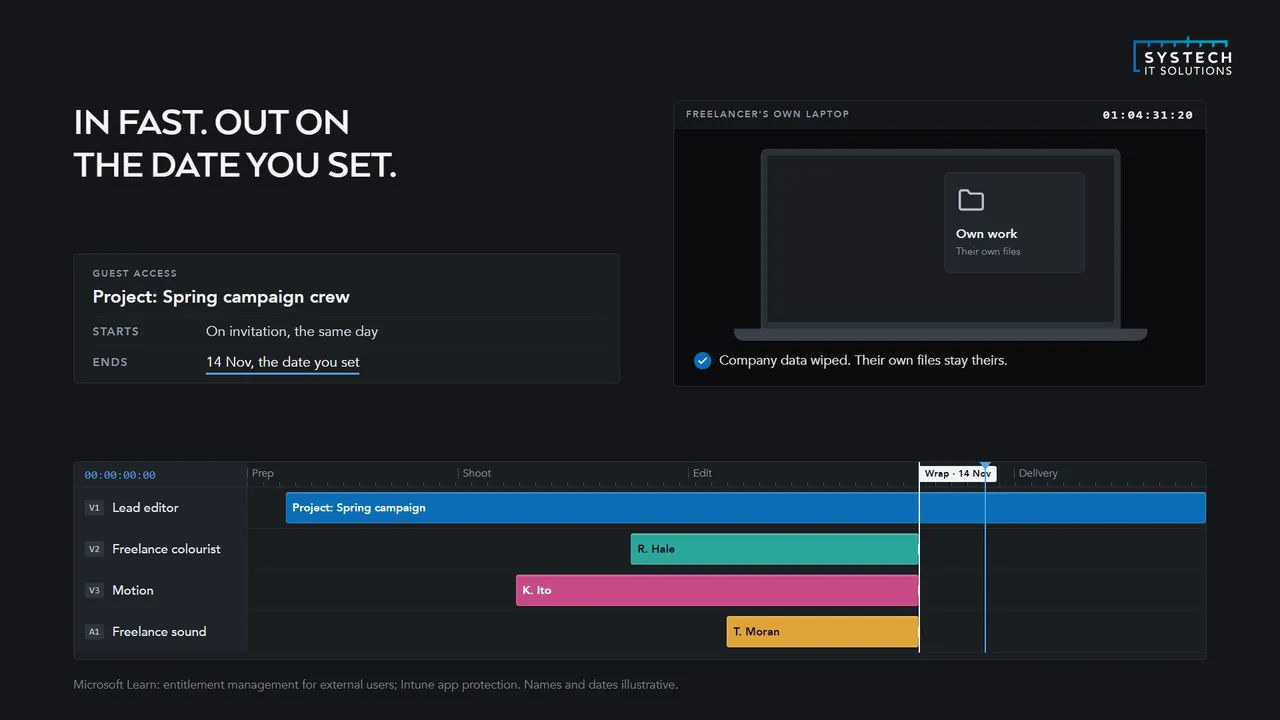
How do you give freelancers access without losing control of the content?
By deciding where the content lives and refusing to let that answer be 'wherever the freelancer put it'.

Media businesses run on contributors who arrive for a project, need deep access quickly, and leave again, and the default approach, adding them to a shared drive and hoping the offboarding gets done, is how assets end up scattered across personal cloud accounts long after a contract ends.
Guest access scoped to the project, and what to do about contributors on their own laptops
The model that works is guest access scoped to the project rather than the organisation. The contributor signs in with their own identity, is granted access to one project workspace and nothing else, and that access carries an expiry date set at the start rather than a reminder someone has to remember. Sharing links are set to expire and are restricted to named people rather than anyone with the URL.
For contributors working on their own laptops, which is most of them, application protection policies are the practical answer. They allow the freelancer to work in Microsoft 365 apps on an unmanaged device while preventing content being saved locally, copied into personal apps or synced to personal storage, and they let you wipe the organisational data without touching anything of theirs. That distinction matters, because demanding full management of a freelancer's own machine is usually refused, reasonably.
Do cloud desktops make sense for creative and post-production work?
For some roles, clearly yes; for others, not yet, and the difference is worth being straight about rather than selling one answer.
Editorial, motion and 3D work has traditionally demanded high-specification local hardware, which meant expensive workstations tied to a building and a workflow that assumed the artist sat next to the machine.
Where GPU-backed desktops change the arithmetic, and the latency and cost caveats
GPU-backed cloud desktops change that arithmetic for a meaningful share of the work. A contributor anywhere can be given a high-specification machine for the duration of a project without shipping hardware, the machine can be scaled up for a heavy phase and switched off between projects, and the content never leaves the data centre, which resolves a great deal of the security concern at the same time. For project-based work with variable headcount that combination is genuinely well matched.
The honest caveats are latency and cost shape. Colour-critical grading and fine frame-accurate work remain sensitive to network conditions, and some workflows still belong on local hardware. Cloud desktops also convert a capital purchase into a running cost, which is favourable when machines would otherwise sit idle between projects and unfavourable when they would be busy continuously. The realistic answer for most media businesses is a mix, with cloud used for the roles and phases where it fits rather than as a wholesale replacement.
What does clean offboarding look like when a project ends?
It looks like something that happens automatically on a date agreed at the start, rather than a task that depends on someone remembering.

The risk in project-based work is not usually a malicious contributor; it is the accumulation of dozens of contributors who technically still have access to material from projects that finished years ago, because nothing ever forced the question.
Letting the platform enforce the end date, and the commercial reason clients now ask about it
Doing it properly means agreeing the end date when access is granted and letting the platform enforce it, so guest access expires by default and continuing requires a deliberate extension. It means recovering content rather than just cutting access: confirming that project files are in the shared workspace rather than only in someone's local working folder, which is a conversation to have during the project rather than after it. And it means removing the organisational data from any personal device that held it, which application protection policies allow you to do selectively.
There is a commercial reason to be rigorous beyond good practice. Clients increasingly ask how their material is protected and what happens to it when contributors leave, and being able to describe a controlled, evidenced process is worth more in a pitch than an assurance that the team is careful.
How do you handle costs that swing between projects?
By making as much of the estate as possible scale with the work rather than with the calendar.
Media businesses have unusually lumpy demand: a large project can double effective headcount for a few months, and the gap afterwards can be equally pronounced. Infrastructure sized for the busiest month is expensive for the rest of the year, and infrastructure sized for the average fails exactly when a project is on.
Licences that flex as the crew changes, and doing the same with compute and storage
Licensing is the first place to look. Microsoft 365 licences can be assigned and released as contributors join and leave, provided somebody is actually doing that, and monthly commitment terms cost slightly more per user but avoid paying annually for people who were present for six weeks. The common finding on review is a licence count that reflects the peak of a project that ended some time ago.
Compute and storage follow the same logic. Cloud desktops can be provisioned for a project and removed afterwards; storage tiering moves completed project archives onto cheaper storage rather than leaving everything on the tier that active work needs. Neither happens automatically, which is why a quarterly review tends to pay for itself several times over in this sector specifically.
“Moving our support to Systech was the easiest IT decision we've made. Response times are excellent and it finally feels like we have a partner rather than a supplier.”
How do you protect unreleased or embargoed content?
By assuming the risk is an ordinary accident rather than a dramatic breach, because it almost always is.
Unreleased material has a value that collapses the moment it leaks, and clients increasingly ask how it is protected before they hand it over, so this has become a commercial question as much as a security one.
The unglamorous controls, keeping material off endpoints entirely, and the contractual gap
The controls that do the work are unglamorous. Access scoped to the specific people on the project rather than to a team or a department, so the circle is as small as the work allows. Sharing links that are restricted to named recipients and expire on a date, rather than links that work for anyone who has the URL and keep working indefinitely. Sensitivity labels that stay attached to the file, so protection persists when material is copied, downloaded or forwarded rather than ending at the folder boundary. And an audit trail showing who accessed what and when, which matters enormously if something does leak, because the first question will be who had it.
Where material is especially sensitive, keeping it off endpoints entirely is the strongest option available: a cloud desktop means the content is viewed but never held locally, so there is no copy on a laptop to lose, and no download to trace afterwards. Visible or forensic watermarking is worth considering for review copies going to external parties, because it changes behaviour as much as it aids investigation.
The remaining gap is usually human and contractual rather than technical. NDAs need to exist before material moves, contributors need to know which project they may discuss and which they may not, and the rule that work happens in the project workspace rather than in personal storage has to be stated at the start. Most leaks trace back to convenience rather than intent.
Questions we hear a lot
Can cloud desktops handle demanding creative workloads?
Yes. Windows 365 and Azure Virtual Desktop can be sized for performance-heavy work and reached from anywhere, so remote and freelance contributors get a fast, consistent desktop without shipping content to unmanaged devices.
How do you handle freelancers coming and going, often on their own laptops?
With well-governed identity and access. We onboard a contributor quickly with exactly the access their project needs and nothing more, and when the project ends we offboard cleanly and completely, so access is fully revoked rather than quietly lingering. Where they're using their own laptop, a cloud desktop or controlled access means they can work without unreleased content ever being copied onto an unmanaged device.
How do you protect unreleased content and client IP?
By keeping the valuable assets centralised and controlling how they can be reached and shared: access scoped to the specific project, external sharing locked down with expiring links, and content kept off personal devices via cloud desktops. That way footage under embargo or an unreleased campaign stays inside a controlled boundary, which also helps you meet the content-security requirements bigger clients and broadcasters now attach to work.
Can you stop us paying for idle capacity and licences between projects?
Yes, this is one of the biggest wins in creative IT. Because cloud desktops and Azure capacity can scale up for an intense project and back down again afterwards, and because we right-size licences to who's actually working, you pay for performance when you need it rather than carrying it as fixed overhead through the quiet periods between jobs.
IT support for media & creative is delivered UK-wide from our office in Brough, East Yorkshire, with on-site support across the county where it helps. We work with businesses in Leeds, York, Bradford, Hull, Sheffield and Barnsley and 6 more Yorkshire towns and cities, and remotely with clients right across the UK.
Ready to talk about your media & creative IT?
A short call about how your IT works today and what your sector asks of it. We will tell you plainly where we would start.
ISO 27001 & ISO 9001 certified · 100% UK-based support
Prefer to talk now? Call us on +44 (0)1482 770583.