
IT & Microsoft cloud for professional services
Secure hybrid work, Microsoft 365, AI productivity and cost control for professional services firms.
Request a callBillable work, secure from anywhere
In short: Client confidentiality, security questionnaires and Copilot readiness for firms whose own clients audit them. If questionnaires are arriving, work backwards from one: it names the controls, names the evidence, and answering it honestly is the fastest way to find out where you stand.
For consultancies, agencies and advisory firms, your people and their expertise are the product, so the technology has one job: let billable work happen securely from anywhere, without getting in the way or leaking a client's confidential information.
The challenge
Professional services firms carry a particular kind of risk. You hold commercially sensitive client data, board papers, deal information, strategy documents, personal data, often under NDAs and increasingly under client security schedules that dictate exactly how their information must be handled. Your people work in a genuinely hybrid pattern, at client sites, at home and in the office, frequently on the move, which makes identity and device the real security perimeter rather than any office wall. On top of that, more and more work now hinges on passing a security questionnaire or holding Cyber Essentials before a framework, public-sector or enterprise client will even shortlist you, so security has become a commercial enabler, not just an overhead. And everyone wants the productivity upside of AI tools like Copilot without accidentally surfacing the wrong client's file to the wrong consultant. The firms that get this right treat governance as the thing that lets them move faster, and want IT cost they can forecast per fee-earner.
What we would do
If clients are sending you security questionnaires, work backwards from the questionnaire. It names the controls, it names the evidence, and answering it honestly is the fastest route to knowing where you actually stand.
- If you are about to turn on Copilot, do the permissions and oversharing work first. It inherits your permissions exactly, and client separation is the thing most likely to be wrong.
- If the trigger is a single lost laptop or a near miss, device management and Conditional Access will close more risk per pound than anything else.
When we are not the answer: If you have no client data obligations beyond the ordinary, a small team, and everything already in Microsoft 365 with MFA on, you are probably in reasonable shape. A posture check will confirm it in 45 minutes, and then you can stop worrying about it.
What we do for professional services
What do client security questionnaires actually ask for?
They ask you to evidence things rather than assert them, and that is the part that catches firms out.

A typical enterprise or framework questionnaire wants to know how access is granted and removed, whether multi-factor authentication is enforced, how devices are managed and encrypted, what happens to data when an engagement ends, how incidents are detected and reported, and how long you keep what. None of that is unreasonable. What makes it painful is being asked for the first time with a deadline attached.
The third most firms cannot answer, and why preparing the answers once beats starting fresh each time
Most professional-services firms can answer perhaps two thirds of a serious questionnaire honestly and immediately. The remaining third tends to be the same items each time: a documented leaver process that is actually followed, evidence that backups have been tested rather than merely configured, a written incident response plan, and a clear statement of which subprocessors touch client data. Those gaps are usually days of work, not months, but only if you find them before a client does.
The efficient move is to prepare the answers once and reuse them. Firms that treat each questionnaire as a fresh scramble spend more partner time on it over a year than the underlying remediation would have cost, and they answer inconsistently, which itself invites follow-up questions.
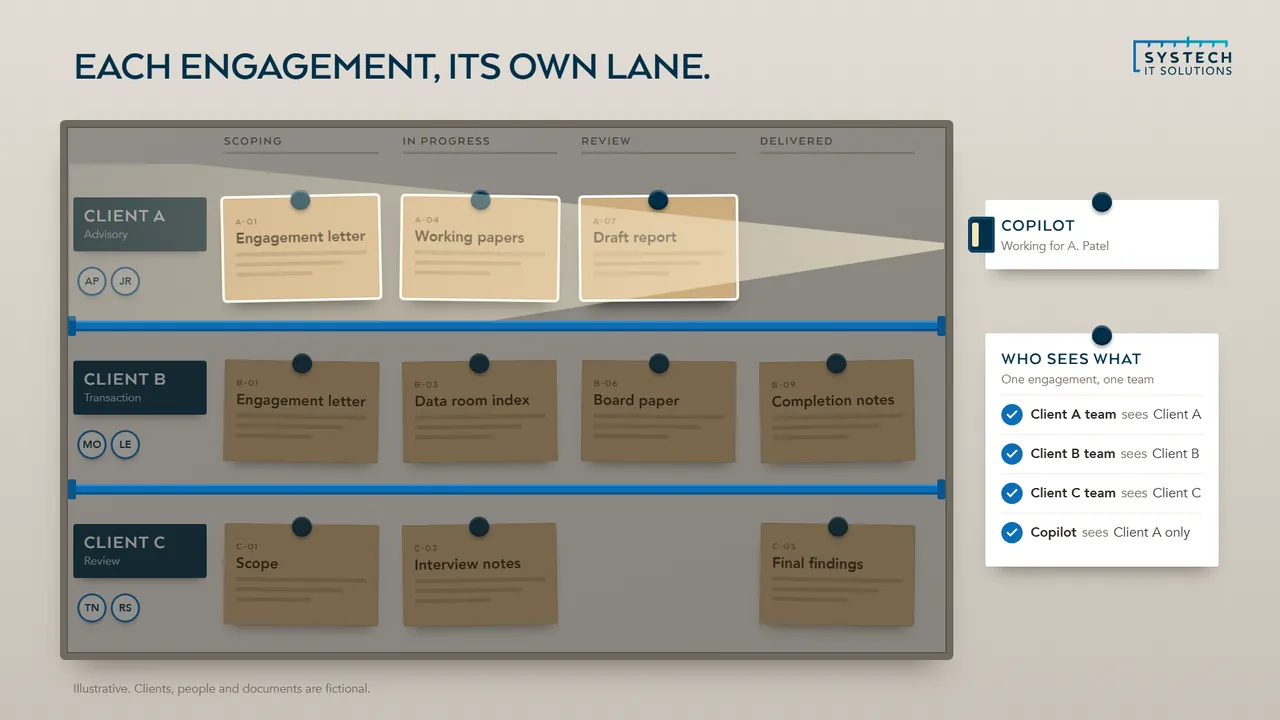
How do you keep one client's information separate from another's?
Structurally, not by convention. The risk in a professional-services firm is rarely a dramatic breach; it is the ordinary accident of a document reaching someone who should not see it, and conflicts of interest make that more consequential than in most sectors. Relying on people remembering which folder is which does not survive a busy week.
Which controls the platform can enforce for you, and how it shortens the questionnaire above
The controls that work are the ones enforced by the platform. Permissions set at the matter or engagement level rather than a shared drive everyone can browse. Sensitivity labels that travel with a document, so classification persists when a file is copied, emailed or downloaded. Data loss prevention rules that stop a labelled document leaving by email or being shared to a personal account. And conditional access, so a document only opens from a managed, compliant device rather than from anywhere someone happens to be signed in.
Getting this right also makes the questionnaire above much easier to answer, because the honest answer becomes a description of a working control rather than a policy statement.
Does hybrid working actually change the security requirements?
It changes where the boundary sits, which changes almost everything downstream.
When everyone worked in one office, the network was a meaningful perimeter and controlling who was on it did real work. With people moving between home, client sites and the office, the perimeter is identity: who is signing in, from what device, in what circumstances.
The baseline that applies wherever people work, and being honest about friction
Practically that means multi-factor authentication everywhere as a baseline rather than an option, conditional access policies that evaluate device compliance and risk at sign-in, managed and encrypted devices whether they belong to the firm or the individual, and enough visibility to notice a sign-in that does not make sense. It also means being deliberate about personal devices, because in most professional firms people read email on their phones whether or not anyone has decided they may.
The trade-off worth being honest about is friction. Controls that are too aggressive get worked around, and a workaround is worse than a slightly looser control that people actually follow. The aim is policies that are strict where the data is sensitive and unobtrusive where it is not.
Where does Copilot fit for a professional-services firm?
It fits well on the work, and badly on an ungoverned SharePoint estate, which is the order most firms discover in the wrong sequence.

Drafting, summarising long documents, preparing meeting notes and searching across years of accumulated material are genuinely well matched to what these tools do, and professional firms have a lot of that work.
Why permissions are the real obstacle, and the order the work has to happen in
The obstacle is almost always permissions. Copilot surfaces what a user already has access to, which means it will cheerfully surface anything that has been over-shared. In a firm where a legacy file share was migrated with broad permissions, or where site access was granted generously years ago and never reviewed, the first serious result is often somebody finding a document they should never have been able to open. The tool did not cause that; it revealed it.
So the sequencing is: tidy the permissions and sharing model first, decide what should be labelled and restricted, then pilot with a defined group. Firms that do it in that order tend to get value quickly. Firms that buy licences first tend to pause the rollout within a month.
“Systech cut our Azure bill by a third in the first quarter and we barely noticed the work happening. They just get on with it and the monthly reporting is genuinely useful.”
What should happen when a fee earner or partner leaves?
Rather more than disabling the account, and it should happen on a defined timeline rather than whenever somebody gets round to it.
Professional-services departures carry a particular risk profile, because the person leaving often has both deep client relationships and broad access to client material, and in some cases is going to a competitor.
The technical steps, and the evidence firms most often cannot produce afterwards
The immediate technical steps are straightforward if they have been prepared: revoke access at the identity layer so every connected application is cut at once rather than one by one, terminate active sessions so an existing sign-in does not simply continue, remove organisational data from personal devices, and convert the mailbox so colleagues can still reach ongoing matters without the account remaining live. Doing this at the identity layer rather than app by app is what makes it quick and complete.
The part firms most often lack is the evidence. Being able to show what a leaver had access to, when it was removed, and what data left with them matters if a dispute follows, and it is nearly impossible to reconstruct after the fact. Alerting on the pattern that usually precedes a resignation, unusual bulk downloads or sudden access to client material outside someone's normal matters, is worth having, and worth telling staff exists, since transparency about monitoring is both fairer and more effective as a deterrent.
Questions we hear a lot
Is Microsoft 365 Copilot safe for a firm handling sensitive client data?
It is, once the groundwork is done. Copilot only surfaces what a user can already access, so we audit SharePoint and OneDrive permissions and apply sensitivity labelling before rollout, so it boosts productivity without exposing client information.
Can you support a fully hybrid or remote firm?
Yes. We secure and manage identity, devices and access wherever your people work, using Conditional Access, Intune and Windows 365 so home, office and client-site working are equally controlled.
Will Cyber Essentials help us win work?
Often it's now the price of entry. A growing number of client, framework and public-sector tenders require Cyber Essentials or Cyber Essentials Plus before you can bid, and many enterprise clients send a security questionnaire as part of onboarding. We get you certified, keep you certified as it comes up for annual renewal, and help you answer the security schedules and due-diligence questionnaires that come with larger engagements.
How do you stop one client's confidential information reaching the wrong team internally?
By structuring access around the matter or engagement, not blanket access to everything. We use least-privilege permissions in SharePoint, sensitivity labelling and data loss prevention so consultants only see the clients they're working on, and confidential information can't easily be forwarded, copied or shared outside where it shouldn't go. This is also the groundwork that makes Copilot safe to switch on.
IT support for professional services is delivered UK-wide from our office in Brough, East Yorkshire, with on-site support across the county where it helps. We work with businesses in Leeds, York, Harrogate, Hull, Sheffield and Barnsley and 6 more Yorkshire towns and cities, and remotely with clients right across the UK.
Ready to talk about your professional services IT?
A short call about how your IT works today and what your sector asks of it. We will tell you plainly where we would start.
ISO 27001 & ISO 9001 certified · 100% UK-based support
Prefer to talk now? Call us on +44 (0)1482 770583.