
IT & Microsoft cloud for manufacturing
Keep the line running: legacy app modernisation, uptime, security and cost control for manufacturers.
Request a callKeep the line running, and recoverable when it stops
In short: Production and office networks separated properly, machine-attached PCs segmented rather than ripped out, and a recovery position you have actually tested. If a customer or insurer has asked for Cyber Essentials, do that first: it forces the same controls and produces evidence you can hand over.
In manufacturing, downtime isn't an IT inconvenience, it's stopped lines, idle staff and missed despatch slots, and the systems most likely to cause it are often the oldest ones on site.
The challenge
Manufacturers live with a tension IT vendors rarely acknowledge: the operational technology on the shop floor, the PLCs, SCADA systems, machine controllers and their aging Windows front-ends, cannot simply be patched, rebooted or swapped on the same cadence as the office estate. Much of it runs mission-critical line-of-business software that is years past a supported operating system, tied to hardware nobody wants to touch, and validated against a production process you daren't disturb mid-shift. Meanwhile ransomware crews have learned that a manufacturer with a stopped line will pay quickly, and increasingly it's the customer's purchasing team, not a regulator, forcing the pace, requiring suppliers to hold ISO 27001 or Cyber Essentials before a contract is renewed. Stretch a small internal IT team across several sites and shift patterns, and keeping IT and OT both running and defensible becomes the real job.
What we would do
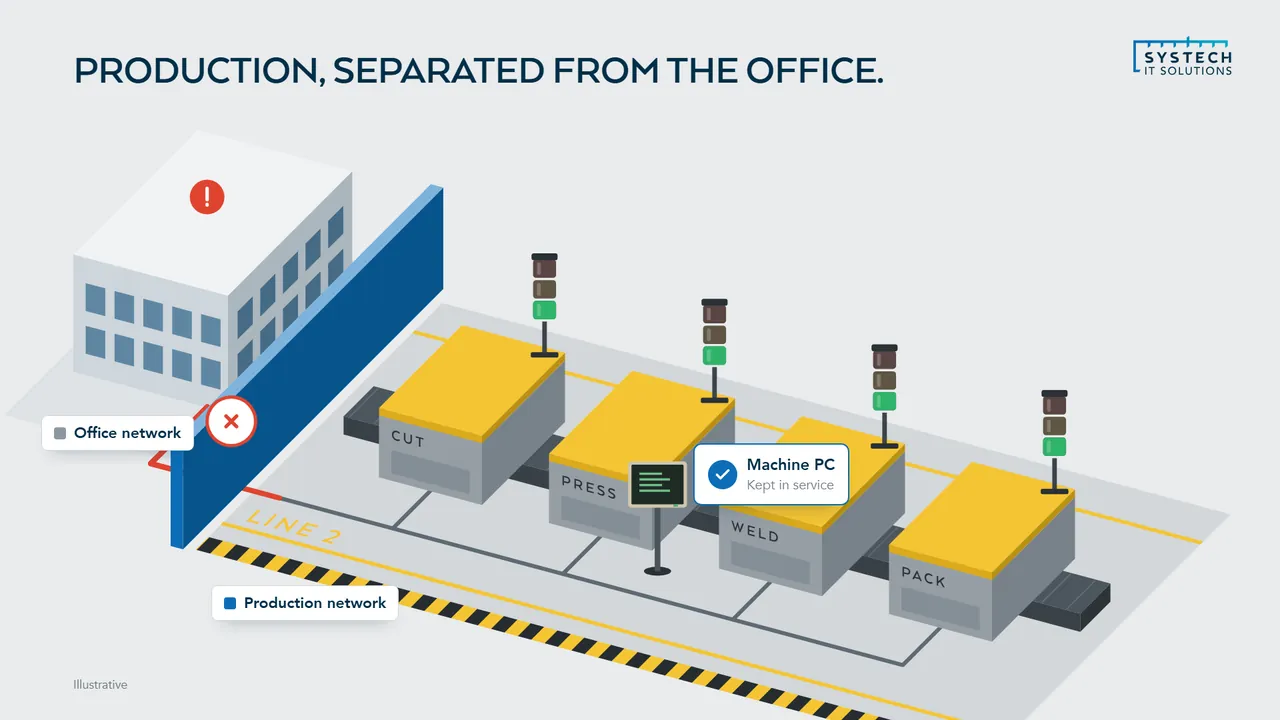
Start with the segmentation and the recovery position, in that order. Production networks and office networks need separating properly, and the question that decides the rest is what you could actually restore, and how quickly, if a line stopped tomorrow.
- If a customer or insurer has asked for Cyber Essentials, do that first: it forces the same controls and produces evidence you can hand over.
- If machine-attached PCs are the blocker, segment them rather than replacing them. Ripping out a working machine because its vendor never certified anything newer is rarely the cheapest route.
When we are not the answer: If your production environment is genuinely air-gapped, already segmented, and you have an internal team who patch and test restores on a schedule, we would be telling you things you know. Book nothing and spend the time on the plant.
What we do for manufacturing
Can you patch a machine that can't be taken offline?
Not on the vendor's schedule, which is why the honest answer is to change what gets patched rather than when.

A machine controller validated against a specific software build, running a Windows front-end that the equipment supplier will not support on anything newer, cannot simply take a monthly update and a reboot mid-shift. Treating it like an office PC is how manufacturers end up either breaking production or, more commonly, quietly patching nothing at all.
How the estate splits, and what to do when the blocker is the application rather than the hardware
The workable approach separates the estate rather than compromising across it. Office devices, servers and anything that can tolerate a maintenance window get a normal patch cadence with a defined 14-day target for critical updates. The machines that genuinely cannot be touched get compensating controls instead: strict network segmentation so they are unreachable from the general network, tightly controlled access, monitoring on the traffic in and out, and a documented reason why each one is treated as an exception. That distinction matters for certification too, because an auditor will accept a segmented, monitored exception with a migration plan far more readily than an estate where nothing is patched and nobody can say why.
Where the constraint is the application rather than the hardware, it is often more solvable than it looks. Capturing a line-of-business application from its running state and repackaging it for a supported operating system removes the dependency without needing the original install media, the source code or a supplier who may no longer exist.
Why do manufacturers keep getting asked for Cyber Essentials?
Because the pressure now comes from customers rather than regulators, and customers ask earlier in the relationship than regulators ever did.
Large manufacturers and retailers have concluded that their own security depends on their suppliers, so certification requirements now flow down the supply chain and increasingly appear as a condition of tendering or renewal rather than a nice-to-have raised after the contract is signed.
Why the 14-day patching rule is the sticking point, and how scope decides whether you pass
For a manufacturer this tends to be uncomfortable in a specific way. The five Cyber Essentials controls, particularly the requirement that all software in scope is supported by its vendor and patched within 14 days for critical updates, sit awkwardly against exactly the aging OT-adjacent estate that keeps production running. This is where segmentation earns its keep: correctly scoped, the certification boundary can exclude genuinely isolated production systems and cover the business estate that handles customer data, which is what the customer asking the question actually cares about.
Getting the scope right is most of the work. Scope too widely and certification becomes impossible without replacing equipment nobody has budget for. Scope too narrowly or dishonestly and it fails at assessment, or worse, passes and gives false assurance.
What does network segmentation actually involve on a factory site?
In practice it means the office network and the production network stop being one flat space where anything can reach anything.

Ransomware that arrives through an email attachment on a finance PC should have no path to a machine controller, and an engineer's laptop plugged into a line should not be able to browse the file server. On a lot of manufacturing sites, built up over years of pragmatic additions, that path currently exists.
Why it disrupts less than people fear, and what blast radius means on a production site
The work is usually less disruptive than people fear because it happens around the production systems rather than to them. Defining the boundaries, putting controlled and monitored crossing points between zones, restricting which systems can talk to which, and logging what crosses can largely be done without reconfiguring the sensitive equipment itself. That matters when the equipment is validated, temperamental or supported by a third party who charges for every visit.
The measurable outcome is blast radius. A compromise on the office side becomes an office-side problem rather than a stopped line, and that difference is usually the gap between a bad week and a genuinely serious event.
How do you support a manufacturer running shifts across several sites?
The starting point is that a single site's working day is not the business's working day.
If a line runs from six in the morning, a service desk that opens at nine is unhelpful for a quarter of the shift, and if maintenance windows are set centrally without reference to what each site is actually producing, they will land in the middle of a run sooner or later.
Patching around shift patterns, and the licence drift that comes with multiple sites
We plan around planned downtime instead. Patching and maintenance follow each site's shift pattern rather than a uniform schedule, monitoring and alerting run continuously regardless of who is on site, and support hours are set against when people are actually working. Centrally managed device configuration through Intune keeps one policy set across every location, so a laptop in one plant is built and secured identically to one in another without anyone maintaining separate standards.
Multi-site also changes the cost conversation. Licences drift as sites are added, acquired or reorganised, and it is common to find production and warehouse staff carrying licence tiers built for knowledge workers. Right-sizing that across the group is usually one of the faster savings available.
“The 24/7 monitoring gives us real peace of mind. Issues are picked up and resolved before we'd even have noticed them, and downtime has dropped noticeably.”
What does a manufacturer actually need to be able to recover?
More than the file server, and in a specific order.
The instinctive answer is documents and email, but for a manufacturer the systems that stop production are usually elsewhere: the ERP or MRP system that holds orders, stock and scheduling, the quality and traceability records you are contractually or legally required to hold, machine configurations and recipes, and the CAD or design data the product depends on.
The order things have to come back in, and why an untested backup is a belief rather than a control
Ranking them matters because recovery is sequential and resources are finite during an incident. If the ERP system comes back but the machine configurations do not, the line still cannot run. If quality records are unrecoverable, product may not be shippable even once production restarts, because the traceability chain is broken. Working out that order in advance, and how long the business can tolerate being without each one, is what turns a backup policy into a recovery plan.
Two things then have to be true rather than assumed. Backups must be immutable, so that ransomware which reaches the network cannot encrypt or delete the copies as well as the originals, which is now a standard part of how these attacks work. And restores must have been tested, because an untested backup is a belief rather than a control. We rehearse recovery for the systems that matter most rather than testing a single file restore and calling it proven.
Questions we hear a lot
Can you modernise a legacy manufacturing application without the install media?
Yes. Using EtherApps Forge we capture the application from its running state and repackage it for a modern, supported operating system, so a critical line-of-business app tied to an old server can move forward without the original media or source code.
How do you protect manufacturing systems from ransomware?
We layer Managed Firewall, endpoint detection and response (EDR) and extended detection and response (XDR) with 24/7 monitoring available, plus immutable, tested backups, so IT and OT-adjacent systems are both defended and recoverable.
Do you support manufacturers with multiple sites and shift patterns?
Yes. We manage devices, identity, networking and security centrally across every location, with one accountable team and consistent policy. Maintenance and patching are scheduled around your shifts and planned-downtime windows so work happens when the line is already idle, not in the middle of production.
Our customers are asking for ISO 27001 or Cyber Essentials before they'll renew. Can you help?
Yes. Supply-chain security requirements are one of the most common reasons manufacturers come to us. We prepare you for Cyber Essentials or Cyber Essentials Plus, assessed by an independent Certification Body, and put in place the technical controls, access management, monitoring, backup, asset and patch discipline, that underpin an ISO 27001 information security management system, so you can evidence it when a customer audits you.
Can you secure the shop floor without disturbing our production systems?
That's the point of network segmentation. Rather than forcing changes onto sensitive OT and machine-control systems, we isolate them behind controlled boundaries, monitor the traffic in and out, and keep the office estate patched and defended separately, so a threat can't move freely between the two and the production process is left undisturbed.
IT support for manufacturing is delivered UK-wide from our office in Brough, East Yorkshire, with on-site support across the county where it helps. We work with businesses in Sheffield, Hull, Bradford, Leeds, York and Barnsley and 6 more Yorkshire towns and cities, and remotely with clients right across the UK.
Ready to talk about your manufacturing IT?
A short call about how your IT works today and what your sector asks of it. We will tell you plainly where we would start.
ISO 27001 & ISO 9001 certified · 100% UK-based support
Prefer to talk now? Call us on +44 (0)1482 770583.