
This is for you if
- You run Microsoft 365 but have never had a formal security review of the tenant
- You're not confident your Secure Score, MFA coverage or Conditional Access setup actually holds up
- You need a straight answer on your real exposure, not a generic best-practice list
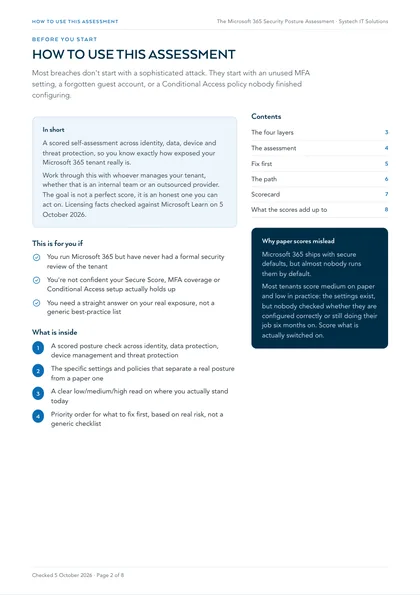
Microsoft 365 ships secure defaults, but almost nobody runs them by default: MFA gaps, stale guest access, unmonitored admin roles and unlabelled sensitive data build up quietly until an incident forces the audit. It's cheaper to find these gaps yourself, on your own schedule.
Microsoft 365 ships with secure defaults, but almost nobody runs them by default. This self-assessment scores your real posture across four areas, honestly rate yourself low, medium or high against each, and you'll have a clear read on where you actually stand today.
Work through this with whoever manages your tenant, whether that's an internal team or an outsourced provider. The goal isn't a perfect score, it's an honest one you can act on.
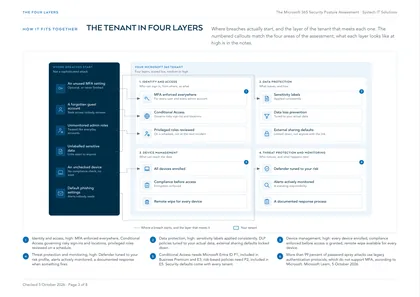
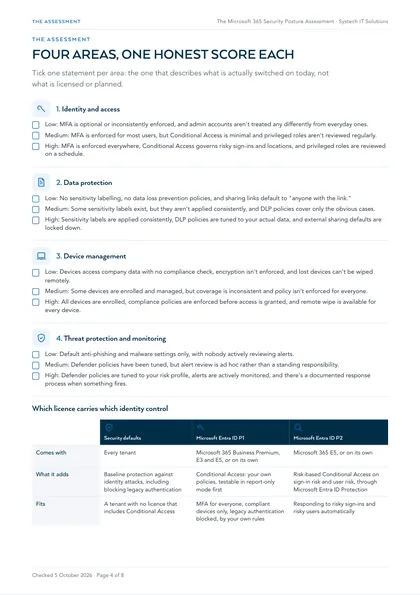
1. Identity and access
Tick the one statement that honestly describes your tenant today.
- Low: MFA is optional or inconsistently enforced, and admin accounts aren't treated any differently from everyday ones.
- Medium: MFA is enforced for most users, but Conditional Access is minimal and privileged roles aren't reviewed regularly.
- High: MFA is enforced everywhere, Conditional Access governs risky sign-ins and locations, and privileged roles are reviewed on a schedule.
| Security defaults | Microsoft Entra ID P1 | Microsoft Entra ID P2 | |
|---|---|---|---|
| Comes with | Every tenant | Microsoft 365 Business Premium, E3 and E5, or on its own | Microsoft 365 E5, or on its own |
| What it adds | Baseline protection against identity attacks, including blocking legacy authentication | Conditional Access: your own policies, testable in report-only mode first | Risk-based Conditional Access on sign-in risk and user risk, through Microsoft Entra ID Protection |
| Fits | A tenant with no licence that includes Conditional Access | MFA for everyone, compliant devices only, legacy authentication blocked, by your own rules | Responding to risky sign-ins and risky users automatically |
2. Data protection
Tick the one statement that honestly describes your tenant today.
- Low: No sensitivity labelling, no data loss prevention policies, and sharing links default to "anyone with the link."
- Medium: Some sensitivity labels exist, but they aren't applied consistently, and DLP policies cover only the obvious cases.
- High: Sensitivity labels are applied consistently, DLP policies are tuned to your actual data, and external sharing defaults are locked down.
3. Device management
Tick the one statement that honestly describes your tenant today.
- Low: Devices access company data with no compliance check, encryption isn't enforced, and lost devices can't be wiped remotely.
- Medium: Some devices are enrolled and managed, but coverage is inconsistent and policy isn't enforced for everyone.
- High: All devices are enrolled, compliance policies are enforced before access is granted, and remote wipe is available for every device.
4. Threat protection and monitoring
Tick the one statement that honestly describes your tenant today.
- Low: Default anti-phishing and malware settings only, with nobody actively reviewing alerts.
- Medium: Defender policies have been tuned, but alert review is ad hoc rather than a standing responsibility.
- High: Defender policies are tuned to your risk profile, alerts are actively monitored, and there's a documented response process when something fires.
Where this leaves you
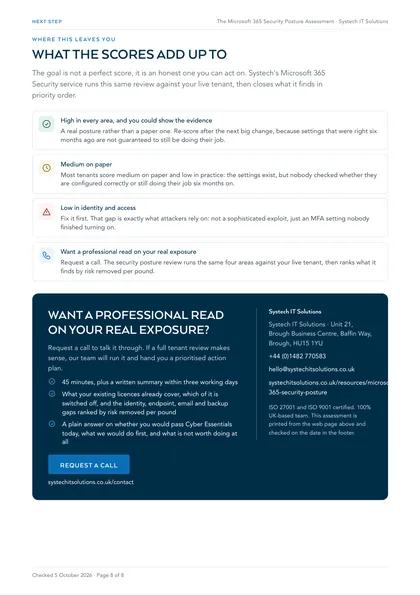
Most tenants score medium on paper and low in practice, the settings exist, but nobody checked whether they're actually configured correctly or still doing their job six months on. That gap is exactly what attackers rely on, not a sophisticated exploit, just an MFA setting nobody finished turning on. Systech's Microsoft 365 security service runs this same review against your live tenant, then closes what it finds in priority order.
High in every area, and you could show the evidence
A real posture rather than a paper one. Re-score after the next big change, because settings that were right six months ago are not guaranteed to still be doing their job.
Medium on paper
Most tenants score medium on paper and low in practice: the settings exist, but nobody checked whether they are configured correctly or still doing their job six months on.
Low in identity and access
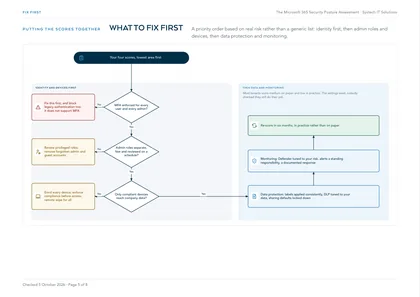
Fix it first. That gap is exactly what attackers rely on: not a sophisticated exploit, just an MFA setting nobody finished turning on.
Want a professional read on your real exposure
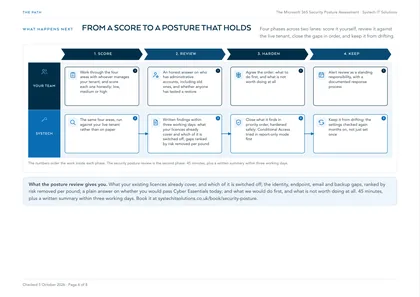
Request a call. The security posture review runs the same four areas against your live tenant, then ranks what it finds by risk removed per pound.
This is one of a set. The rest, covering AI readiness, security, cost, compliance and device management in the same format, are listed on all our free checklists and assessments.