
This is for you if
- You're still running end-of-life or soon-to-be-unsupported Windows Server or desktop OS versions
- A legacy line-of-business application is the reason migration keeps getting pushed back
- You need the old app captured and made to work on modern infrastructure, not just replaced and hoped for the best
Unsupported servers and applications don't fail gracefully, they fail during an audit, a compliance review, or a hardware death with no vendor left to call for support. The application is usually the real blocker, not the OS, and most migration plans stall the moment they hit it.
Most legacy migrations don't stall on the operating system, they stall on the one application nobody's willing to touch. This is the assess, capture and migrate process we run to get legacy servers and the applications tied to them onto modern, supported infrastructure, properly.
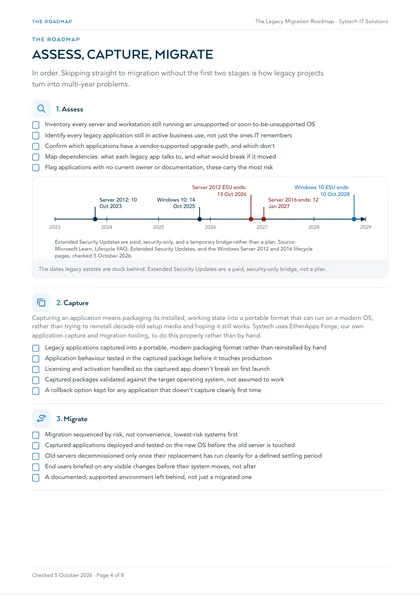
Work through it in order. Skipping straight to migration without the assess and capture stages is exactly how legacy projects turn into multi-year problems.
1. Assess
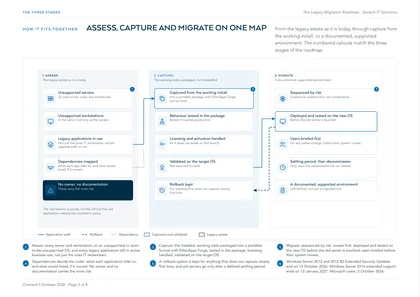
- Inventory every server and workstation still running an unsupported or soon-to-be-unsupported OS
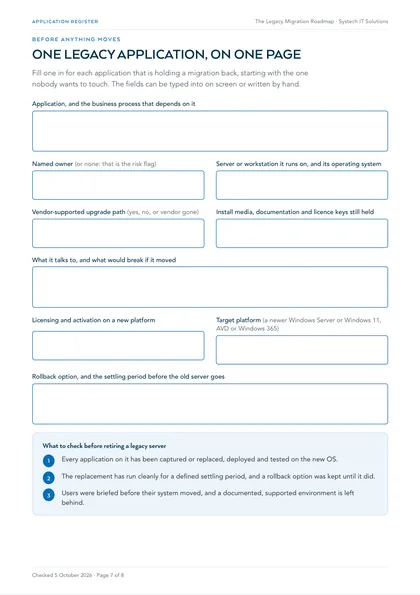
- Identify every legacy application still in active business use, not just the ones IT remembers
- Confirm which applications have a vendor-supported upgrade path, and which don't
- Map dependencies: what each legacy app talks to, and what would break if it moved
- Flag applications with no current owner or documentation, these carry the most risk
2. Capture
Capturing an application means packaging its installed, working state into a portable format that can run on a modern OS, rather than trying to reinstall decade-old setup media and hoping it still works. Systech uses EtherApps Forge, our own application capture and migration tooling, to do this properly rather than by hand.
- Legacy applications captured into a portable, modern packaging format rather than reinstalled by hand
- Application behaviour tested in the captured package before it touches production
- Licensing and activation handled so the captured app doesn't break on first launch
- Captured packages validated against the target operating system, not assumed to work
- A rollback option kept for any application that doesn't capture cleanly first time
3. Migrate
- Migration sequenced by risk, not convenience, lowest-risk systems first
- Captured applications deployed and tested on the new OS before the old server is touched
- Old servers decommissioned only once their replacement has run cleanly for a defined settling period
- End users briefed on any visible changes before their system moves, not after
- A documented, supported environment left behind, not just a migrated one
Where this leaves you
Most legacy estates aren't stuck because migrating the OS is hard, they're stuck because one application has quietly become "the thing we can't touch." Capturing it properly removes that excuse: the application keeps working, the server underneath it gets modernised, and support stops depending on hardware nobody can still buy. Systech's Legacy Migration service runs this exact assess, capture and migrate process end to end, including the applications everyone else told you couldn't be moved.
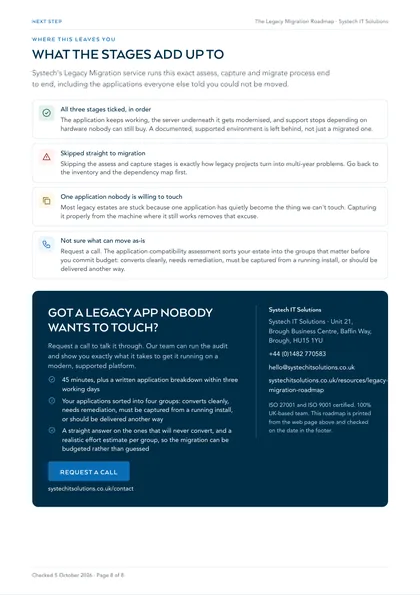
All three stages ticked, in order
The application keeps working, the server underneath it gets modernised, and support stops depending on hardware nobody can still buy. A documented, supported environment is left behind, not just a migrated one.
Skipped straight to migration
Skipping the assess and capture stages is exactly how legacy projects turn into multi-year problems. Go back to the inventory and the dependency map first.
One application nobody is willing to touch
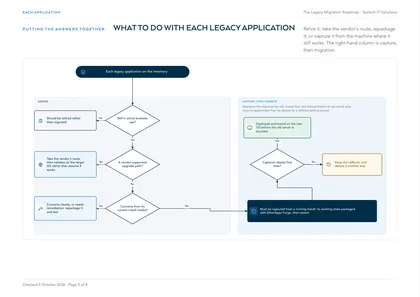
Most legacy estates are stuck because one application has quietly become the thing we can't touch. Capturing it properly from the machine where it still works removes that excuse.
Not sure what can move as-is
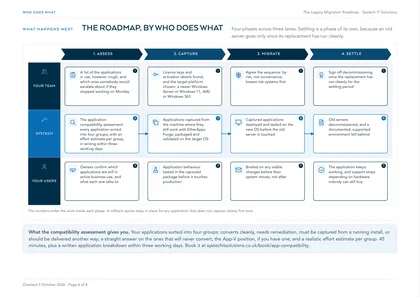
Request a call. The application compatibility assessment sorts your estate into the groups that matter before you commit budget: converts cleanly, needs remediation, must be captured from a running install, or should be delivered another way.
This is one of a set. The rest, covering AI readiness, security, cost, compliance and device management in the same format, are listed on all our free checklists and assessments.