
This is for you if
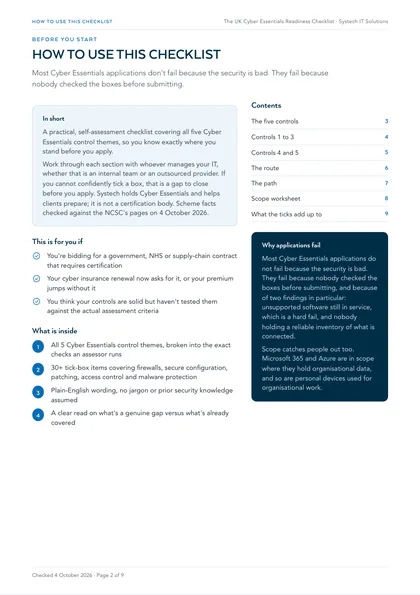
- You're bidding for a government, NHS or supply-chain contract that requires certification
- Your cyber insurance renewal now asks for it, or your premium jumps without it
- You think your controls are solid but haven't tested them against the actual assessment criteria
A failed submission doesn't just cost the re-assessment fee. It can cost the contract, the renewal deadline, or weeks chasing gaps you didn't know existed. Most of that is avoidable with an honest look at where you stand first.
Cyber Essentials is the UK government-backed scheme that certifies a business has basic technical controls in place against the most common internet-based attacks. This checklist mirrors the five control themes assessors check against, so you can run an honest self-assessment and see exactly where the gaps are before you submit an application.
Work through each section with whoever manages your IT, whether that's an internal team or an outsourced provider. If you can't confidently tick a box, that's a gap to close before you apply. Systech holds Cyber Essentials and helps clients prepare; it is not a certification body.
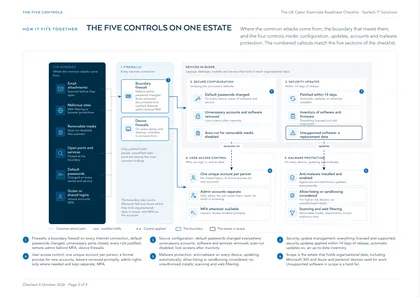
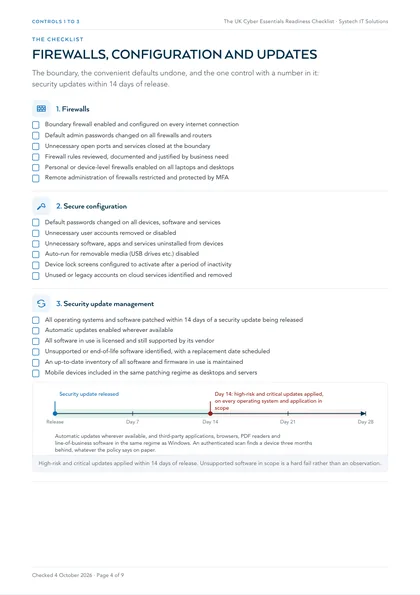
1. Firewalls
- Boundary firewall enabled and configured on every internet connection
- Default admin passwords changed on all firewalls and routers
- Unnecessary open ports and services closed at the boundary
- Firewall rules reviewed, documented and justified by business need
- Personal or device-level firewalls enabled on all laptops and desktops
- Remote administration of firewalls restricted and protected by MFA
2. Secure configuration
- Default passwords changed on all devices, software and services
- Unnecessary user accounts removed or disabled
- Unnecessary software, apps and services uninstalled from devices
- Auto-run for removable media (USB drives etc.) disabled
- Device lock screens configured to activate after a period of inactivity
- Unused or legacy accounts on cloud services identified and removed
3. Security update management
- All operating systems and software patched within 14 days of a security update being released
- Automatic updates enabled wherever available
- All software in use is licensed and still supported by its vendor
- Unsupported or end-of-life software identified, with a replacement date scheduled
- An up-to-date inventory of all software and firmware in use is maintained
- Mobile devices included in the same patching regime as desktops and servers
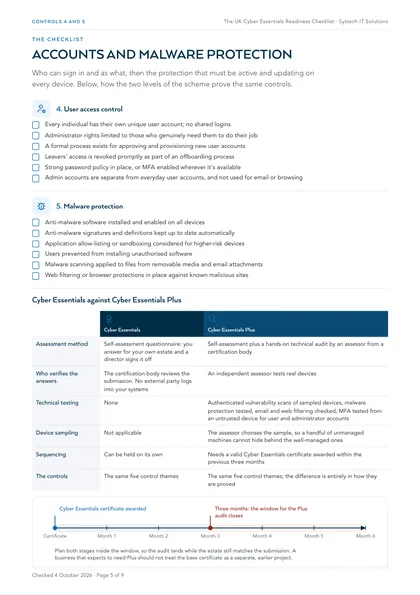
4. User access control
- Every individual has their own unique user account; no shared logins
- Administrator rights limited to those who genuinely need them to do their job
- A formal process exists for approving and provisioning new user accounts
- Leavers' access is revoked promptly as part of an offboarding process
- Strong password policy in place, or MFA enabled wherever it's available
- Admin accounts are separate from everyday user accounts, and not used for email or browsing
5. Malware protection
- Anti-malware software installed and enabled on all devices
- Anti-malware signatures and definitions kept up to date automatically
- Application allow-listing or sandboxing considered for higher-risk devices
- Users prevented from installing unauthorised software
- Malware scanning applied to files from removable media and email attachments
- Web filtering or browser protections in place against known malicious sites
| Cyber Essentials | Cyber Essentials Plus | |
|---|---|---|
| Assessment method | Self-assessment questionnaire: you answer for your own estate and a director signs it off | Self-assessment plus a hands-on technical audit by an assessor from a certification body |
| Who verifies the answers | The certification body reviews the submission. No external party logs into your systems | An independent assessor tests real devices |
| Technical testing | None | Authenticated vulnerability scans of sampled devices, malware protection tested, email and web filtering checked, MFA tested from an untrusted device for user and administrator accounts |
| Device sampling | Not applicable | The assessor chooses the sample, so a handful of unmanaged machines cannot hide behind the well-managed ones |
| Sequencing | Can be held on its own | Needs a valid Cyber Essentials certificate awarded within the previous three months |
| The controls | The same five control themes | The same five control themes; the difference is entirely in how they are proved |
If you need Plus
Where this leaves you
Ticking every box above doesn't guarantee certification on its own, an assessor will still verify the detail, but it puts a business in a strong position to apply with confidence rather than uncertainty. If any of these controls are missing, patchy, or you're simply not sure how your current setup measures up, Systech can help you close the gaps and prepare for certification, end to end: see our Cyber Essentials certification support for how that works.
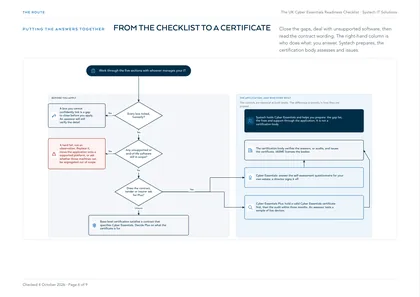
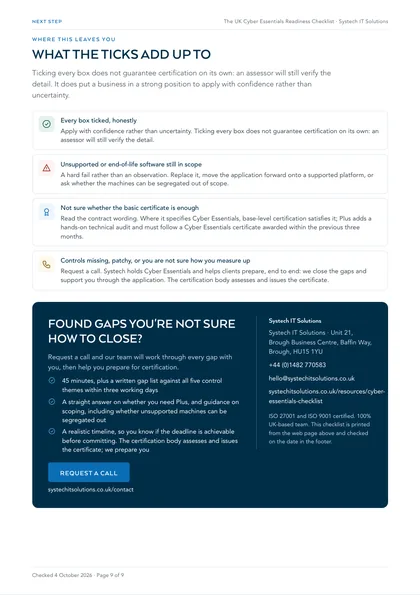
Every box ticked, honestly
Apply with confidence rather than uncertainty. Ticking every box does not guarantee certification on its own: an assessor will still verify the detail.
Unsupported or end-of-life software still in scope
A hard fail rather than an observation. Replace it, move the application forward onto a supported platform, or ask whether the machines can be segregated out of scope.
Not sure whether the basic certificate is enough
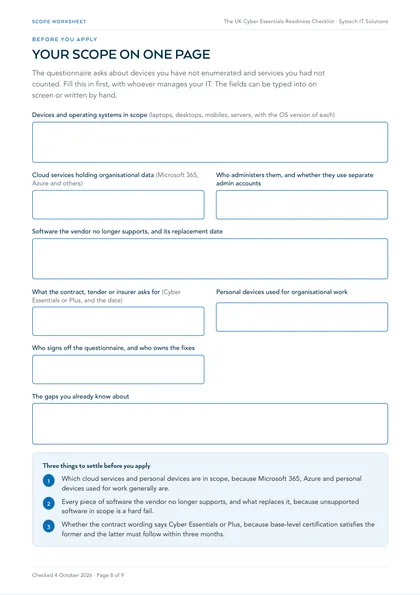
Read the contract wording. Where it specifies Cyber Essentials, base-level certification satisfies it; Plus adds a hands-on technical audit and must follow a Cyber Essentials certificate awarded within the previous three months.
Controls missing, patchy, or you are not sure how you measure up
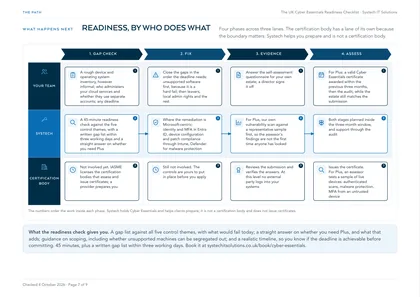
Request a call. Systech holds Cyber Essentials and helps clients prepare, end to end: we close the gaps and support you through the application. The certification body assesses and issues the certificate.
Basic or Plus?
Not sure whether the basic certificate is enough, or whether an assessor needs to test your controls hands-on? Cyber Essentials vs Cyber Essentials Plus sets out the difference, the cost gap and who each level is for.