
This is for you if
- You still have Windows 10 devices in service and need a plan you can defend
- Some of your hardware fails the Windows 11 requirements, and you do not yet know how much
- An application ties some machines to Windows 10, and ESU is starting to look permanent
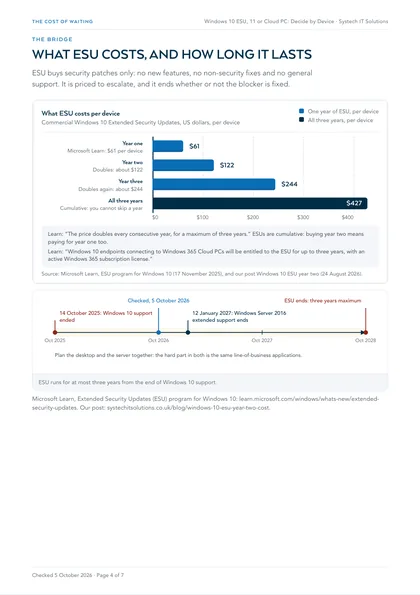
Windows 10 support ended on 14 October 2025. Extended Security Updates cost $61 per device in year one and the price doubles every year, for at most three years. Bought without a plan, ESU becomes an annual payment that funds inaction and gets more expensive each time.
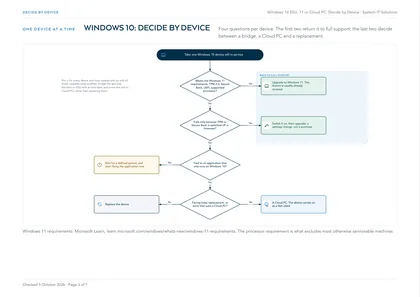
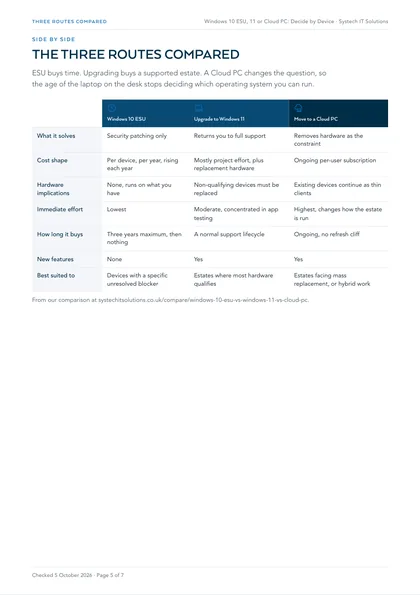
The right route off Windows 10 is rarely one answer for the whole estate: it is a short answer per device. The flowchart above asks four questions of each machine, and the counts turn Extended Security Updates, Windows 11 and Cloud PCs into a plan with dates.
The facts come from our Windows 10 ESU vs Windows 11 vs Cloud PC comparison, our post on what ESU costs in year two, and Microsoft Learn's pages on the ESU programme and the Windows 11 requirements, checked on 5 October 2026.
What ESU costs, and how long it lasts
ESU buys security patches only: no new features, no non-security fixes and no general support. Microsoft Learn gives $61 per device for year one, and the price doubles every consecutive year, for a maximum of three years. It is cumulative, so buying year two means paying for year one too.
Count your devices
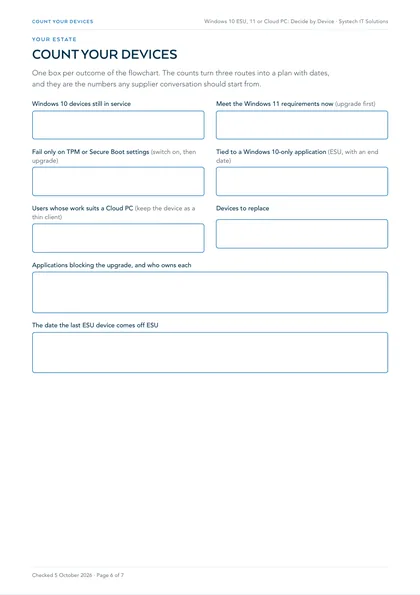
One box per outcome of the flowchart. In the PDF the fields can be typed into on screen.
The plan: usually a mix, with dates attached
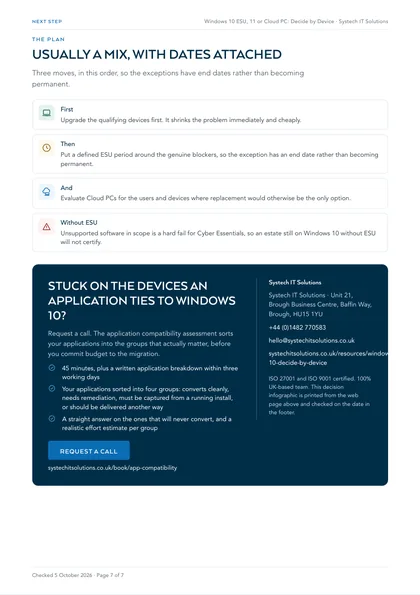
First
Upgrade the qualifying devices first. It shrinks the problem immediately and cheaply.
Then
Put a defined ESU period around the genuine blockers, so the exception has an end date rather than becoming permanent.
And
Evaluate Cloud PCs for the users and devices where replacement would otherwise be the only option.
Without ESU
Unsupported software in scope is a hard fail for Cyber Essentials, so an estate still on Windows 10 without ESU will not certify.
Where this leaves you
In practice the operating system is rarely the hard part. The blocker is almost always a line-of-business application. The application compatibility assessment sorts your applications into the groups that actually matter before you commit budget: 45 minutes, plus a written application breakdown within three working days. For the planning framework, see the legacy migration roadmap.
Frequently asked
How much does Windows 10 ESU cost per device?
Microsoft Learn gives $61 per device for year one through volume licensing, with the price doubling every consecutive year for a maximum of three years: about $122 in year two and $244 in year three. ESUs are cumulative, so buying year two means paying for year one too.
Do Windows 10 devices connecting to a Cloud PC need ESU?
Microsoft Learn says Windows 10 endpoints connecting to Windows 365 Cloud PCs are entitled to ESU for up to three years with an active Windows 365 subscription licence. Additional configuration is needed to enable it on the local device.