
This is for you if
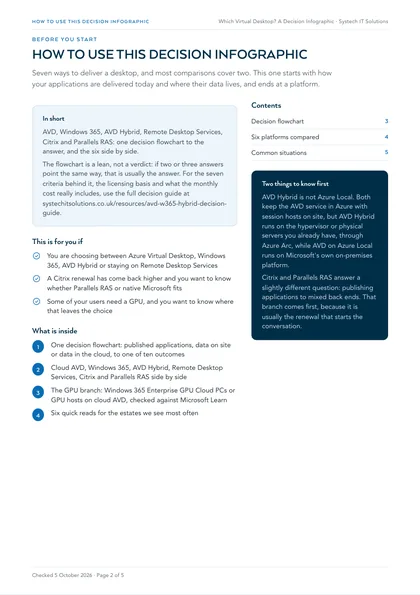
- You are choosing between Azure Virtual Desktop, Windows 365, AVD Hybrid or staying on Remote Desktop Services
- A Citrix renewal has come back higher and you want to know whether Parallels RAS or native Microsoft fits
- Some of your users need a GPU, and you want to know where that leaves the choice
The platform usually gets picked from whoever is selling one of them. Choose a cloud desktop far from the data it depends on and every query becomes a round trip; buy fixed per-user Cloud PCs for a workforce that signs in half the week and you pay for capacity nobody uses. A short set of questions, asked first, avoids both.
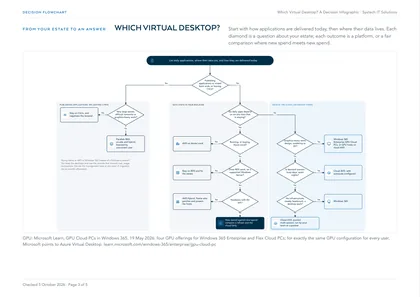
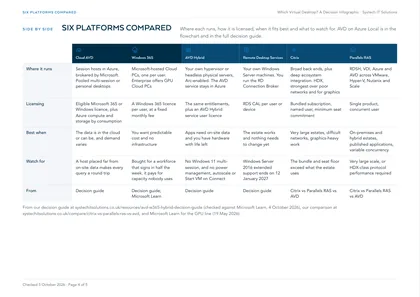
Seven ways to deliver a Windows desktop on one page: cloud Azure Virtual Desktop, AVD on Azure Local, AVD Hybrid, Windows 365, Remote Desktop Services, Citrix and Parallels RAS. The flowchart above starts with how your applications are delivered today and where their data lives, and ends at a platform.
Every line comes from pages already on our site: the AVD, Windows 365 or AVD Hybrid decision guide, checked against Microsoft Learn on 4 October 2026, and our Citrix vs Parallels RAS vs Azure Virtual Desktop comparison. The GPU line was checked against Microsoft Learn on 5 October 2026.
Two things to know first
AVD Hybrid is not Azure Local. Both keep the Azure Virtual Desktop service in Azure with session hosts on site, but AVD Hybrid runs on the hypervisor or physical servers you already have, onboarded through Azure Arc, while AVD on Azure Local runs on Microsoft's own on-premises platform. AVD Hybrid does not support Windows 11 multi-session, power management, autoscale or Start VM on Connect.
Graphics-heavy work no longer rules out a Cloud PC. Microsoft Learn's GPU Cloud PCs in Windows 365 page, dated 19 May 2026, lists four GPU offerings for Windows 365 Enterprise and Flex Cloud PCs, and points to Azure Virtual Desktop where every user needs exactly the same GPU configuration.
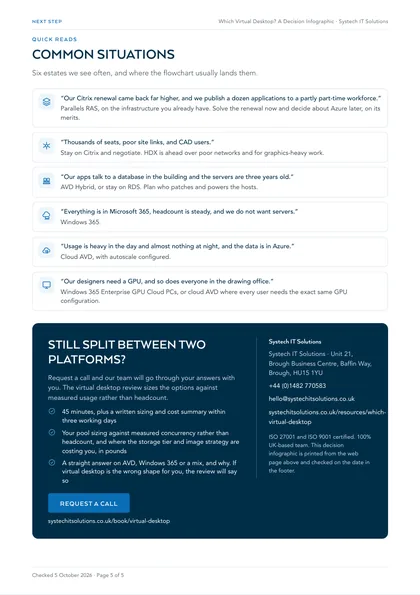
Quick reads for common situations
“Our Citrix renewal came back far higher, and we publish a dozen applications to a partly part-time workforce.”
Parallels RAS, on the infrastructure you already have. Solve the renewal now and decide about Azure later, on its merits.
“Thousands of seats, poor site links, and CAD users.”
Stay on Citrix and negotiate. HDX is ahead over poor networks and for graphics-heavy work.
“Our apps talk to a database in the building and the servers are three years old.”
AVD Hybrid, or stay on RDS. Plan who patches and powers the hosts.
“Everything is in Microsoft 365, headcount is steady, and we do not want servers.”
Windows 365.
“Usage is heavy in the day and almost nothing at night, and the data is in Azure.”
Cloud AVD, with autoscale configured.
“Our designers need a GPU, and so does everyone in the drawing office.”
Windows 365 Enterprise GPU Cloud PCs, or cloud AVD where every user needs the exact same GPU configuration.
Where this leaves you
The flowchart is a lean, not a verdict: if two or three answers point the same way, that is usually the answer. For the seven criteria behind it, the licensing basis and what the monthly cost really includes, use the full decision guide. To have the options sized against measured usage rather than headcount, the virtual desktop review takes 45 minutes, plus a written sizing and cost summary within three working days.
Frequently asked
Is AVD Hybrid the same as Azure Local?
No. Both keep the Azure Virtual Desktop service in Azure with session hosts on site, but AVD Hybrid runs on the hypervisor or physical servers you already have, onboarded through Azure Arc, while AVD on Azure Local runs on Microsoft's own on-premises platform. AVD Hybrid does not support Windows 11 multi-session; AVD on Azure Local does.
Can Windows 365 run graphics-heavy work?
Yes. Microsoft Learn lists four GPU offerings for Windows 365 Enterprise and Flex Cloud PCs. Where every user needs exactly the same GPU configuration, Microsoft points to Azure Virtual Desktop instead.