
This is for you if
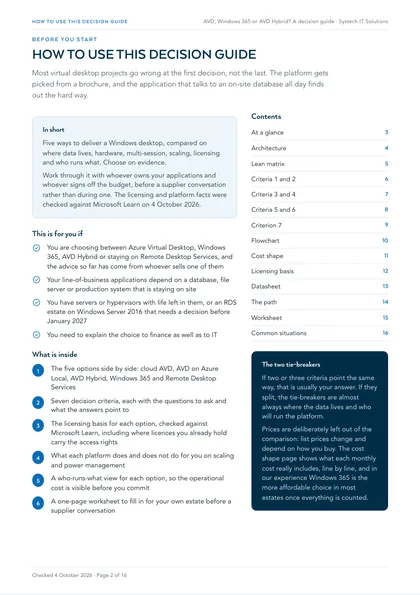
- You are choosing between Azure Virtual Desktop, Windows 365, AVD Hybrid or staying on Remote Desktop Services, and the advice so far has come from whoever sells one of them
- Your line-of-business applications depend on a database, file server or production system that is staying on site
- You have servers or hypervisors with life left in them, or an RDS estate on Windows Server 2016 that needs a decision before January 2027
- You need to explain the choice to finance as well as to IT
Choose the wrong platform and the cost turns up twice: once in the bill, and again in the complaints. A cloud desktop placed far from the data it depends on makes every query a round trip, and the new platform gets the blame. A fixed per-user Cloud PC bought for a workforce that only signs in for half the week pays for capacity nobody uses. An on-site option chosen without knowing who will patch and power the hosts leaves an estate nobody owns. Every one of these is avoidable with a short set of questions asked before anything is bought.
This guide compares the five ways to deliver a Windows desktop on the questions that actually decide it: where your data lives, what you already own, whether people share a host, how capacity scales, how each option is licensed and who runs it. Work through it with whoever owns your applications and whoever signs off the budget, before a supplier conversation rather than during one.
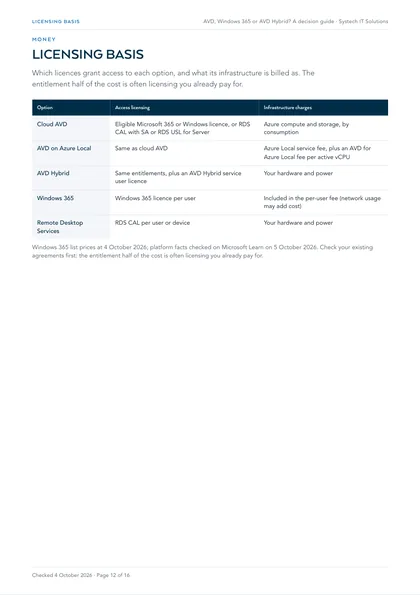
How this guide treats licensing and cost
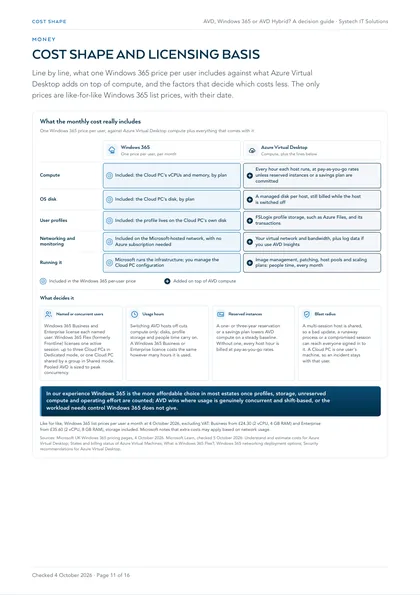
The licensing and platform facts here were checked against Microsoft Learn on 4 October 2026. Prices are deliberately left out of the comparison, because list prices change and depend on how you buy. The one cost figure on this page shows what each option's monthly cost includes, line by line, and quotes only like-for-like Windows 365 list prices with their date.
In our experience Windows 365 is the more affordable choice in most estates once profiles, storage, unreserved compute and operating effort are counted; AVD wins where usage is genuinely concurrent and shift-based, or the workload needs control Windows 365 does not give. Check your existing agreements first: the entitlement half of the cost is often licensing you already pay for. Our AVD vs Windows 365 vs traditional desktops comparison works through the four lines of a full TCO model.
The options at a glance
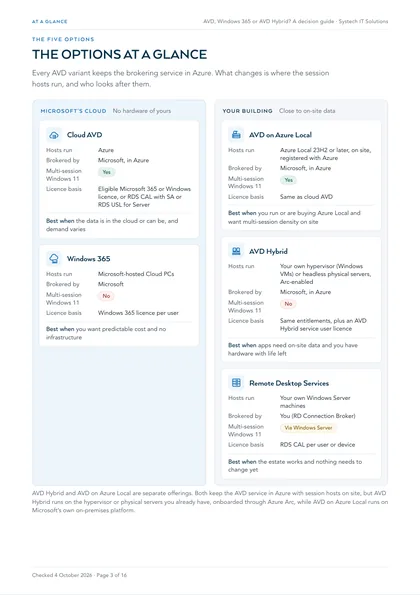
Cloud AVD
- Hosts run
- Azure
- Brokered by
- Microsoft, in Azure
- Multi-session Windows 11
- Yes
- Licence basis
- Eligible Microsoft 365 or Windows licence, or RDS CAL with SA or RDS USL for Server
Best when the data is in the cloud or can be, and demand varies
Windows 365
- Hosts run
- Microsoft-hosted Cloud PCs
- Brokered by
- Microsoft
- Multi-session Windows 11
- No
- Licence basis
- Windows 365 licence per user
Best when you want predictable cost and no infrastructure
AVD on Azure Local
- Hosts run
- Azure Local 23H2 or later, on site, registered with Azure
- Brokered by
- Microsoft, in Azure
- Multi-session Windows 11
- Yes
- Licence basis
- Same as cloud AVD
Best when you run or are buying Azure Local and want multi-session density on site
AVD Hybrid
- Hosts run
- Your own hypervisor (Windows VMs) or headless physical servers, Arc-enabled
- Brokered by
- Microsoft, in Azure
- Multi-session Windows 11
- No
- Licence basis
- Same entitlements, plus an AVD Hybrid service user licence
Best when apps need on-site data and you have hardware with life left
Remote Desktop Services
- Hosts run
- Your own Windows Server machines
- Brokered by
- You (RD Connection Broker)
- Multi-session Windows 11
- Via Windows Server
- Licence basis
- RDS CAL per user or device
Best when the estate works and nothing needs to change yet
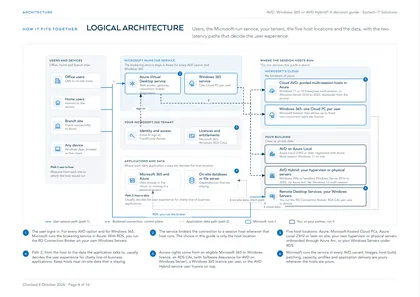
AVD Hybrid and AVD on Azure Local are separate offerings. Both keep the AVD service in Azure with session hosts on site, but AVD Hybrid runs on the hypervisor or physical servers you already have, onboarded through Azure Arc, while AVD on Azure Local runs on Microsoft's own on-premises platform. Scaling is covered under criterion 5 below.
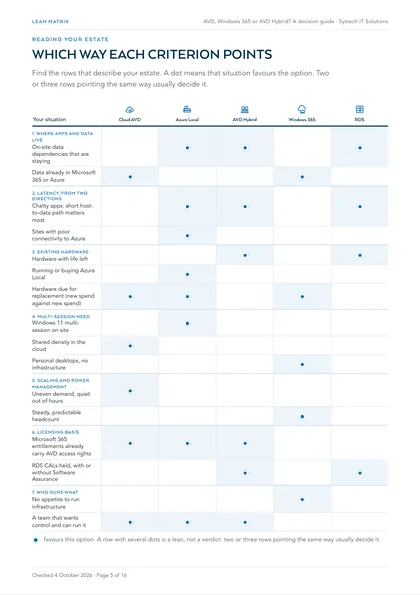
Which way each criterion points
Find the rows that describe your estate. A row with several dots is a lean, not a verdict: two or three rows pointing the same way usually decide it, and the seven criteria below are the questions behind each row.
| Your situation | Cloud AVD | Azure Local | AVD Hybrid | Windows 365 | RDS |
|---|---|---|---|---|---|
| 1. Where apps and data liveOn-site data dependencies that are staying | favours | favours | favours | ||
| Data already in Microsoft 365 or Azure | favours | favours | |||
| 2. Latency, from two directionsChatty apps: short host-to-data path matters most | favours | favours | favours | ||
| Sites with poor connectivity to Azure | favours | ||||
| 3. Existing hardwareHardware with life left | favours | favours | |||
| Running or buying Azure Local | favours | ||||
| Hardware due for replacement (new spend against new spend) | favours | favours | favours | ||
| 4. Multi-session needWindows 11 multi-session on site | favours | ||||
| Shared density in the cloud | favours | ||||
| Personal desktops, no infrastructure | favours | ||||
| 5. Scaling and power managementUneven demand, quiet out of hours | favours | ||||
| Steady, predictable headcount | favours | ||||
| 6. Licensing basisMicrosoft 365 entitlements already carry AVD access rights | favours | favours | favours | ||
| RDS CALs held, with or without Software Assurance | favours | favours | |||
| 7. Who runs whatNo appetite to run infrastructure | favours | ||||
| A team that wants control and can run it | favours | favours | favours |
favours this option. A row with several dots is a lean, not a verdict: two or three rows pointing the same way usually decide it.
The seven decision criteria
Work through each one for your own estate. The "points to" line is a lean, not a verdict: two or three criteria usually decide it.
1 Where apps and data live
- List every application users open daily and, next to each, where its data sits: Microsoft 365, Azure, an on-site database, a file server, or a production or site system
- Mark any application that queries an on-site database constantly or opens large files from an on-site file server
- For each on-site dependency, record whether it is staying, moving in a planned project, or undecided
Points to: on-site dependencies that are staying favour AVD Hybrid, AVD on Azure Local or RDS. Dependencies already in the cloud favour cloud AVD or Windows 365.
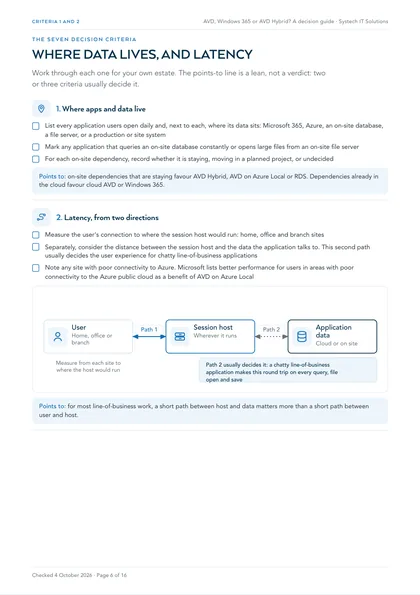
2 Latency, from two directions
- Measure the user's connection to where the session host would run: home, office and branch sites
- Separately, consider the distance between the session host and the data the application talks to. This second path usually decides the user experience for chatty line-of-business applications
- Note any site with poor connectivity to Azure. Microsoft lists better performance for users in areas with poor connectivity to the Azure public cloud as a benefit of AVD on Azure Local
Points to: for most line-of-business work, a short path between host and data matters more than a short path between user and host.
3 Existing hardware
- List the servers and hypervisors that could host session hosts, with purchase date and support status
- Check whether any are already Azure Local, or whether Azure Local is planned
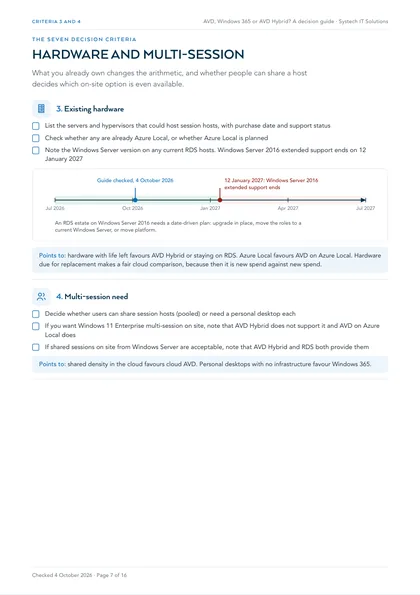
- Note the Windows Server version on any current RDS hosts. Windows Server 2016 extended support ends on 12 January 2027
Points to: hardware with life left favours AVD Hybrid or staying on RDS. Azure Local favours AVD on Azure Local. Hardware due for replacement makes a fair cloud comparison, because then it is new spend against new spend.
4 Multi-session need
- Decide whether users can share session hosts (pooled) or need a personal desktop each
- If you want Windows 11 Enterprise multi-session on site, note that AVD Hybrid does not support it and AVD on Azure Local does
- If shared sessions on site from Windows Server are acceptable, note that AVD Hybrid and RDS both provide them
Points to: shared density in the cloud favours cloud AVD. Personal desktops with no infrastructure favour Windows 365.
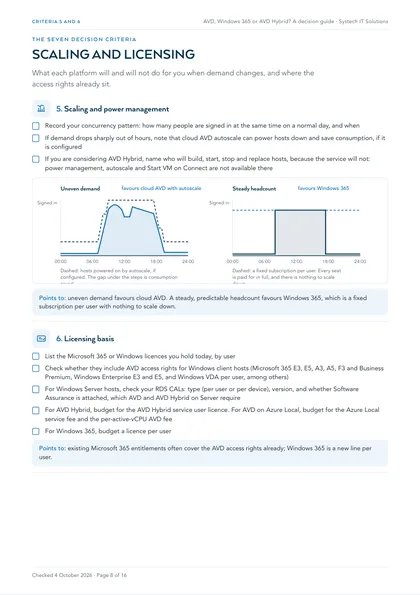
5 Scaling and power management
- Record your concurrency pattern: how many people are signed in at the same time on a normal day, and when
- If demand drops sharply out of hours, note that cloud AVD autoscale can power hosts down and save consumption, if it is configured
- If you are considering AVD Hybrid, name who will build, start, stop and replace hosts, because the service will not: power management, autoscale and Start VM on Connect are not available there
Points to: uneven demand favours cloud AVD. A steady, predictable headcount favours Windows 365, which is a fixed subscription per user with nothing to scale down.
6 Licensing basis
- List the Microsoft 365 or Windows licences you hold today, by user
- Check whether they include AVD access rights for Windows client hosts (Microsoft 365 E3, E5, A3, A5, F3 and Business Premium, Windows Enterprise E3 and E5, and Windows VDA per user, among others)
- For Windows Server hosts, check your RDS CALs: type (per user or per device), version, and whether Software Assurance is attached, which AVD and AVD Hybrid on Server require
- For AVD Hybrid, budget for the AVD Hybrid service user licence. For AVD on Azure Local, budget for the Azure Local service fee and the per-active-vCPU AVD fee
- For Windows 365, budget a licence per user
Points to: existing Microsoft 365 entitlements often cover the AVD access rights already; Windows 365 is a new line per user.
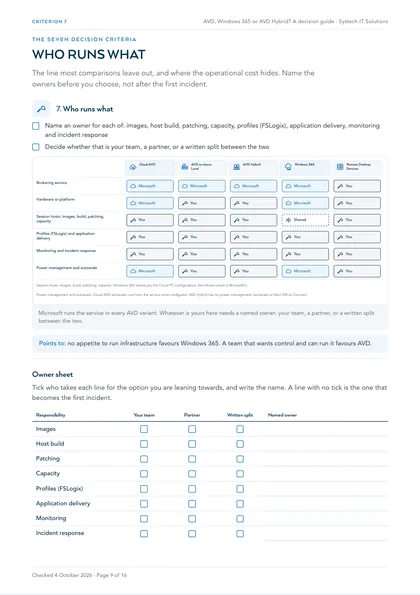
7 Who runs what
- Name an owner for each of: images, host build, patching, capacity, profiles (FSLogix), application delivery, monitoring and incident response
- Decide whether that is your team, a partner, or a written split between the two
Points to: no appetite to run infrastructure favours Windows 365. A team that wants control and can run it favours AVD.
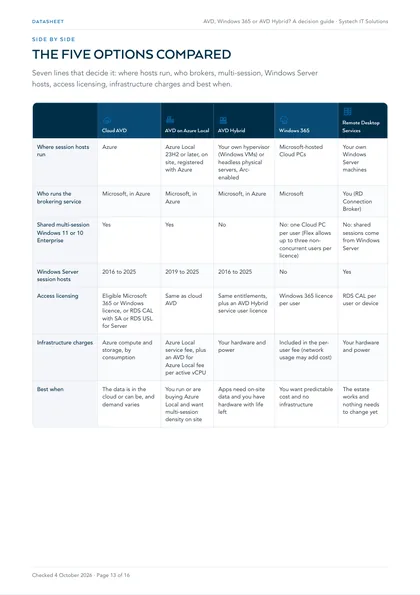
The five options, side by side
Seven lines that decide it: where hosts run, who brokers, multi-session, Windows Server hosts, access licensing, infrastructure charges and best when.
| Cloud AVD | AVD on Azure Local | AVD Hybrid | Windows 365 | Remote Desktop Services | |
|---|---|---|---|---|---|
| Where session hosts run | Azure | Azure Local 23H2 or later, on site, registered with Azure | Your own hypervisor (Windows VMs) or headless physical servers, Arc-enabled | Microsoft-hosted Cloud PCs | Your own Windows Server machines |
| Who runs the brokering service | Microsoft, in Azure | Microsoft, in Azure | Microsoft, in Azure | Microsoft | You (RD Connection Broker) |
| Shared multi-session Windows 11 or 10 Enterprise | Yes | Yes | No | No: one Cloud PC per user (Flex allows up to three non-concurrent users per licence) | No: shared sessions come from Windows Server |
| Windows Server session hosts | 2016 to 2025 | 2019 to 2025 | 2016 to 2025 | No | Yes |
| Access licensing | Eligible Microsoft 365 or Windows licence, or RDS CAL with SA or RDS USL for Server | Same as cloud AVD | Same entitlements, plus an AVD Hybrid service user licence | Windows 365 licence per user | RDS CAL per user or device |
| Infrastructure charges | Azure compute and storage, by consumption | Azure Local service fee, plus an AVD for Azure Local fee per active vCPU | Your hardware and power | Included in the per-user fee (network usage may add cost) | Your hardware and power |
| Best when | The data is in the cloud or can be, and demand varies | You run or are buying Azure Local and want multi-session density on site | Apps need on-site data and you have hardware with life left | You want predictable cost and no infrastructure | The estate works and nothing needs to change yet |
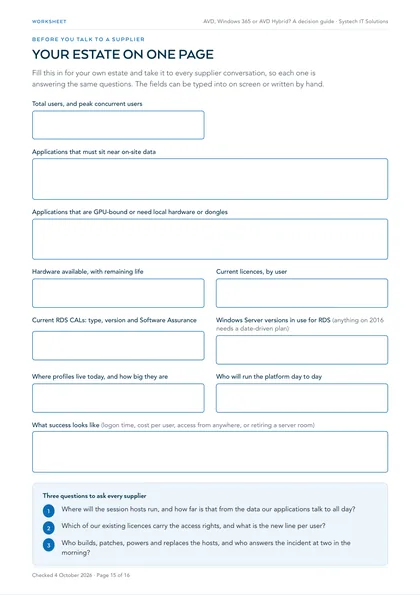
Before you talk to a supplier
A one-page worksheet. Fill it in for your own estate and take it to every supplier conversation, so each one is answering the same questions. In the PDF the fields can be typed into on screen.
Quick reads for common situations
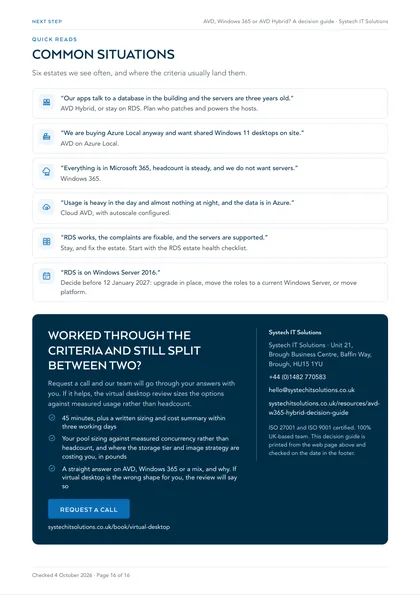
“Our apps talk to a database in the building and the servers are three years old.”
AVD Hybrid, or stay on RDS. Plan who patches and powers the hosts.
“We are buying Azure Local anyway and want shared Windows 11 desktops on site.”
AVD on Azure Local.
“Everything is in Microsoft 365, headcount is steady, and we do not want servers.”
Windows 365.
“Usage is heavy in the day and almost nothing at night, and the data is in Azure.”
Cloud AVD, with autoscale configured.
“RDS works, the complaints are fixable, and the servers are supported.”
Stay, and fix the estate. Start with the RDS estate health checklist.
“RDS is on Windows Server 2016.”
Decide before 12 January 2027: upgrade in place, move the roles to a current Windows Server, or move platform.
If RDS works, the complaints are fixable and the servers are supported, start with our RDS estate health checklist.
Where this leaves you
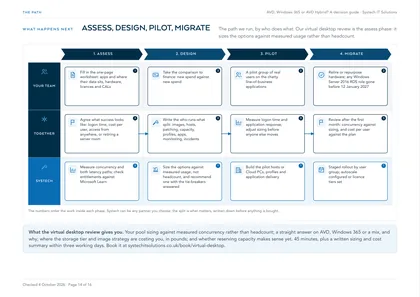
If two or three criteria point the same way, that is usually your answer. If they split, the tie-breakers are almost always where the data lives and who will run the platform. Our virtual desktop review sizes the options against measured usage rather than headcount, so the comparison you take to finance is built on how your people actually work.
This is one of a set. The rest, covering virtual desktops, AI readiness, security, cost, compliance and device management in the same format, are listed on all our free checklists and assessments.
What are the five ways to deliver a Windows desktop?
Cloud Azure Virtual Desktop (AVD): session hosts run in Azure. The AVD service brokers connections, and you size, image and scale the host pools, which can be shared (pooled) or personal.
AVD on Azure Local: the AVD service stays in Azure, but the session hosts run on Azure Local, Microsoft's on-premises platform, which has to be at version 23H2 or later and registered with Azure. It supports Windows 11 and Windows 10 Enterprise multi-session on site.
AVD Hybrid: the AVD service stays in Azure and the session hosts run on hardware you already own, either Windows virtual machines on your existing hypervisor or headless physical Windows Server machines, onboarded through Azure Arc. It is a separate offering from AVD on Azure Local.
Windows 365: Microsoft-hosted Cloud PCs, one per user in the Business, Enterprise and Government editions, licensed per user for a fixed monthly fee and managed through Intune. Remote Desktop Services (RDS) is the session-based role in Windows Server, on your own servers, licensed with RDS Client Access Licences. It is still shipping, still supported on current Windows Server, and still the right answer for some estates.
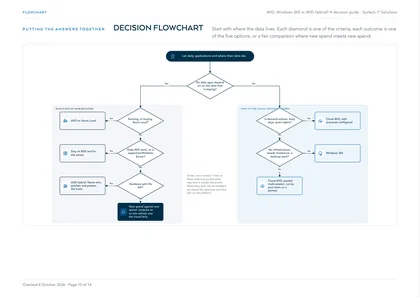
Which question decides it first?
Where the applications and data live. If the systems your users work in all day are staying in your building, putting the desktop a region away from them adds a round trip to every query, file open and save. That is the case for keeping the session hosts on site with AVD Hybrid, AVD on Azure Local or RDS. If the data is already in Microsoft 365 or Azure, or can move there in a planned project, cloud AVD or Windows 365 becomes the simpler answer, because there is no hardware to run at all.
The second question is what you already own. Servers and hypervisors with years of life left change the arithmetic: buying the same capacity again in Azure duplicates spend. Hardware due for replacement anyway is the fair moment to compare cloud against on-site, because then it is new spend against new spend.
How do licensing and cost shape differ?
Cloud AVD takes its user access rights from licences many organisations already hold (Microsoft 365 E3, E5, A3, A5, F3, Business Premium and others) for Windows client session hosts, or from RDS CALs with Software Assurance or RDS User Subscription Licences for Windows Server hosts. Azure compute and storage are billed on top, by consumption. AVD on Azure Local has three components: the same user access rights, the Azure Local service fee, and an Azure Virtual Desktop for Azure Local fee per active vCPU.
AVD Hybrid needs the same user entitlement to the host operating system plus an Azure Virtual Desktop Hybrid service user licence; the hardware is yours. Windows 365 is a separate licence per user for a fixed monthly fee, and Microsoft notes additional costs may apply based on network usage. RDS needs Windows Server licences plus an RDS CAL for every user or device, with no Azure service charge. We do not quote prices, because list prices change and depend on how you buy.
What does each option do, and not do, about scaling?
Cloud AVD can scale for you. Autoscale scaling plans power session hosts on ahead of the working day and off afterwards, so pooled capacity follows demand. That only saves money if it is configured, and it needs a custom maximum session limit on the host pool and a role assignment that lets the service manage power state.
AVD Hybrid does not provision session hosts or manage their state, so power management, autoscale, Start VM on Connect and Session Host Configuration are not available. On-site capacity is the capacity your users get, so headroom is a design decision. Windows 365 is a fixed subscription per user, so there is nothing to scale down. RDS runs on servers you own, so switching them off saves power, not licence or capital cost.
Who runs what under each option?
This is the line most comparisons leave out, and it is where the operational cost hides. Microsoft runs the AVD service in every AVD variant. In cloud AVD you still own the images, host pools, scaling, profiles and application delivery. In AVD Hybrid and AVD on Azure Local you also own the hardware, hypervisor or platform, operating system patching and capacity.
Windows 365 removes the infrastructure and leaves you the Cloud PC configuration, applications and Intune policy. RDS is yours end to end. Whoever takes these on, name them before you choose, not after the first incident.
Frequently asked
Is AVD Hybrid the same as Azure Virtual Desktop on Azure Local?
No. Both put session hosts on site with the AVD service in Azure, but AVD Hybrid uses the hypervisor or physical servers you already run, onboarded through Azure Arc. AVD on Azure Local runs on Azure Local, Microsoft's own on-premises platform, at version 23H2 or later. Azure Local supports Windows 11 and Windows 10 Enterprise multi-session; AVD Hybrid does not. They are also costed differently: Azure Local adds a platform service fee and a per-active-vCPU AVD fee.
Do we need new licences for Azure Virtual Desktop?
Often not for access rights. Microsoft 365 E3, E5, A3, A5, F3 and Business Premium, Windows Enterprise E3 and E5, Windows Education A3 and A5 and Windows VDA per user all carry access rights to AVD with Windows client session hosts. Windows Server session hosts need RDS CALs with Software Assurance or RDS User Subscription Licences. Azure compute and storage are charged separately, and AVD Hybrid adds its own service user licence.
Can Windows 365 share one Cloud PC between several people?
In the Business, Enterprise and Government editions, each Cloud PC belongs to one user. Windows 365 Flex lets a single licence provision up to three Cloud PCs for non-concurrent use, aimed at people who only need access for part of the day. If you want many people sharing one host at the same time, that is a multi-session AVD design rather than Windows 365.
Does AVD Hybrid scale our hosts down at night?
No. AVD Hybrid does not provision or manage session host state, so power management, autoscale and Start VM on Connect are not available. Microsoft's guidance is to manage on-site hosts with hypervisor tools, scripts or partner solutions. If scaling down out of hours is a large part of your business case, cloud AVD is the option that does it from the service.
Is Remote Desktop Services being retired?
No. RDS remains a role in current versions of Windows Server. What matters is the Windows Server version underneath it: Windows Server 2016 extended support ends on 12 January 2027. An unsupported server is a security decision, and the answer may be moving the roles to a current version rather than changing platform.
Which option is cheapest?
It depends on concurrency, existing licences and existing hardware, which is why we do not publish a single answer. Fixed per-user pricing (Windows 365) is predictable; consumption pricing (cloud AVD) rewards uneven demand if autoscale is configured; on-site options reuse hardware you have already paid for. Compare like with like: new spend against new spend.