
This is for you if
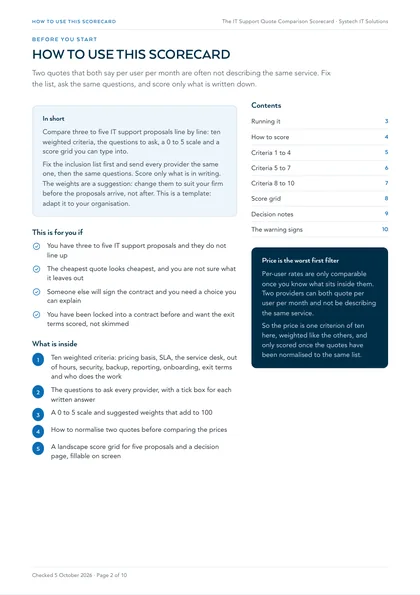
- You have three to five IT support proposals and they do not line up
- The cheapest quote looks cheapest, and you are not sure what it leaves out
- Someone else will sign the contract and you need a choice you can explain
- You have been locked into a contract before and want the exit terms scored, not skimmed
Proposals are written to be compared on price, and price is the worst first filter: one rate covers a service desk, another covers the desk plus patching, endpoint protection, backup and monitoring. Compare them as they arrive and the cheaper quote usually turns out to be a smaller service. Score them on the same list, with the same questions, and the decision becomes one you can defend.
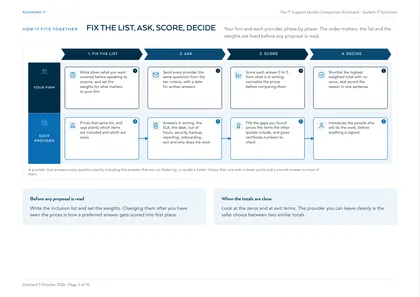
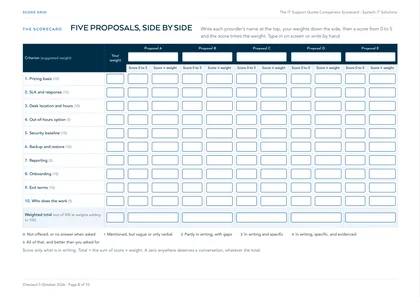
Compare three to five IT support proposals line by line on ten weighted criteria, with the same questions for every provider and a score only for what is written down. Score them in the grid below as you read, or in the PDF.
Fix the inclusion list first and send every provider the same one, then the same questions below. Set your weights before the proposals arrive, not after. This is a template: adapt it to your organisation.
Score it here
Type each provider's name, adjust the weights if you need to, and score each criterion from 0 to 5. The weighted totals are worked out as you go; the PDF has the same grid, fillable on screen, to keep with the contract.
| Criterion | Weight | |||||
|---|---|---|---|---|---|---|
| 1. Pricing basis | ||||||
| 2. SLA and response | ||||||
| 3. Desk location and hours | ||||||
| 4. Out-of-hours option | ||||||
| 5. Security baseline | ||||||
| 6. Backup and restore | ||||||
| 7. Reporting | ||||||
| 8. Onboarding | ||||||
| 9. Exit terms | ||||||
| 10. Who does the work | ||||||
| Weighted total | 100 | / 500 | / 500 | / 500 | / 500 | / 500 |
Scores run 0 to 5, so a proposal’s total is out of five times the weights. Your weights add up to 100. Nothing you type here is stored or sent: it stays in this browser tab, so use the PDF to keep a copy.
The scale
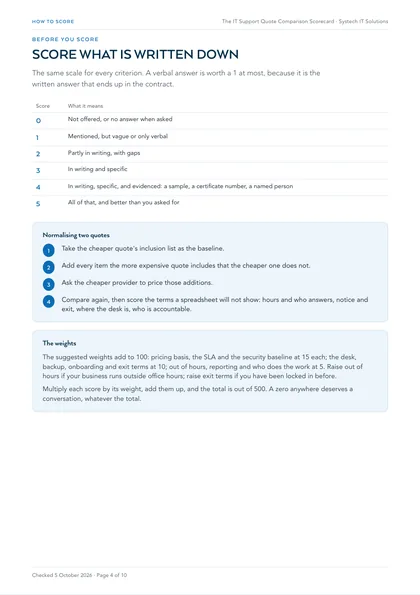
The same scale for every criterion. A verbal answer is worth a 1 at most, because it is the written answer that ends up in the contract.
| Score | What it means |
|---|---|
| 0 | Not offered, or no answer when asked |
| 1 | Mentioned, but vague or only verbal |
| 2 | Partly in writing, with gaps |
| 3 | In writing and specific |
| 4 | In writing, specific, and evidenced: a sample, a certificate number, a named person |
| 5 | All of that, and better than you asked for |
Normalise the prices first
- Take the cheaper quote's inclusion list as the baseline.
- Add every item the more expensive quote includes that the cheaper one does not.
- Ask the cheaper provider to price those additions.
- Compare again, then score the terms a spreadsheet will not show: hours and who answers, notice and exit, where the desk is, who is accountable.
Very often the gap narrows sharply or reverses, because the cheaper quote was a smaller service rather than better value.
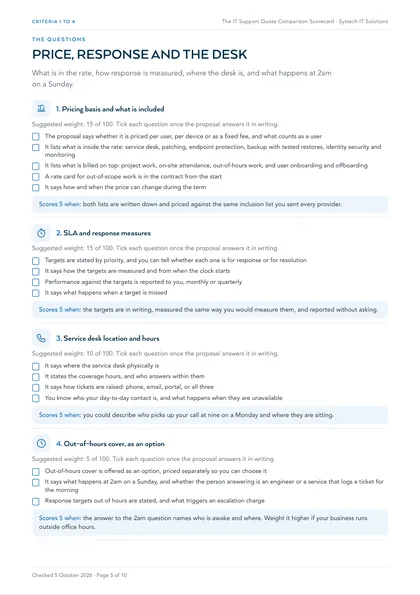
1. Pricing basis and what is included
Suggested weight: 15 of 100. Tick each question once the proposal answers it in writing.
- The proposal says whether it is priced per user, per device or as a fixed fee, and what counts as a user
- It lists what is inside the rate: service desk, patching, endpoint protection, backup with tested restores, identity security and monitoring
- It lists what is billed on top: project work, on-site attendance, out-of-hours work, and user onboarding and offboarding
- A rate card for out-of-scope work is in the contract from the start
- It says how and when the price can change during the term
Scores 5 when: both lists are written down and priced against the same inclusion list you sent every provider.
2. SLA and response measures
Suggested weight: 15 of 100. Tick each question once the proposal answers it in writing.
- Targets are stated by priority, and you can tell whether each one is for response or for resolution
- It says how the targets are measured and from when the clock starts
- Performance against the targets is reported to you, monthly or quarterly
- It says what happens when a target is missed
Scores 5 when: the targets are in writing, measured the same way you would measure them, and reported without asking.
3. Service desk location and hours
Suggested weight: 10 of 100. Tick each question once the proposal answers it in writing.
- It says where the service desk physically is
- It states the coverage hours, and who answers within them
- It says how tickets are raised: phone, email, portal, or all three
- You know who your day-to-day contact is, and what happens when they are unavailable
Scores 5 when: you could describe who picks up your call at nine on a Monday and where they are sitting.
4. Out-of-hours cover, as an option
Suggested weight: 5 of 100. Tick each question once the proposal answers it in writing.
- Out-of-hours cover is offered as an option, priced separately so you can choose it
- It says what happens at 2am on a Sunday, and whether the person answering is an engineer or a service that logs a ticket for the morning
- Response targets out of hours are stated, and what triggers an escalation charge
Scores 5 when: the answer to the 2am question names who is awake and where. Weight it higher if your business runs outside office hours.
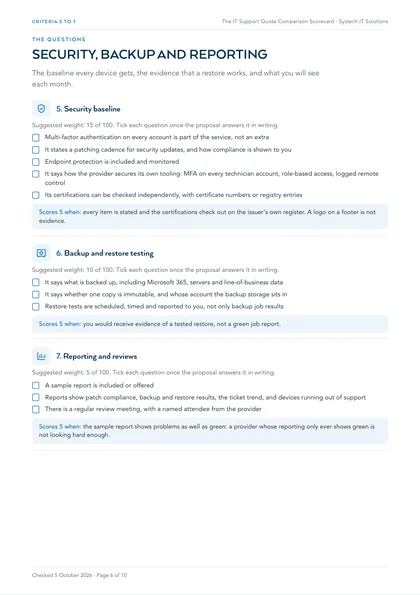
5. Security baseline
Suggested weight: 15 of 100. Tick each question once the proposal answers it in writing.
- Multi-factor authentication on every account is part of the service, not an extra
- It states a patching cadence for security updates, and how compliance is shown to you
- Endpoint protection is included and monitored
- It says how the provider secures its own tooling: MFA on every technician account, role-based access, logged remote control
- Its certifications can be checked independently, with certificate numbers or registry entries
Scores 5 when: every item is stated and the certifications check out on the issuer's own register. A logo on a footer is not evidence.
6. Backup and restore testing
Suggested weight: 10 of 100. Tick each question once the proposal answers it in writing.
- It says what is backed up, including Microsoft 365, servers and line-of-business data
- It says whether one copy is immutable, and whose account the backup storage sits in
- Restore tests are scheduled, timed and reported to you, not only backup job results
Scores 5 when: you would receive evidence of a tested restore, not a green job report.
7. Reporting and reviews
Suggested weight: 5 of 100. Tick each question once the proposal answers it in writing.
- A sample report is included or offered
- Reports show patch compliance, backup and restore results, the ticket trend, and devices running out of support
- There is a regular review meeting, with a named attendee from the provider
Scores 5 when: the sample report shows problems as well as green: a provider whose reporting only ever shows green is not looking hard enough.
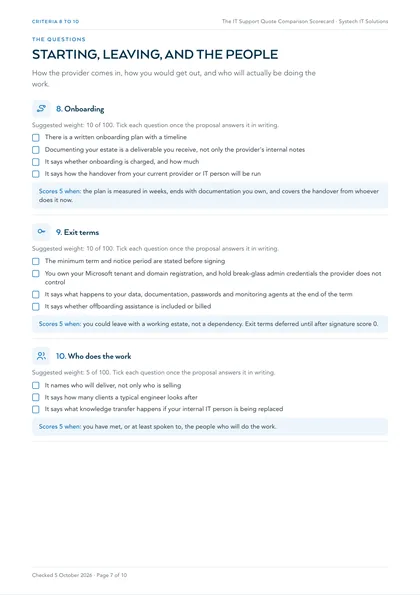
8. Onboarding
Suggested weight: 10 of 100. Tick each question once the proposal answers it in writing.
- There is a written onboarding plan with a timeline
- Documenting your estate is a deliverable you receive, not only the provider's internal notes
- It says whether onboarding is charged, and how much
- It says how the handover from your current provider or IT person will be run
Scores 5 when: the plan is measured in weeks, ends with documentation you own, and covers the handover from whoever does it now.
9. Exit terms
Suggested weight: 10 of 100. Tick each question once the proposal answers it in writing.
- The minimum term and notice period are stated before signing
- You own your Microsoft tenant and domain registration, and hold break-glass admin credentials the provider does not control
- It says what happens to your data, documentation, passwords and monitoring agents at the end of the term
- It says whether offboarding assistance is included or billed
Scores 5 when: you could leave with a working estate, not a dependency. Exit terms deferred until after signature score 0.
10. Who does the work
Suggested weight: 5 of 100. Tick each question once the proposal answers it in writing.
- It names who will deliver, not only who is selling
- It says how many clients a typical engineer looks after
- It says what knowledge transfer happens if your internal IT person is being replaced
Scores 5 when: you have met, or at least spoken to, the people who will do the work.
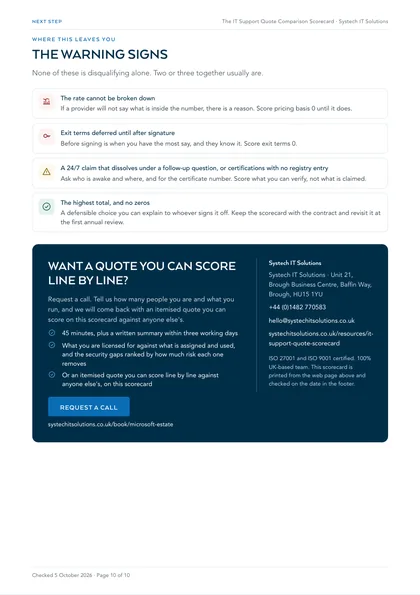
The warning signs
None of these is disqualifying alone. Two or three together usually are.
The rate cannot be broken down
If a provider will not say what is inside the number, there is a reason. Score pricing basis 0 until it does.
Exit terms deferred until after signature
Before signing is when you have the most say, and they know it. Score exit terms 0.
A 24/7 claim that dissolves under a follow-up question, or certifications with no registry entry
Ask who is awake and where, and for the certificate number. Score what you can verify, not what is claimed.
The highest total, and no zeros
A defensible choice you can explain to whoever signs it off. Keep the scorecard with the contract and revisit it at the first annual review.
The questions come from our guide to choosing an IT support company, and the support models themselves are compared in managed IT vs in-house IT vs break-fix. Our own starting price and what sits inside it are on the pricing page, published so it can be scored like anyone else's. Once you have chosen, the 30-day IT provider handover checklist covers the move itself.
Frequently asked
How do I compare IT support quotes fairly?
Fix the inclusion list first and send every provider the same one, then the same questions. Score only what is written down, on the same scale for every criterion, and normalise the prices: take the cheaper quote's inclusion list, add everything the more expensive quote includes that it does not, and ask the cheaper provider to price those additions before you compare again.
What weights should we use?
The scorecard suggests weights that add to 100: pricing basis, the SLA and the security baseline at 15 each; the service desk, backup, onboarding and exit terms at 10; out of hours, reporting and who does the work at 5. Change them before the proposals arrive, not after: raise out of hours if your business runs outside office hours, or exit terms if you have been locked in before.
What are the warning signs in an IT support proposal?
A rate that cannot be broken down; certifications with no registry entry; a 24/7 claim that dissolves under a follow-up question; exit terms deferred until after signature; a plan to replace your internal IT person that does not address knowledge transfer; and no price until the third meeting. None is disqualifying alone. Two or three together usually are.