
This is for you if
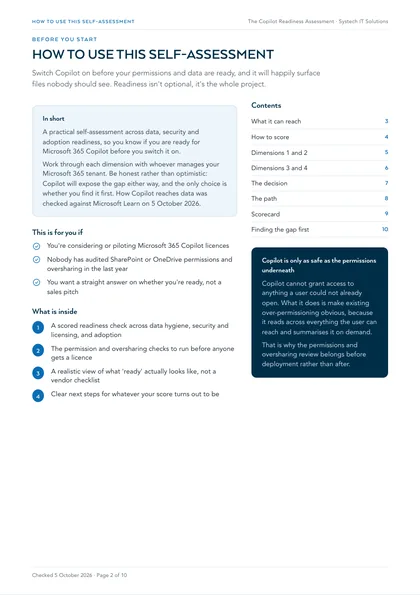
- You're considering or piloting Microsoft 365 Copilot licences
- Nobody has audited SharePoint or OneDrive permissions and oversharing in the last year
- You want a straight answer on whether you're ready, not a sales pitch
Copilot surfaces whatever a user can already access, so any existing oversharing, stale permissions or unlabelled sensitive data becomes instantly and disastrously more visible the day you switch it on. Most businesses find this out after rollout, not before.
Microsoft 365 Copilot is only as safe as the permissions and data underneath it. This self-assessment scores your readiness across four areas: rate yourself low, medium or high against each, and you will know exactly what to fix before anyone gets a licence, not after.
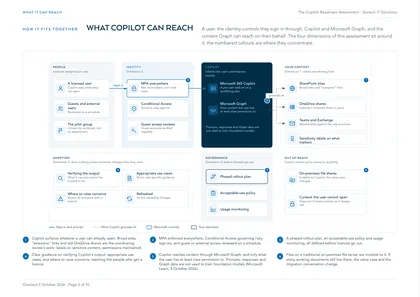
Work through each dimension with whoever manages your Microsoft 365 tenant. Be honest rather than optimistic: Copilot will expose the gap either way, and the only choice is whether you find it first. How Copilot reaches your data was checked against Microsoft Learn on 5 October 2026: it works through Microsoft Graph, and only surfaces content each user can already open.
How to score yourself
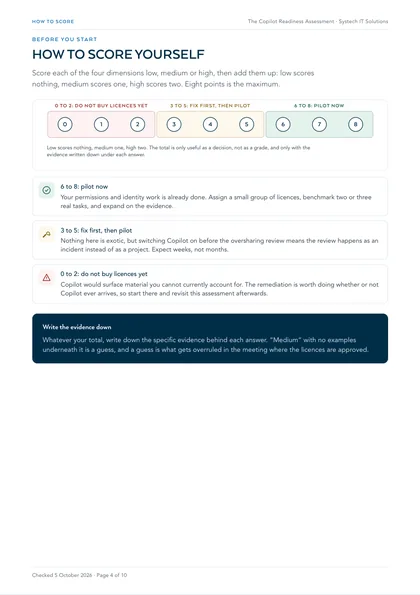
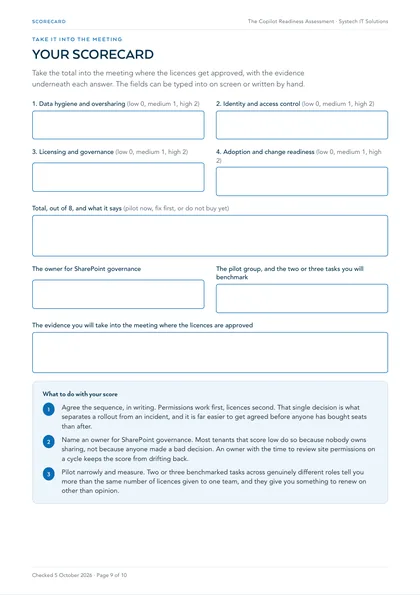
Score each of the four dimensions below as low, medium or high, then add them up: low scores nothing, medium scores one, high scores two. Eight points is the maximum, and the total is only useful as a decision, not as a grade.
6 to 8: pilot now
Your permissions and identity work is already done. Assign a small group of licences, benchmark two or three real tasks, and expand on the evidence.
3 to 5: fix first, then pilot
Nothing here is exotic, but switching Copilot on before the oversharing review means the review happens as an incident instead of as a project. Expect weeks, not months.
0 to 2: do not buy licences yet
Copilot would surface material you cannot currently account for. The remediation is worth doing whether or not Copilot ever arrives, so start there and revisit this assessment afterwards.
Whatever your total, write down the specific evidence behind each answer. "Medium" with no examples underneath it is a guess, and a guess is what gets overruled in the meeting where the licences are approved.
Want this scored against your own tenant rather than from memory? The Copilot readiness check shows you exactly what Copilot would surface today, across your real sites, sharing links and guest accounts, with a written summary in three working days. You keep the findings whether or not you engage us.
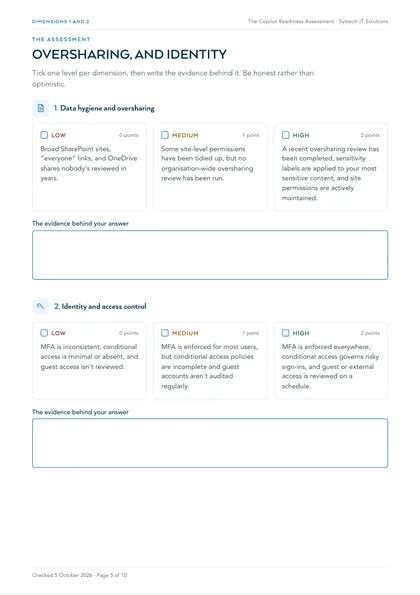
1. Data hygiene and oversharing
Broad SharePoint sites, “everyone” links, and OneDrive shares nobody's reviewed in years.
Some site-level permissions have been tidied up, but no organisation-wide oversharing review has been run.
A recent oversharing review has been completed, sensitivity labels are applied to your most sensitive content, and site permissions are actively maintained.
2. Identity and access control
MFA is inconsistent, conditional access is minimal or absent, and guest access isn't reviewed.
MFA is enforced for most users, but conditional access policies are incomplete and guest accounts aren't audited regularly.
MFA is enforced everywhere, conditional access governs risky sign-ins, and guest or external access is reviewed on a schedule.
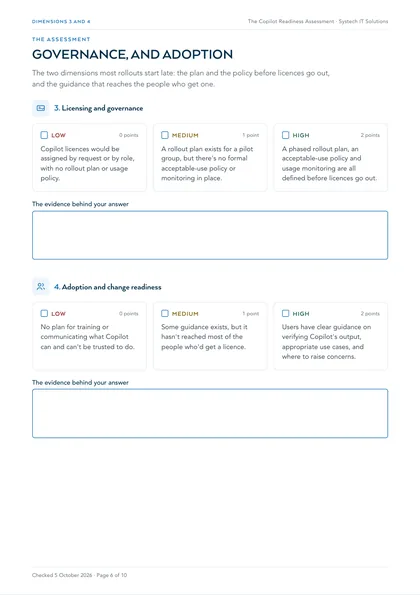
3. Licensing and governance
Copilot licences would be assigned by request or by role, with no rollout plan or usage policy.
A rollout plan exists for a pilot group, but there's no formal acceptable-use policy or monitoring in place.
A phased rollout plan, an acceptable-use policy and usage monitoring are all defined before licences go out.
4. Adoption and change readiness
No plan for training or communicating what Copilot can and can't be trusted to do.
Some guidance exists, but it hasn't reached most of the people who'd get a licence.
Users have clear guidance on verifying Copilot's output, appropriate use cases, and where to raise concerns.
Where this leaves you
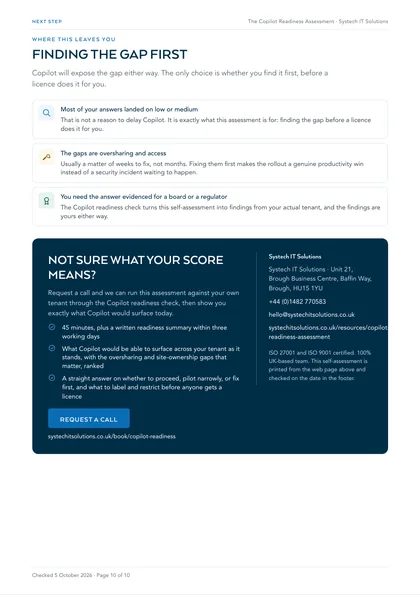
If most of your answers landed on low or medium, that is not a reason to delay Copilot: it is exactly what this assessment is for, finding the gap before a licence does it for you. Oversharing and access issues are usually a matter of weeks to fix, not months, and fixing them first means Copilot's rollout is a genuine productivity win instead of a security incident waiting to happen. For the fix-first work itself, the practical Copilot readiness checklist walks through the tenant settings in order, and our Copilot and AI services cover the rollout end to end if you would rather hand it over.
What to do with your score
Take the total into the meeting where the licences get approved, with the evidence underneath each answer. Three things usually follow from it.
- Agree the sequence, in writing. Permissions work first, licences second. That single decision is what separates a rollout from an incident, and it is far easier to get agreed before anyone has bought seats than after.
- Name an owner for SharePoint governance. Most tenants that score low do so because nobody owns sharing, not because anyone made a bad decision. An owner with the time to review site permissions on a cycle keeps the score from drifting back.
- Pilot narrowly and measure. Two or three benchmarked tasks across genuinely different roles tell you more than the same number of licences given to one team, and they give you something to renew on other than opinion.
If you would rather not score this yourself, or you need the answer evidenced for a board or a regulator, the Copilot readiness check turns this self-assessment into findings from your actual tenant: what Copilot would surface as things stand, the oversharing and site-ownership gaps ranked, and a straight answer on whether to proceed, pilot narrowly, or fix first. Forty-five minutes, a written summary within three working days, and the findings are yours either way.
What does Copilot readiness actually mean?
It means your data, permissions and licensing are in a state where turning Copilot on is safe and useful rather than embarrassing. Copilot inherits the permissions of the person using it: it can surface anything that person already has access to, including things they were never meant to find. Readiness is mostly about closing that gap before anyone types a prompt.
The three areas that decide it are oversharing (who can see what across SharePoint, OneDrive and Teams), data hygiene (whether the content Copilot draws on is current and correctly labelled), and adoption (whether people have a reason to use it once it appears). Licensing is the easy part, and it is the part most projects start with.
Why does Copilot surface files people should not see?
Because those permissions were already wrong, and nothing before Copilot made it obvious. A decade of share-with-everyone links, Teams created for one project and never locked down, and site permissions inherited from a migration all add up to a large pool of content accessible to far more people than anyone intended.
Search never made this visible, because search rewards precise queries and most people do not go looking. Copilot does go looking, on every prompt, and it summarises what it finds. The problem is not new; Copilot is just the first tool that reads everything a user can reach and then repeats it back in a sentence.
What should you check before switching Copilot on?
Start with sharing links and site permissions. Audit organisation-wide sharing links, review who has access to each SharePoint site, check Teams membership against the current org structure, and look specifically at HR, finance and leadership content, which is where an accidental disclosure hurts most.
Then look at data lifecycle. Content that should have been deleted years ago is still fair game for Copilot if someone can reach it. Retention policies, sensitivity labels on genuinely confidential material, and a clear-out of abandoned sites do more for readiness than any single technical control.
Do you need E5 or a specific licence for Copilot?
Microsoft 365 Copilot is a per-user add-on licence that sits on top of a qualifying Microsoft 365 subscription rather than replacing one. You do not need E5 to run it, but some of the governance tooling that makes readiness easier, particularly the more advanced information protection and insider risk features, sits in the higher tiers.
The practical question is not which licence unlocks Copilot, it is which licence unlocks the controls you need to deploy it responsibly at your size. That is worth answering before you buy seats, because the answer changes what the rollout costs in total.
How many licences should you start with?
Fewer than you think, and chosen deliberately. A pilot group drawn from roles with genuinely different workloads tells you far more than the same number of licences spread across one department. You are trying to learn where it saves real time, not to prove that it works.
Pick people who will actually report back, give them specific tasks to try rather than telling them to have a play, and measure against how the work was done before. Without that comparison you get enthusiasm rather than evidence, and enthusiasm does not survive a renewal conversation.
What does a rollout look like after the pilot?
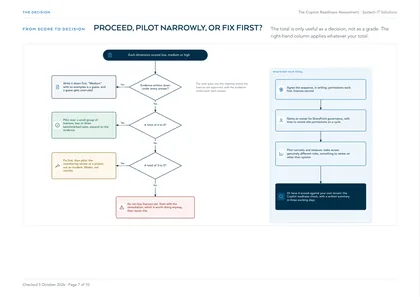
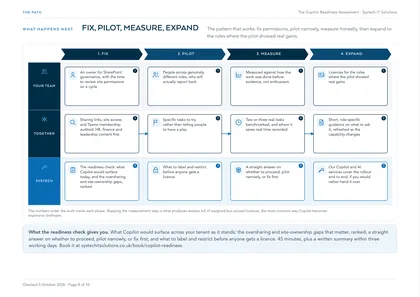
The pattern that works is: fix permissions, pilot narrowly, measure honestly, then expand to the roles where the pilot showed real gains. Skipping the measurement step is what produces estates full of assigned-but-unused licences, which is the most common way Copilot becomes expensive shelfware.
Adoption support matters more than for most Microsoft products, because Copilot does nothing unless someone changes how they work. Short, role-specific guidance on what to ask it beats a generic training session, and it should be refreshed as the capability changes.
Frequently asked
Will Copilot let staff see files they should not have access to?
No. Copilot cannot grant access to anything a user could not already open. What it does is make existing over-permissioning obvious, because it reads across everything the user can reach and summarises it on demand. If your sharing links, Teams membership and site permissions have drifted over the years, Copilot will surface the consequences quickly. That is why a permissions and oversharing review belongs before deployment rather than after.
Is our data used to train Microsoft's models?
Microsoft's commercial data protection terms state that Microsoft 365 Copilot does not use your tenant data to train the underlying foundation models, and that prompts and responses stay within your tenant's compliance boundary. Check the current Microsoft licensing terms for your own agreement, since the detail differs between commercial, education and government tenants, and confirm which Copilot experiences your users can reach, as consumer-facing tools carry different terms.
How long does a readiness assessment take?
It depends on the size and tidiness of the tenant rather than on headcount, so it is scoped once we have looked at your environment. What is consistent is the shape: understand the permissions and sharing position, review data lifecycle and labelling, confirm licensing, then agree a pilot group and what you will measure. The checklist on this page covers the same ground and is free to work through yourself.
Can we roll Copilot out to one department first?
Yes, and you should. Copilot licences are assigned per user, so you can start with a defined group and expand later. The mistake is choosing that group by department politics rather than by workload: a pilot spread across a few genuinely different roles tells you far more about where the value sits than the same number of licences concentrated in one team.
What if we are not ready?
That is a useful outcome, not a failed assessment. Most tenants are not ready on first look, and the gap is normally permissions drift rather than anything exotic. Knowing that before you buy several hundred per-user add-on licences is precisely the point, and the remediation work has value whether or not you go ahead with Copilot.
Does Copilot work with our on-premises file shares?
Not directly. Microsoft 365 Copilot draws on content in Microsoft Graph, which means SharePoint, OneDrive, Teams, Exchange and the other Microsoft 365 workloads. Files sitting on a traditional on-premises file server are invisible to it. If a significant share of your working documents still live on-premises, that changes both the value case and the migration conversation, and it is worth establishing early.