
This is for you if
- Your Microsoft renewal is coming and you want the numbers before the conversation, not during it
- You are under 300 users and have been quoted for E3 or E5, or you are not sure Business Premium still fits
- Nobody can say which licences are assigned to people who have left, or which Copilot seats are actually used
- You own or sign off the Microsoft bill and want a clear picture you can check yourself
Licensing waste does not announce itself. It is a slightly larger invoice each year, a security product bought separately that was already included, a tier upgrade taken on advice nobody re-examined, and licences still assigned to people who left. And the window to change most of it is short: on many subscriptions, seats can only be reduced at renewal, so a review that starts after that date can only confirm what you already have.
This is a worksheet, not a quiz. Fill it in with whoever administers your Microsoft 365 tenant and whoever signs off the bill, using the admin centre reports you already have. Where a cell cannot be filled with a number or a name, write "unknown": that is a finding too.
You need: a Microsoft 365 role that can read usage reports (Reports Reader is enough), your current leavers list from HR, and your latest Microsoft invoice or reseller statement. Usage reports hide user names by default; a Global Administrator can change that in Org settings, Services, Reports, if your privacy practices allow it, and the change is recorded in the Purview audit log. The report paths and licensing rules here were checked against Microsoft Learn on 4 October 2026.
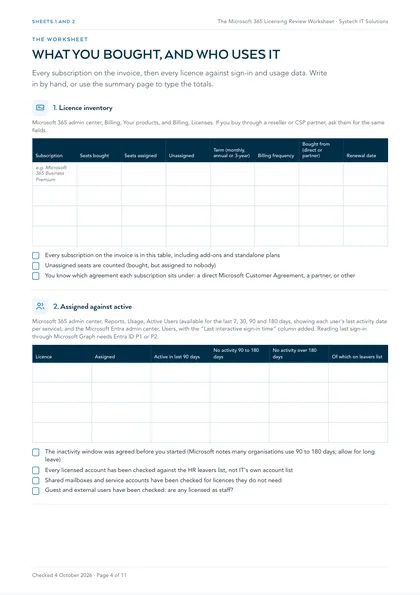
1. Licence inventory
Microsoft 365 admin center, Billing, Your products, and Billing, Licenses. If you buy through a reseller or CSP partner, ask them for the same fields.
| Subscription | Seats bought | Seats assigned | Unassigned | Term (monthly, annual or 3-year) | Billing frequency | Bought from (direct or partner) | Renewal date |
|---|---|---|---|---|---|---|---|
| e.g. Microsoft 365 Business Premium | |||||||
- Every subscription on the invoice is in this table, including add-ons and standalone plans
- Unassigned seats are counted (bought, but assigned to nobody)
- You know which agreement each subscription sits under: a direct Microsoft Customer Agreement, a partner, or other
2. Assigned against active
Microsoft 365 admin center, Reports, Usage, Active Users (available for the last 7, 30, 90 and 180 days, showing each user's last activity date per service); and the Microsoft Entra admin center, Users, with the “Last interactive sign-in time” column added. Reading last sign-in through Microsoft Graph needs Entra ID P1 or P2.
| Licence | Assigned | Active in last 90 days | No activity 90 to 180 days | No activity over 180 days | Of which on leavers list |
|---|---|---|---|---|---|
- The inactivity window was agreed before you started (Microsoft notes many organisations use 90 to 180 days; allow for long leave)
- Every licensed account has been checked against the HR leavers list, not IT's own account list
- Shared mailboxes and service accounts have been checked for licences they do not need
- Guest and external users have been checked: are any licensed as staff?
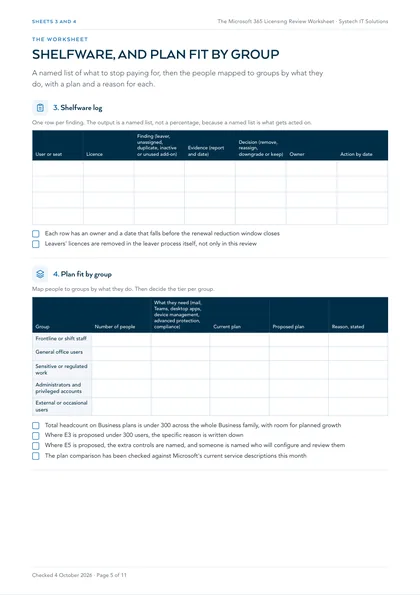
3. Shelfware log
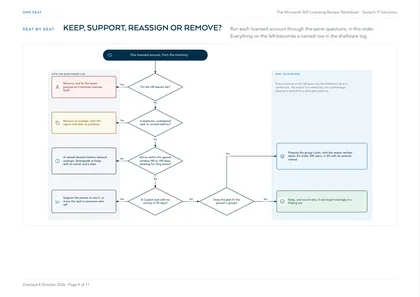
One row per finding. The output is a named list, not a percentage, because a named list is what gets acted on.
| User or seat | Licence | Finding (leaver, unassigned, duplicate, inactive or unused add-on) | Evidence (report and date) | Decision (remove, reassign, downgrade or keep) | Owner | Action by date |
|---|---|---|---|---|---|---|
- Each row has an owner and a date that falls before the renewal reduction window closes
- Leavers' licences are removed in the leaver process itself, not only in this review
4. Plan fit by group
Map people to groups by what they do. Then decide the tier per group.
| Group | Number of people | What they need (mail, Teams, desktop apps, device management, advanced protection, compliance) | Current plan | Proposed plan | Reason, stated |
|---|---|---|---|---|---|
| Frontline or shift staff | |||||
| General office users | |||||
| Sensitive or regulated work | |||||
| Administrators and privileged accounts | |||||
| External or occasional users |
- Total headcount on Business plans is under 300 across the whole Business family, with room for planned growth
- Where E3 is proposed under 300 users, the specific reason is written down
- Where E5 is proposed, the extra controls are named, and someone is named who will configure and review them
- The plan comparison has been checked against Microsoft's current service descriptions this month
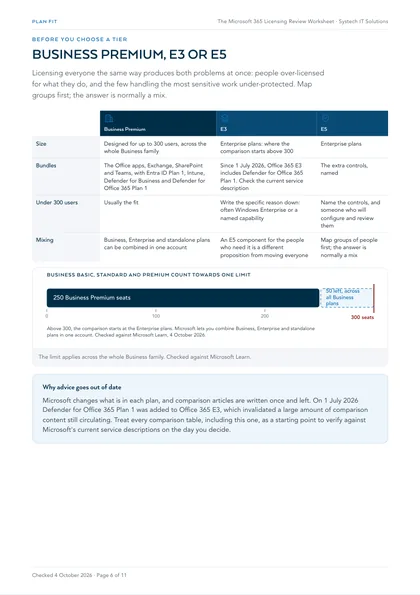
| Business Premium | E3 | E5 | |
|---|---|---|---|
| Size | Designed for up to 300 users, across the whole Business family | Enterprise plans: where the comparison starts above 300 | Enterprise plans |
| Bundles | The Office apps, Exchange, SharePoint and Teams, with Entra ID Plan 1, Intune, Defender for Business and Defender for Office 365 Plan 1 | Since 1 July 2026, Office 365 E3 includes Defender for Office 365 Plan 1. Check the current service description | The extra controls, named |
| Under 300 users | Usually the fit | Write the specific reason down: often Windows Enterprise or a named capability | Name the controls, and someone who will configure and review them |
| Mixing | Business, Enterprise and standalone plans can be combined in one account | An E5 component for the people who need it is a different proposition from moving everyone | Map groups of people first; the answer is normally a mix |
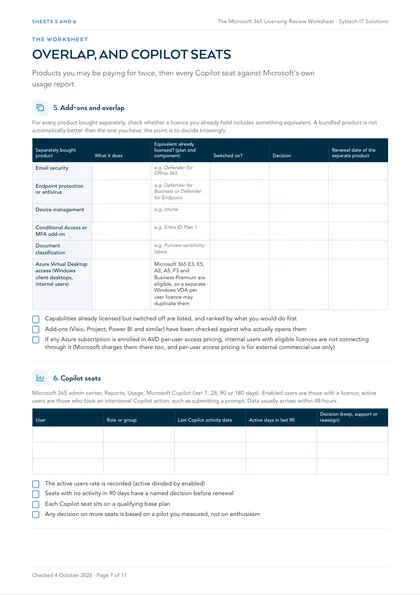
5. Add-ons and overlap
For every product bought separately, check whether a licence you already hold includes something equivalent. A bundled product is not automatically better than the one you have; the point is to decide knowingly.
| Separately bought product | What it does | Equivalent already licensed? (plan and component) | Switched on? | Decision | Renewal date of the separate product |
|---|---|---|---|---|---|
| Email security | e.g. Defender for Office 365 | ||||
| Endpoint protection or antivirus | e.g. Defender for Business or Defender for Endpoint | ||||
| Device management | e.g. Intune | ||||
| Conditional Access or MFA add-on | e.g. Entra ID Plan 1 | ||||
| Document classification | e.g. Purview sensitivity labels | ||||
| Azure Virtual Desktop access (Windows client desktops, internal users) | Microsoft 365 E3, E5, A3, A5, F3 and Business Premium are eligible, so a separate Windows VDA per user licence may duplicate them |
- Capabilities already licensed but switched off are listed, and ranked by what you would do first
- Add-ons (Visio, Project, Power BI and similar) have been checked against who actually opens them
- If any Azure subscription is enrolled in AVD per-user access pricing, internal users with eligible licences are not connecting through it (Microsoft charges them there too, and per-user access pricing is for external commercial use only)
6. Copilot seats
Microsoft 365 admin center, Reports, Usage, Microsoft Copilot (last 7, 28, 90 or 180 days). Enabled users are those with a licence; active users are those who took an intentional Copilot action, such as submitting a prompt. Data usually arrives within 48 hours.
| User | Role or group | Last Copilot activity date | Active days in last 90 | Decision (keep, support or reassign) |
|---|---|---|---|---|
- The active users rate is recorded (active divided by enabled)
- Seats with no activity in 90 days have a named decision before renewal
- Each Copilot seat sits on a qualifying base plan
- Any decision on more seats is based on a pilot you measured, not on enthusiasm
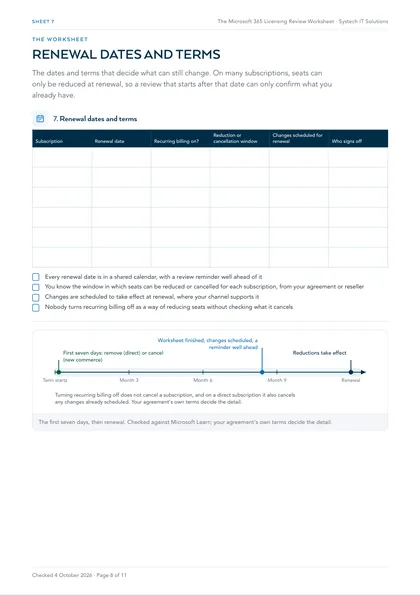
7. Renewal dates and terms
| Subscription | Renewal date | Recurring billing on? | Reduction or cancellation window | Changes scheduled for renewal | Who signs off |
|---|---|---|---|---|---|
- Every renewal date is in a shared calendar, with a review reminder well ahead of it
- You know the window in which seats can be reduced or cancelled for each subscription, from your agreement or reseller
- Changes are scheduled to take effect at renewal, where your channel supports it
- Nobody turns recurring billing off as a way of reducing seats without checking what it cancels
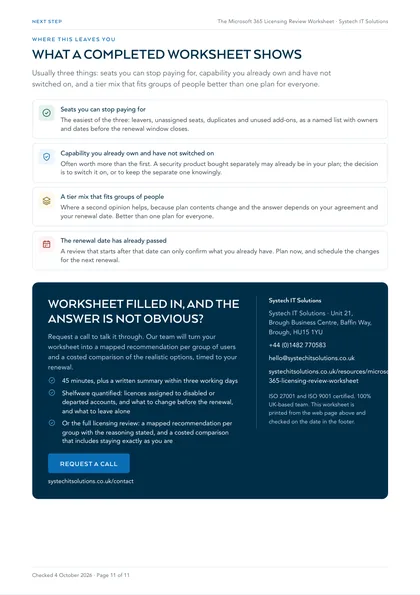
Where this leaves you
Seats you can stop paying for
The easiest of the three: leavers, unassigned seats, duplicates and unused add-ons, as a named list with owners and dates before the renewal window closes.
Capability you already own and have not switched on
Often worth more than the first. A security product bought separately may already be in your plan; the decision is to switch it on, or to keep the separate one knowingly.
A tier mix that fits groups of people
Where a second opinion helps, because plan contents change and the answer depends on your agreement and your renewal date. Better than one plan for everyone.
The renewal date has already passed
A review that starts after that date can only confirm what you already have. Plan now, and schedule the changes for the next renewal.
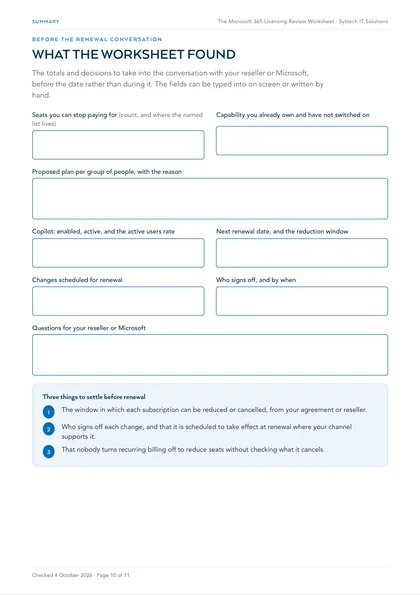
A completed worksheet usually shows three things: seats you can stop paying for, capability you already own and have not switched on, and a tier mix that fits groups of people better than one plan for everyone. The first is easiest. The second is often worth more. The third is where a second opinion helps, because plan contents change and the answer depends on your agreement and your renewal date. That is what our Microsoft 365 licensing review produces: a written mapping, a recommendation per group with the reasoning stated, and a costed comparison that includes staying exactly as you are.
More from the set
For the Azure side of the same bill, use the Microsoft 365 cost optimisation checklist. The full set is on all our free checklists and assessments.
Why review groups of people rather than the whole organisation?
Because licensing everyone the same way produces both problems at once: people over-licensed for what they do, and the few handling the most sensitive work under-protected because the tier was chosen for the average. Microsoft lets you combine Business, Enterprise and standalone plans within one account, so a mix is allowed, not a workaround.
Most estates contain at least five groups that genuinely differ: frontline or shift staff, general office users, people handling sensitive or regulated material, administrators and privileged accounts, and external or occasional users. Once people are mapped that way, the tier question usually answers itself, and the answer is normally a mix. Buying an E5 component for the twelve people who need it is a different proposition from moving two hundred people to E5.
Where does the 300-user line come in?
Microsoft's Business plans, including Business Premium, are designed for organisations with up to 300 users, and the limit applies across the whole Business family: an organisation with 250 Business Premium seats can provision only 50 more seats in total across Business plans. Above that, the comparison starts at the Enterprise plans.
Under 300 users, Business Premium bundles the Office apps, Exchange, SharePoint and Teams with the parts organisations most often buy separately: Entra ID Plan 1 for Conditional Access, Intune, Defender for Business and Defender for Office 365 Plan 1. That is why a business under 300 users being quoted E3 should ask what specific reason drives it. There are genuine reasons, often Windows Enterprise or a named capability, but they should be named rather than assumed.
Why does licensing advice go out of date so quickly?
Because Microsoft changes what is in each plan, and comparison articles are written once and left. A recent example: on 1 July 2026 Defender for Office 365 Plan 1 was added to Office 365 E3, which invalidated a large amount of comparison content still circulating.
Treat every comparison table, including any you build with this worksheet, as a starting point to verify against Microsoft's current service descriptions on the day you decide. It is also the honest reason to repeat a review rather than do it once: the right answer moves even when your organisation does not.
When can you actually change your licences?
Earlier than you think you need to start, and later than you might hope to act. For subscriptions bought directly from Microsoft on a Microsoft Customer Agreement, you can buy licences at any time but can only remove them within seven days of buying or renewing; after that, a reduction takes effect at renewal. Through the Cloud Solution Provider channel, new commerce subscriptions can only be cancelled in the first seven days of their term, and changes can be scheduled to take effect at the end of the term.
In practice that means the reconciliation work in this worksheet has to be finished before the renewal date, with the changes scheduled, not discovered afterwards. Turning recurring billing off does not cancel a subscription, and on a direct subscription it also cancels any changes you have already scheduled, so check before you touch it. Your agreement's own terms decide the detail, which is why the renewal sheet asks you to record them.
Are Copilot seats a licensing question or an adoption question?
Both, and the worksheet treats them together. Microsoft 365 Copilot is a per-user add-on on top of a qualifying Microsoft 365 plan, so every seat is a recurring cost that should be matched to someone who uses it. Microsoft's Copilot usage report shows enabled users against active users over the last 7, 28, 90 or 180 days, with each user's last activity date by app.
An enabled user with no recent activity is not automatically shelfware. They may not have been shown what to use it for. But a seat with no activity across a full quarter deserves a decision: support the person to use it, or move the seat to someone who will. Making that call before renewal is what stops Copilot becoming expensive shelfware.
Frequently asked
We have fewer than 300 users. Do we need E3?
Usually not, and it is worth asking anyone who recommends it to explain why. Microsoft's Business plans, including Business Premium, are designed for up to 300 users, and Business Premium bundles Entra ID Plan 1, Intune, Defender for Business and Defender for Office 365 Plan 1 alongside the Office apps. The genuine reasons to be on E3 under 300 users exist, most often Windows Enterprise or a specific named capability, but they should be named rather than assumed.
Can we mix Business Premium, E3 and E5 in one tenant?
Yes. Microsoft states that you can combine Enterprise, Business and standalone plans within a single account. The limit to watch is that the Business family as a whole is capped at 300 provisioned licences, so seats on Business Premium, Business Standard and Business Basic all count toward the same 300.
Can we reduce licences before our renewal?
It depends on how and where you bought them. On a Microsoft Customer Agreement bought direct, licences can only be removed within seven days of buying or renewing; otherwise the reduction lands at renewal. New commerce subscriptions bought through a partner can only be cancelled in the first seven days of their term, with changes schedulable for the end of the term. Check your own agreement, and if the honest answer is that nothing can change for another eight months, plan now and act at renewal.
How do we know which Copilot seats are being used?
Use the Microsoft Copilot usage report in the Microsoft 365 admin center. It shows enabled users against active users over 7, 28, 90 or 180 days, and a per-user table with each person's last Copilot activity date by app. Microsoft advises using that report, or the Copilot Dashboard in Viva Insights, for usage figures rather than building counts from the audit log.
Why can't we see user names in the usage reports?
Microsoft hides user, group and site names in usage reports by default, to help organisations meet local privacy laws. A Global Administrator can change the setting in Org settings, Services, Reports, if your privacy practices allow it. Showing the names is recorded in the Purview audit log, so agree it with whoever owns data protection first.
You sell licences. How is a licensing review impartial?
It is the right question to ask any partner. Ask what we would recommend if you bought the licences somewhere else entirely: the answer should be the same. The written recommendation is yours to keep and act on without us, and it regularly says to stay on your current tier and switch things on rather than buy anything.