
This is for you if
- You run Remote Desktop Services and the person who built it has moved on, or everything about it lives in one person's head
- Users report the same problems most mornings: slow logons, sessions that hang, reconnections that land on a new session
- Your session hosts or Connection Broker run Windows Server 2016, and you need a plan before support ends on 12 January 2027
- You want to know whether to fix RDS or replace it, and you want that decided on evidence
An RDS estate nobody owns degrades predictably. Profiles grow, logons stretch from seconds to minutes, one application starts affecting everyone on the same host, and a licence grace period that quietly ran out years ago becomes an outage the day a CAL is needed. Meanwhile the cheapest fixes go undone because nobody is confident what a change will break, and the estate gets judged, and sometimes replaced, on symptoms that were fixable.
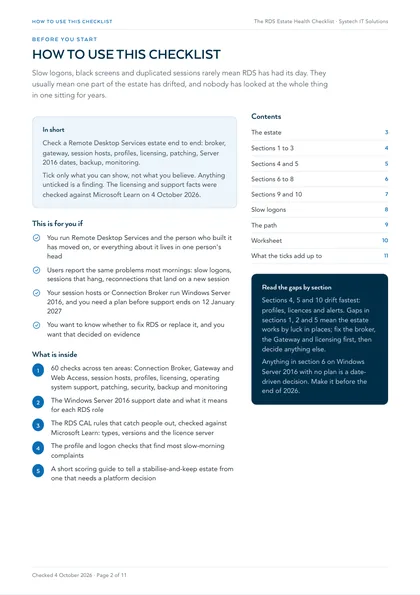
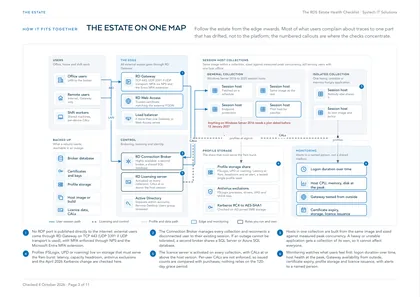
This checklist looks at a Remote Desktop Services estate end to end, in one sitting: the broker, the Gateway, the session hosts, profiles, licensing, support dates, patching, security, backup and monitoring. Work through it with whoever runs the estate. Tick only what you can show, not what you believe. Anything unticked is a finding.
Most of what users complain about traces to one part of the estate that has drifted, not to the platform. The checks below find which part, so a decision to keep, fix or replace RDS is made on evidence. The licensing and support facts were checked against Microsoft Learn on 4 October 2026.
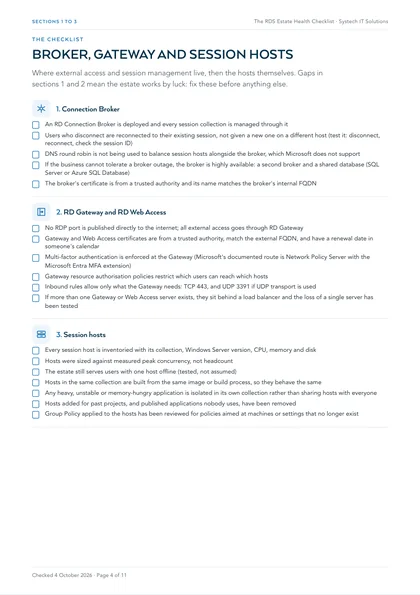
1. Connection Broker
- An RD Connection Broker is deployed and every session collection is managed through it
- Users who disconnect are reconnected to their existing session, not given a new one on a different host (test it: disconnect, reconnect, check the session ID)
- DNS round robin is not being used to balance session hosts alongside the broker, which Microsoft does not support
- If the business cannot tolerate a broker outage, the broker is highly available: a second broker and a shared database (SQL Server or Azure SQL Database)
- The broker's certificate is from a trusted authority and its name matches the broker's internal FQDN
2. RD Gateway and RD Web Access
- No RDP port is published directly to the internet; all external access goes through RD Gateway
- Gateway and Web Access certificates are from a trusted authority, match the external FQDN, and have a renewal date in someone's calendar
- Multi-factor authentication is enforced at the Gateway (Microsoft's documented route is Network Policy Server with the Microsoft Entra MFA extension)
- Gateway resource authorisation policies restrict which users can reach which hosts
- Inbound rules allow only what the Gateway needs: TCP 443, and UDP 3391 if UDP transport is used
- If more than one Gateway or Web Access server exists, they sit behind a load balancer and the loss of a single server has been tested
3. Session hosts
- Every session host is inventoried with its collection, Windows Server version, CPU, memory and disk
- Hosts were sized against measured peak concurrency, not headcount
- The estate still serves users with one host offline (tested, not assumed)
- Hosts in the same collection are built from the same image or build process, so they behave the same
- Any heavy, unstable or memory-hungry application is isolated in its own collection rather than sharing hosts with everyone
- Hosts added for past projects, and published applications nobody uses, have been removed
- Group Policy applied to the hosts has been reviewed for policies aimed at machines or settings that no longer exist
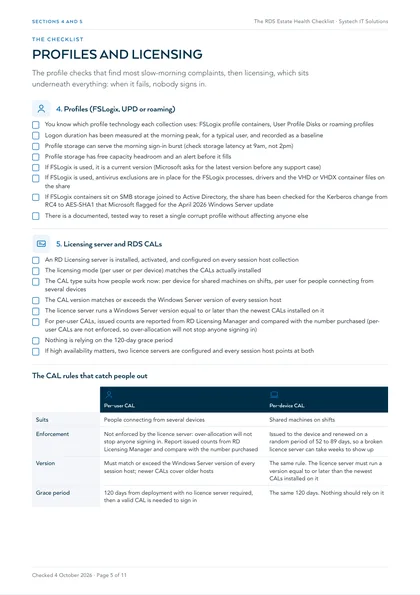
4. Profiles (FSLogix, UPD or roaming)
- You know which profile technology each collection uses: FSLogix profile containers, User Profile Disks or roaming profiles
- Logon duration has been measured at the morning peak, for a typical user, and recorded as a baseline
- Profile storage can serve the morning sign-in burst (check storage latency at 9am, not 2pm)
- Profile storage has free capacity headroom and an alert before it fills
- If FSLogix is used, it is a current version (Microsoft asks for the latest version before any support case)
- If FSLogix is used, antivirus exclusions are in place for the FSLogix processes, drivers and the VHD or VHDX container files on the share
- If FSLogix containers sit on SMB storage joined to Active Directory, the share has been checked for the Kerberos change from RC4 to AES-SHA1 that Microsoft flagged for the April 2026 Windows Server update
- There is a documented, tested way to reset a single corrupt profile without affecting anyone else
5. Licensing server and RDS CALs
- An RD Licensing server is installed, activated, and configured on every session host collection
- The licensing mode (per user or per device) matches the CALs actually installed
- The CAL type suits how people work now: per device for shared machines on shifts, per user for people connecting from several devices
- The CAL version matches or exceeds the Windows Server version of every session host
- The licence server runs a Windows Server version equal to or later than the newest CALs installed on it
- For per-user CALs, issued counts are reported from RD Licensing Manager and compared with the number purchased (per-user CALs are not enforced, so over-allocation will not stop anyone signing in)
- Nothing is relying on the 120-day grace period
- If high availability matters, two licence servers are configured and every session host points at both
| Per-user CAL | Per-device CAL | |
|---|---|---|
| Suits | People connecting from several devices | Shared machines on shifts |
| Enforcement | Not enforced by the licence server: over-allocation will not stop anyone signing in. Report issued counts from RD Licensing Manager and compare with the number purchased | Issued to the device and renewed on a random period of 52 to 89 days, so a broken licence server can take weeks to show up |
| Version | Must match or exceed the Windows Server version of every session host; newer CALs cover older hosts | The same rule. The licence server must run a version equal to or later than the newest CALs installed on it |
| Grace period | 120 days from deployment with no licence server required, then a valid CAL is needed to sign in | The same 120 days. Nothing should rely on it |
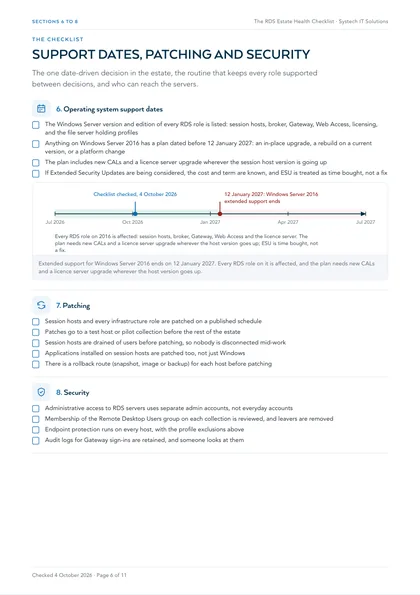
6. Operating system support dates
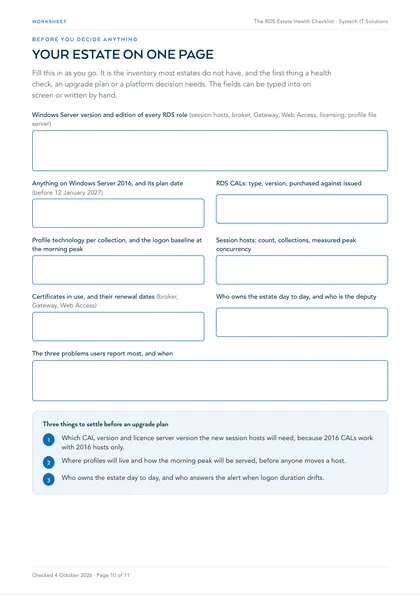
- The Windows Server version and edition of every RDS role is listed: session hosts, broker, Gateway, Web Access, licensing, and the file server holding profiles
- Anything on Windows Server 2016 has a plan dated before 12 January 2027: an in-place upgrade, a rebuild on a current version, or a platform change
- The plan includes new CALs and a licence server upgrade wherever the session host version is going up
- If Extended Security Updates are being considered, the cost and term are known, and ESU is treated as time bought, not a fix
7. Patching
- Session hosts and every infrastructure role are patched on a published schedule
- Patches go to a test host or pilot collection before the rest of the estate
- Session hosts are drained of users before patching, so nobody is disconnected mid-work
- Applications installed on session hosts are patched too, not just Windows
- There is a rollback route (snapshot, image or backup) for each host before patching
8. Security
- Administrative access to RDS servers uses separate admin accounts, not everyday accounts
- Membership of the Remote Desktop Users group on each collection is reviewed, and leavers are removed
- Endpoint protection runs on every host, with the profile exclusions above
- Audit logs for Gateway sign-ins are retained, and someone looks at them
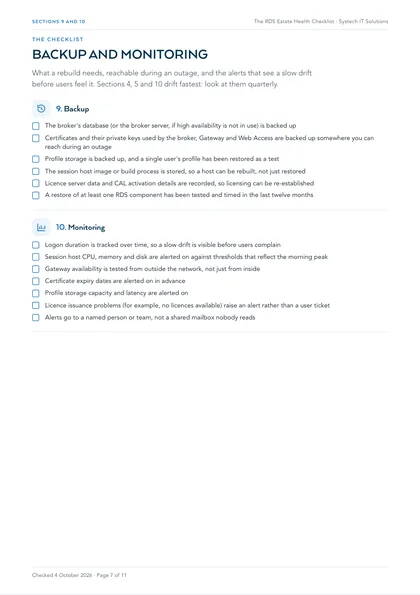
9. Backup
- The broker's database (or the broker server, if high availability is not in use) is backed up
- Certificates and their private keys used by the broker, Gateway and Web Access are backed up somewhere you can reach during an outage
- Profile storage is backed up, and a single user's profile has been restored as a test
- The session host image or build process is stored, so a host can be rebuilt, not just restored
- Licence server data and CAL activation details are recorded, so licensing can be re-established
- A restore of at least one RDS component has been tested and timed in the last twelve months
10. Monitoring
- Logon duration is tracked over time, so a slow drift is visible before users complain
- Session host CPU, memory and disk are alerted on against thresholds that reflect the morning peak
- Gateway availability is tested from outside the network, not just from inside
- Certificate expiry dates are alerted on in advance
- Profile storage capacity and latency are alerted on
- Licence issuance problems (for example, no licences available) raise an alert rather than a user ticket
- Alerts go to a named person or team, not a shared mailbox nobody reads
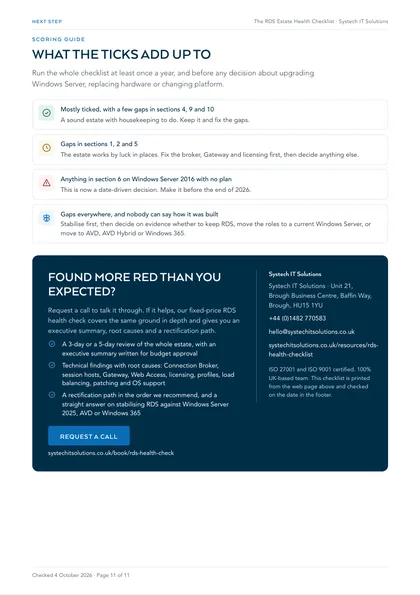
Scoring guide
Mostly ticked, with a few gaps in sections 4, 9 and 10
A sound estate with housekeeping to do. Keep it and fix the gaps.
Gaps in sections 1, 2 and 5
The estate works by luck in places. Fix the broker, Gateway and licensing first, then decide anything else.
Anything in section 6 on Windows Server 2016 with no plan
This is now a date-driven decision. Make it before the end of 2026.
Gaps everywhere, and nobody can say how it was built
Stabilise first, then decide on evidence whether to keep RDS, move the roles to a current Windows Server, or move to AVD, AVD Hybrid or Windows 365.
Our recommendation is to run the whole checklist at least once a year, and before any decision about upgrading Windows Server, replacing hardware or changing platform. Sections 4, 5 and 10 drift fastest, so we recommend a quarterly look at those.
Where this leaves you
A health check like this usually produces a short list of cheap fixes and a smaller list of real decisions. The fixes are typically the broker, the profile path, certificates, the Gateway and licence hygiene. The decisions are typically the Windows Server version, hardware life and whether anything users need is now better served by AVD, AVD Hybrid or Windows 365. Our fixed-price RDS health check covers the same ground in depth and gives you an executive summary, root causes and a rectification path. If you are weighing a platform change, read the AVD, Windows 365 or AVD Hybrid decision guide alongside it.
This is one of a set. The rest are listed on all our free checklists and assessments.
Is Remote Desktop Services still worth keeping?
Often, yes. RDS remains a role in current versions of Windows Server, and an estate that works, on hardware with life left, does not need replacing because the market has moved on to Azure Virtual Desktop and Windows 365. Most complaints trace to profiles, storage or one misbehaving application rather than the platform, and those are cheap to fix.
The decision that is date-driven is the Windows Server version underneath, and that can often be solved by moving the roles to a supported Windows Server rather than by changing platform.
What does Windows Server 2016 end of support mean for RDS?
Extended support for Windows Server 2016 ends on 12 January 2027. After that, a newly discovered vulnerability stays unpatched unless you pay for Extended Security Updates. Every RDS role on 2016 is affected: session hosts, Connection Broker, Gateway, Web Access and the licence server.
There is a licensing knock-on as well. RDS CALs must be the same version as the session host's Windows Server or later, and must be installed on a licence server running that version or later. Moving session hosts to Windows Server 2025 needs Windows Server 2025 RDS CALs and a licence server on 2025.
Why are logons slow, and where should you look first?
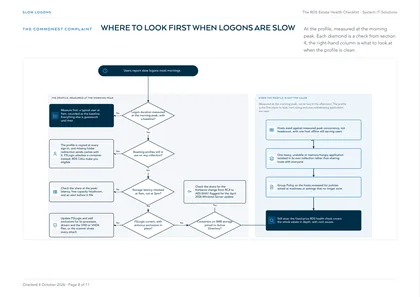
At the profile, measured at the morning peak. Roaming profiles that have grown for years are copied at every sign-in; missing folder redirection sends caches along with them; and storage that is fine at two in the afternoon cannot serve forty people signing in within ten minutes.
FSLogix changes the shape of the problem by attaching a profile container instead of copying a profile, and RDS CALs make you eligible for it. It does not fix storage that cannot keep up, and it needs antivirus exclusions configured, or the scanner will slow every attach.
How do RDS CALs catch people out?
In four ways. A licensing grace period of 120 days lets an estate run with no licence server, then stops it. Per-user CALs are not enforced by the licence server, so an estate can be over-allocated without anyone noticing, in breach of the licence terms.
Per-device CALs bought for an office workforce that has since gone hybrid end up undercounting. And CAL versions must match or exceed the Windows Server version, so an upgrade plan without a CAL plan stalls on the day.
What should a health check produce?
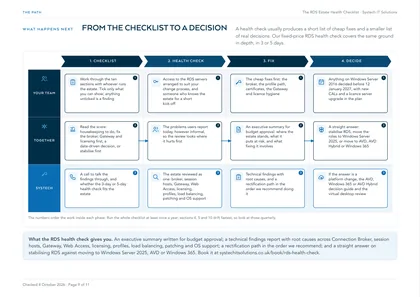
A short list of cheap fixes and a smaller list of real decisions. The fixes are usually the broker, the profile path, certificates, the Gateway and licence hygiene. The decisions are usually the Windows Server version, hardware life and whether anything users need is now better served by AVD, AVD Hybrid or Windows 365.
Written down, that is something you can take to budget approval, rather than a migration proposal written before anybody looked.
Frequently asked
Is Remote Desktop Services being discontinued?
No. RDS remains a role in current versions of Windows Server. The attention has moved to Azure Virtual Desktop and Windows 365, which is easy to mistake for a lifecycle announcement. The question that matters is the Windows Server version your estate runs on.
When does Windows Server 2016 support end?
Extended support ends on 12 January 2027. Mainstream support ended in January 2022. After January 2027 there are no further security updates outside the paid Extended Security Updates programme.
Can we keep our Windows Server 2016 RDS CALs if we upgrade the session hosts?
Not for a newer Windows Server. RDS CALs must be the same version as the session host's Windows Server or later, so 2016 CALs work with 2016 hosts only. Newer CALs work with older hosts, so 2025 CALs cover hosts from 2016 to 2025. The licence server must also run a version equal to or later than the CALs installed on it.
What happens if the RDS licence server stops working?
There is a 120-day grace period from deployment during which no licence server is required. After that, clients need a valid RDS CAL from a licence server before they can sign in. Per-device CALs already issued remain valid until renewal, which happens on a random period of 52 to 89 days, so a broken licence server can take weeks to show up. Microsoft documents configuring two licence servers for availability.
Do we need FSLogix if we already use User Profile Disks?
Not necessarily, but FSLogix is the more common choice now, and RDS CALs make you eligible for it. Both attach a disk rather than copying a roaming profile. Whichever you use, the checks are the same: measure logon at the peak, watch storage latency and capacity, and know how to reset a single profile.
How often should we run through this checklist?
Our recommendation is at least once a year, and before any decision about upgrading Windows Server, replacing hardware or changing platform. We also recommend a quarterly look at sections 4, 5 and 10, because profiles, licences and alerts drift fastest.