
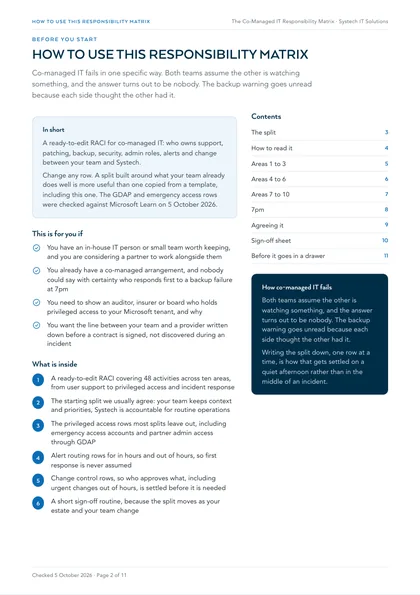
This is for you if
- You have an in-house IT person or small team worth keeping, and you are considering a partner to work alongside them
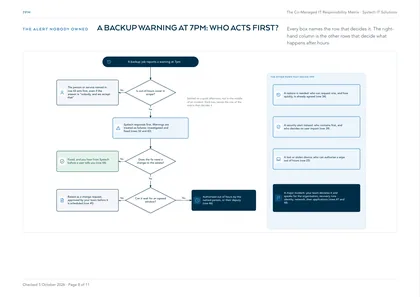
- You already have a co-managed arrangement, and nobody could say with certainty who responds first to a backup failure at 7pm
- You need to show an auditor, insurer or board who holds privileged access to your Microsoft tenant, and why
- You want the line between your team and a provider written down before a contract is signed, not discovered during an incident
Without a written split, co-managed IT drifts into two teams doing some things twice and other things never. Privileged roles pile up because nobody removes them. Alerts go to whoever set them up years ago. Changes land on the estate without the internal team knowing they were coming, or wait for an approval nobody realises is theirs to give. All of it is cheap to settle on paper in an afternoon, and expensive to settle in the middle of an incident.
This is a ready-to-edit responsibility matrix for co-managed IT: 48 recurring activities across ten areas, each assigned between your internal team and Systech. Use it to settle who does what before a contract is signed, or to check an arrangement you already have. Change any row. A split built around what your team already does well is more useful than one copied from a template, including this one.
Co-managed IT fails in one specific way: both teams assume the other is watching something, and the answer turns out to be nobody. Writing the split down, one row at a time, is how that gets settled on a quiet afternoon rather than in the middle of an incident.
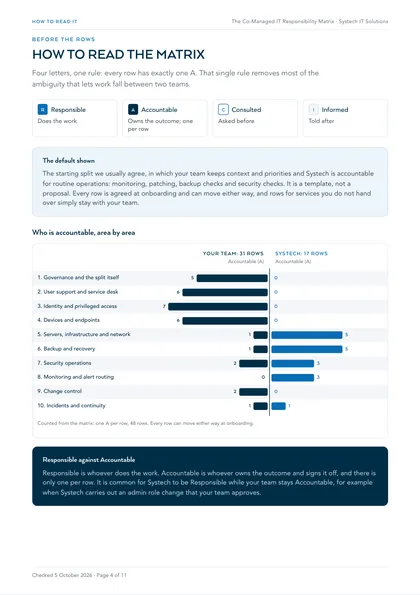
How to read the matrix
- R Responsible
- Does the work
- A Accountable
- Owns the outcome; one per row
- C Consulted
- Asked before
- I Informed
- Told after
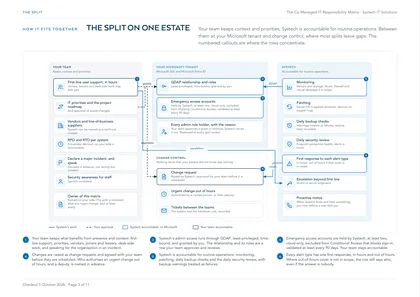
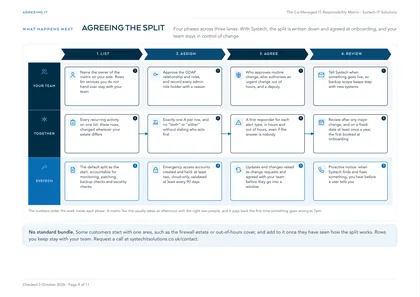
Default shown: the starting split we usually agree, in which your team keeps context and priorities and Systech is accountable for routine operations: monitoring, patching, backup checks and security checks. It is a template, not a proposal. Every row is agreed at onboarding and can move either way, and rows for services you do not hand over simply stay with your team.
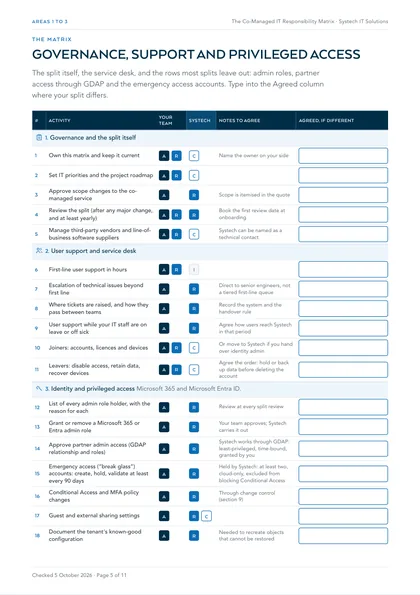
1. Governance and the split itself
| # | Activity | Your team | Systech | Notes to agree |
|---|---|---|---|---|
| 1 | Own this matrix and keep it current | AR | C | Name the owner on your side |
| 2 | Set IT priorities and the project roadmap | AR | C | |
| 3 | Approve scope changes to the co-managed service | A | R | Scope is itemised in the quote |
| 4 | Review the split (after any major change, and at least yearly) | AR | R | Book the first review date at onboarding |
| 5 | Manage third-party vendors and line-of-business software suppliers | AR | C | Systech can be named as a technical contact |
2. User support and service desk
| # | Activity | Your team | Systech | Notes to agree |
|---|---|---|---|---|
| 6 | First-line user support in hours | AR | I | |
| 7 | Escalation of technical issues beyond first line | A | R | Direct to senior engineers, not a tiered first-line queue |
| 8 | Where tickets are raised, and how they pass between teams | A | R | Record the system and the handover rule |
| 9 | User support while your IT staff are on leave or off sick | A | R | Agree how users reach Systech in that period |
| 10 | Joiners: accounts, licences and devices | AR | C | Or move to Systech if you hand over identity admin |
| 11 | Leavers: disable access, retain data, recover devices | AR | C | Agree the order: hold or back up data before deleting the account |
3. Identity and privileged access
Microsoft 365 and Microsoft Entra ID.
| # | Activity | Your team | Systech | Notes to agree |
|---|---|---|---|---|
| 12 | List of every admin role holder, with the reason for each | A | R | Review at every split review |
| 13 | Grant or remove a Microsoft 365 or Entra admin role | A | R | Your team approves; Systech carries it out |
| 14 | Approve partner admin access (GDAP relationship and roles) | A | R | Systech works through GDAP: least-privileged, time-bound, granted by you |
| 15 | Emergency access (“break glass”) accounts: create, hold, validate at least every 90 days | A | R | Held by Systech: at least two, cloud-only, excluded from blocking Conditional Access |
| 16 | Conditional Access and MFA policy changes | A | R | Through change control (section 9) |
| 17 | Guest and external sharing settings | A | RC | |
| 18 | Document the tenant's known-good configuration | A | R | Needed to recreate objects that cannot be restored |
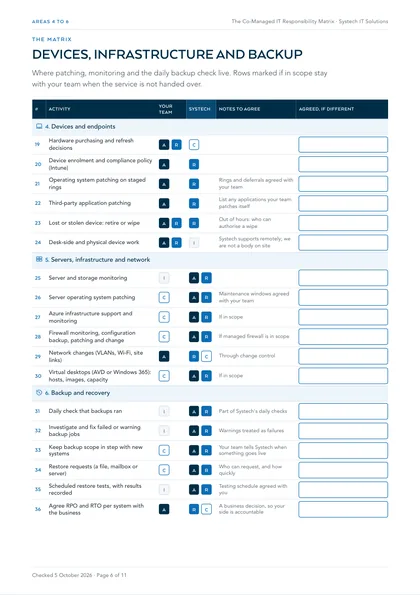
4. Devices and endpoints
| # | Activity | Your team | Systech | Notes to agree |
|---|---|---|---|---|
| 19 | Hardware purchasing and refresh decisions | AR | C | |
| 20 | Device enrolment and compliance policy (Intune) | A | R | |
| 21 | Operating system patching on staged rings | A | R | Rings and deferrals agreed with your team |
| 22 | Third-party application patching | A | R | List any applications your team patches itself |
| 23 | Lost or stolen device: retire or wipe | AR | R | Out of hours: who can authorise a wipe |
| 24 | Desk-side and physical device work | AR | I | Systech supports remotely; we are not a body on site |
5. Servers, infrastructure and network
| # | Activity | Your team | Systech | Notes to agree |
|---|---|---|---|---|
| 25 | Server and storage monitoring | I | AR | |
| 26 | Server operating system patching | C | AR | Maintenance windows agreed with your team |
| 27 | Azure infrastructure support and monitoring | C | AR | If in scope |
| 28 | Firewall monitoring, configuration backup, patching and change | C | AR | If managed firewall is in scope |
| 29 | Network changes (VLANs, Wi-Fi, site links) | A | RC | Through change control |
| 30 | Virtual desktops (AVD or Windows 365): hosts, images, capacity | C | AR | If in scope |
6. Backup and recovery
| # | Activity | Your team | Systech | Notes to agree |
|---|---|---|---|---|
| 31 | Daily check that backups ran | I | AR | Part of Systech's daily checks |
| 32 | Investigate and fix failed or warning backup jobs | I | AR | Warnings treated as failures |
| 33 | Keep backup scope in step with new systems | C | AR | Your team tells Systech when something goes live |
| 34 | Restore requests (a file, mailbox or server) | C | AR | Who can request, and how quickly |
| 35 | Scheduled restore tests, with results recorded | I | AR | Testing schedule agreed with you |
| 36 | Agree RPO and RTO per system with the business | A | RC | A business decision, so your side is accountable |
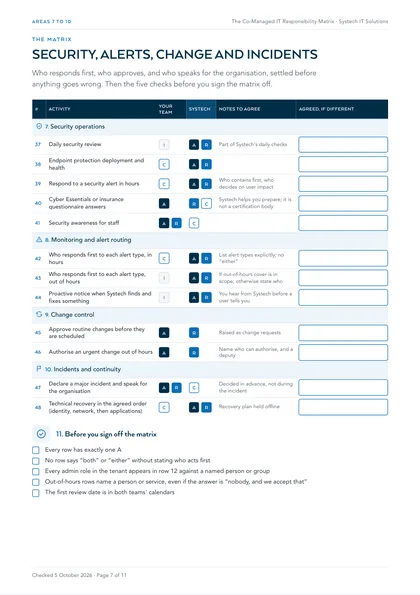
7. Security operations
| # | Activity | Your team | Systech | Notes to agree |
|---|---|---|---|---|
| 37 | Daily security review | I | AR | Part of Systech's daily checks |
| 38 | Endpoint protection deployment and health | C | AR | |
| 39 | Respond to a security alert in hours | C | AR | Who contains first, who decides on user impact |
| 40 | Cyber Essentials or insurance questionnaire answers | A | RC | Systech helps you prepare; it is not a certification body |
| 41 | Security awareness for staff | AR | C |
8. Monitoring and alert routing
| # | Activity | Your team | Systech | Notes to agree |
|---|---|---|---|---|
| 42 | Who responds first to each alert type, in hours | C | AR | List alert types explicitly; no “either” |
| 43 | Who responds first to each alert type, out of hours | I | AR | If out-of-hours cover is in scope; otherwise state who |
| 44 | Proactive notice when Systech finds and fixes something | I | AR | You hear from Systech before a user tells you |
9. Change control
| # | Activity | Your team | Systech | Notes to agree |
|---|---|---|---|---|
| 45 | Approve routine changes before they are scheduled | A | R | Raised as change requests |
| 46 | Authorise an urgent change out of hours | A | R | Name who can authorise, and a deputy |
10. Incidents and continuity
| # | Activity | Your team | Systech | Notes to agree |
|---|---|---|---|---|
| 47 | Declare a major incident and speak for the organisation | AR | C | Decided in advance, not during the incident |
| 48 | Technical recovery in the agreed order (identity, network, then applications) | C | AR | Recovery plan held offline |
11. Before you sign off the matrix
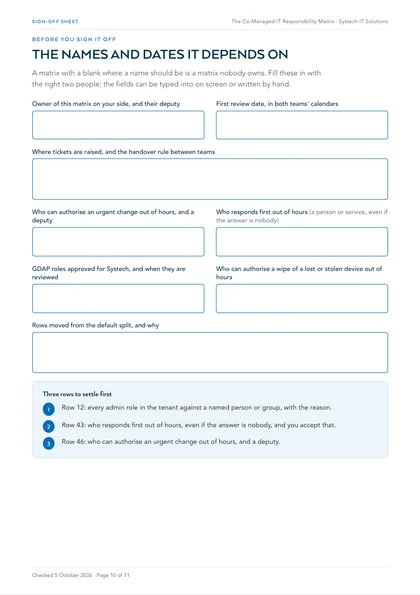
- Every row has exactly one A
- No row says “both” or “either” without stating who acts first
- Every admin role in the tenant appears in row 12 against a named person or group
- Out-of-hours rows name a person or service, even if the answer is “nobody, and we accept that”
- The first review date is in both teams' calendars
Where this leaves you
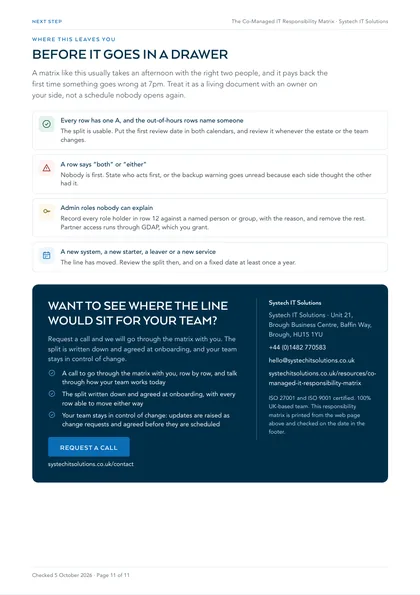
Every row has one A, and the out-of-hours rows name someone
The split is usable. Put the first review date in both calendars, and review it whenever the estate or the team changes.
A row says “both” or “either”
Nobody is first. State who acts first, or the backup warning goes unread because each side thought the other had it.
Admin roles nobody can explain
Record every role holder in row 12 against a named person or group, with the reason, and remove the rest. Partner access runs through GDAP, which you grant.
A new system, a new starter, a leaver or a new service
The line has moved. Review the split then, and on a fixed date at least once a year.
A matrix like this usually takes an afternoon with the right two people, and it pays back the first time something goes wrong at 7pm. Review it whenever the estate or the team changes, and on a fixed date at least once a year: a new system, a new starter, a leaver or a new service all move the line. With Systech, the split is written down and agreed at onboarding, and your team stays in control of change.
This is one of a set. The rest are listed on all our free checklists and assessments.
What is a co-managed IT responsibility matrix?
It is a written list of every recurring IT activity, with each one assigned to your internal team, to your partner, or to both in defined roles. The common format is RACI: who is Responsible for doing the work, who is Accountable for the outcome and signs it off, who is Consulted before it happens, and who is Informed after.
Each activity has exactly one Accountable party. That single rule removes most of the ambiguity that causes things to fall between two teams.
Which split usually works?
Your team keeps what benefits from presence and context: day-to-day user support, business priorities, vendor relationships and project ownership. We take what benefits from tooling, scale and continuity: monitoring, patching, backup checks, security, out-of-hours cover where it is in scope, and the specialist work that comes up a few times a year and has to be right.
Done well, the internal role gets better rather than smaller: the week stops going on patching and backup warnings and starts including the projects that were always deferred. The matrix starts from that split, and every row can move.
Who should hold privileged access?
Fewer people than currently do, and each for a reason you could explain to an auditor. Record every administrative role in the Microsoft tenant against a named person or a named partner group, and remove the rest. Microsoft recommends two or more emergency access accounts that are cloud-only, protected with phishing-resistant authentication, excluded from blocking Conditional Access policies, monitored for every sign-in and validated at least every 90 days. In our default split, Systech holds those accounts and your team stays accountable for them.
Our admin access to your tenant runs through Microsoft's granular delegated admin privileges (GDAP), which is least-privileged and time-bound, and which you must explicitly grant. It belongs in the matrix as a row your team approves and reviews.
How do you stop changes surprising either side?
Agree change control before work is scheduled, not as a report afterwards. Updates and changes are raised as change requests and agreed with your team before they go into a window, so nothing lands on your estate that your people did not know was coming.
Decide in advance who approves routine changes, who can authorise an urgent change out of hours, and who is told. Those are rows in the matrix, and settling them on a quiet day is far easier than in the middle of an incident.
How often should the split be reviewed?
Whenever the estate or the team changes, and on a fixed date at least once a year. A new system, a new starter in your team, a leaver, or a new service from the partner all move the line.
Treat the matrix as a living document with an owner on your side, not a schedule to the contract that nobody opens again.
Frequently asked
What is the difference between Responsible and Accountable?
Responsible is whoever does the work. Accountable is whoever owns the outcome and signs it off, and there is only one per activity. In a co-managed split it is common for Systech to be Responsible for a task while your team stays Accountable, for example when Systech carries out an admin role change that your team approves.
Who owns what in a co-managed arrangement?
Whatever the written split agreed at onboarding says, and nothing is assumed. Typically your team keeps user-facing support, priorities, vendors and projects, and Systech is accountable for routine operations: monitoring, patching, backup checks and security checks, plus out-of-hours cover where it is in scope. The written version names the systems, the administrative roles, the first responder for each alert type and how tickets pass between the teams.
Will Systech make changes to our systems without asking?
No. Updates and changes are raised as change requests and agreed with your team before they are scheduled. Who can approve a change, and who can authorise an urgent one out of hours, is agreed at onboarding.
How does Systech's admin access to our Microsoft tenant work?
Through granular delegated admin privileges (GDAP), which Microsoft describes as least-privileged, time-bound access that the customer must explicitly grant. The relationship and the roles are recorded in the matrix, approved on your side, and reviewed at every split review.
What happens when our IT person is on holiday or off sick?
The work in Systech's half of the split carries on as normal, because it never depended on them. For their half, what Systech picks up while they are away, and how your users reach us, is agreed at onboarding as part of the split. If evenings and weekends are a gap too, out-of-hours cover can be added to the scope.
Is there a minimum scope?
There is no standard bundle. Some customers start with one area, such as the firewall estate or out-of-hours cover, and add to it once they have seen how the split works. The matrix works the same way: rows you keep stay with your team.