
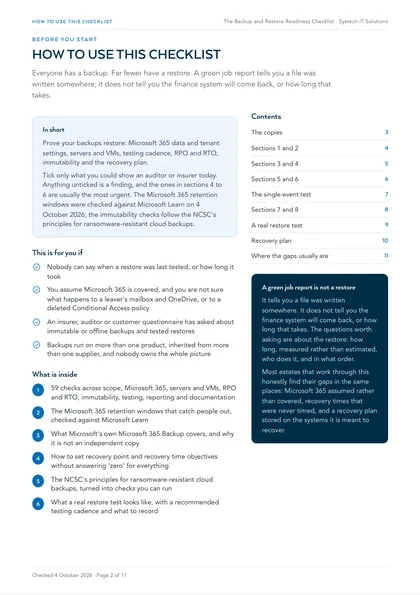
This is for you if
- Nobody can say when a restore was last tested, or how long it took
- You assume Microsoft 365 is covered, and you are not sure what happens to a leaver's mailbox and OneDrive, or to a deleted Conditional Access policy
- An insurer, auditor or customer questionnaire has asked about immutable or offline backups and tested restores
- Backups run on more than one product, inherited from more than one supplier, and nobody owns the whole picture
Untested backups fail silently. The job that has completed with warnings for six months was skipping something. The server rebuilt in March was never added back to the schedule. The Microsoft 365 data was only ever covered by recycle bins with fixed windows. And the restore procedure, the backup platform's credentials and the recovery plan all live inside the systems that have just gone down. You find out which of these applies on the worst possible day, which is why the time to prove a restore is now.
This checklist tests whether you could restore, not whether you have backups. It covers scope, Microsoft 365 data and tenant settings, servers and virtual machines, recovery objectives, immutability, restore testing, reporting and the recovery plan. Tick only what you could show an auditor or insurer today. Anything unticked is a finding, and the ones in sections 4 to 6 are usually the most urgent.
A green job report tells you a file was written somewhere. It does not tell you the finance system will come back, or how long that takes. The Microsoft 365 retention windows below were checked against Microsoft Learn on 4 October 2026, and the immutability checks follow the NCSC's principles for ransomware-resistant cloud backups.
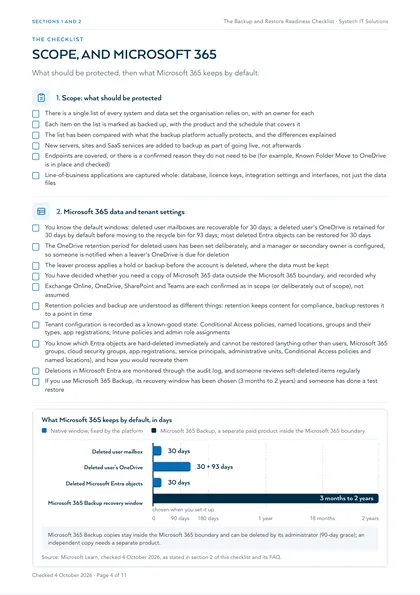
1. Scope: what should be protected
- There is a single list of every system and data set the organisation relies on, with an owner for each
- Each item on the list is marked as backed up, with the product and the schedule that covers it
- The list has been compared with what the backup platform actually protects, and the differences explained
- New servers, sites and SaaS services are added to backup as part of going live, not afterwards
- Endpoints are covered, or there is a confirmed reason they do not need to be (for example, Known Folder Move to OneDrive is in place and checked)
- Line-of-business applications are captured whole: database, licence keys, integration settings and interfaces, not just the data files
2. Microsoft 365 data and tenant settings
- You know the default windows: deleted user mailboxes are recoverable for 30 days; a deleted user's OneDrive is retained for 30 days by default before moving to the recycle bin for 93 days; most deleted Entra objects can be restored for 30 days
- The OneDrive retention period for deleted users has been set deliberately, and a manager or secondary owner is configured, so someone is notified when a leaver's OneDrive is due for deletion
- The leaver process applies a hold or backup before the account is deleted, where the data must be kept
- You have decided whether you need a copy of Microsoft 365 data outside the Microsoft 365 boundary, and recorded why
- Exchange Online, OneDrive, SharePoint and Teams are each confirmed as in scope (or deliberately out of scope), not assumed
- Retention policies and backup are understood as different things: retention keeps content for compliance, backup restores it to a point in time
- Tenant configuration is recorded as a known-good state: Conditional Access policies, named locations, groups and their types, app registrations, Intune policies and admin role assignments
- You know which Entra objects are hard-deleted immediately and cannot be restored (anything other than users, Microsoft 365 groups, cloud security groups, app registrations, service principals, administrative units, Conditional Access policies and named locations), and how you would recreate them
- Deletions in Microsoft Entra are monitored through the audit log, and someone reviews soft-deleted items regularly
- If you use Microsoft 365 Backup, its recovery window has been chosen (3 months to 2 years) and someone has done a test restore
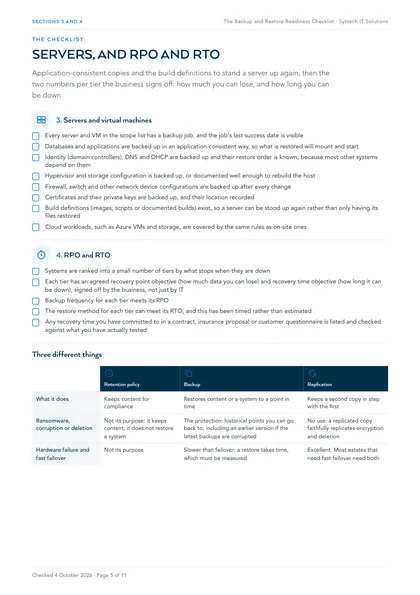
3. Servers and virtual machines
- Every server and VM in the scope list has a backup job, and the job's last success date is visible
- Databases and applications are backed up in an application-consistent way, so what is restored will mount and start
- Identity (domain controllers), DNS and DHCP are backed up and their restore order is known, because most other systems depend on them
- Hypervisor and storage configuration is backed up, or documented well enough to rebuild the host
- Firewall, switch and other network device configurations are backed up after every change
- Certificates and their private keys are backed up, and their location recorded
- Build definitions (images, scripts or documented builds) exist, so a server can be stood up again rather than only having its files restored
- Cloud workloads, such as Azure VMs and storage, are covered by the same rules as on-site ones
4. RPO and RTO
- Systems are ranked into a small number of tiers by what stops when they are down
- Each tier has an agreed recovery point objective (how much data you can lose) and recovery time objective (how long it can be down), signed off by the business, not just by IT
- Backup frequency for each tier meets its RPO
- The restore method for each tier can meet its RTO, and this has been timed rather than estimated
- Any recovery time you have committed to in a contract, insurance proposal or customer questionnaire is listed and checked against what you have actually tested
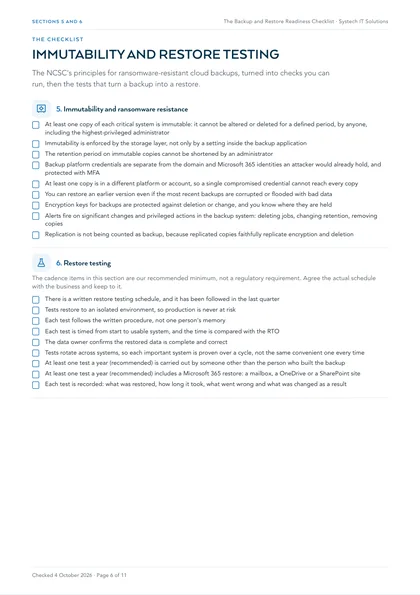
5. Immutability and ransomware resistance
- At least one copy of each critical system is immutable: it cannot be altered or deleted for a defined period, by anyone, including the highest-privileged administrator
- Immutability is enforced by the storage layer, not only by a setting inside the backup application
- The retention period on immutable copies cannot be shortened by an administrator
- Backup platform credentials are separate from the domain and Microsoft 365 identities an attacker would already hold, and protected with MFA
- At least one copy is in a different platform or account, so a single compromised credential cannot reach every copy
- You can restore an earlier version even if the most recent backups are corrupted or flooded with bad data
- Encryption keys for backups are protected against deletion or change, and you know where they are held
- Alerts fire on significant changes and privileged actions in the backup system: deleting jobs, changing retention, removing copies
- Replication is not being counted as backup, because replicated copies faithfully replicate encryption and deletion
| Retention policy | Backup | Replication | |
|---|---|---|---|
| What it does | Keeps content for compliance | Restores content or a system to a point in time | Keeps a second copy in step with the first |
| Ransomware, corruption or deletion | Not its purpose: it keeps content, it does not restore a system | The protection: historical points you can go back to, including an earlier version if the latest backups are corrupted | No use: a replicated copy faithfully replicates encryption and deletion |
| Hardware failure and fast failover | Not its purpose | Slower than failover: a restore takes time, which must be measured | Excellent. Most estates that need fast failover need both |
6. Restore testing
The cadence items in this section are our recommended minimum, not a regulatory requirement. Agree the actual schedule with the business and keep to it.
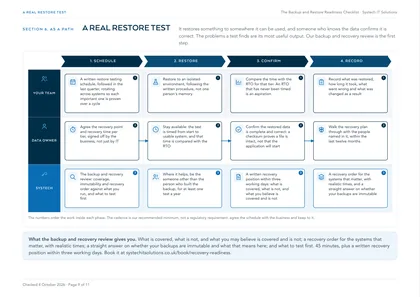
- There is a written restore testing schedule, and it has been followed in the last quarter
- Tests restore to an isolated environment, so production is never at risk
- Each test follows the written procedure, not one person's memory
- Each test is timed from start to usable system, and the time is compared with the RTO
- The data owner confirms the restored data is complete and correct
- Tests rotate across systems, so each important system is proven over a cycle, not the same convenient one every time
- At least one test a year (recommended) is carried out by someone other than the person who built the backup
- At least one test a year (recommended) includes a Microsoft 365 restore: a mailbox, a OneDrive or a SharePoint site
- Each test is recorded: what was restored, how long it took, what went wrong and what was changed as a result
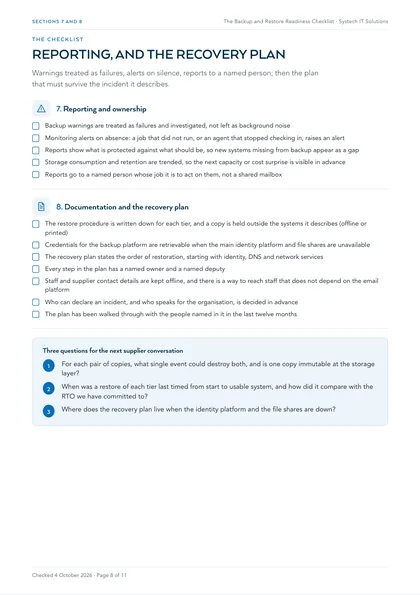
7. Reporting and ownership
- Backup warnings are treated as failures and investigated, not left as background noise
- Monitoring alerts on absence: a job that did not run, or an agent that stopped checking in, raises an alert
- Reports show what is protected against what should be, so new systems missing from backup appear as a gap
- Storage consumption and retention are trended, so the next capacity or cost surprise is visible in advance
- Reports go to a named person whose job it is to act on them, not a shared mailbox
8. Documentation and the recovery plan
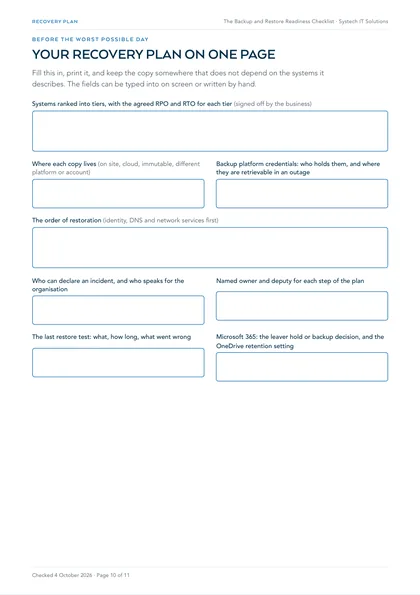
- The restore procedure is written down for each tier, and a copy is held outside the systems it describes (offline or printed)
- Credentials for the backup platform are retrievable when the main identity platform and file shares are unavailable
- The recovery plan states the order of restoration, starting with identity, DNS and network services
- Every step in the plan has a named owner and a named deputy
- Staff and supplier contact details are kept offline, and there is a way to reach staff that does not depend on the email platform
- Who can declare an incident, and who speaks for the organisation, is decided in advance
- The plan has been walked through with the people named in it in the last twelve months
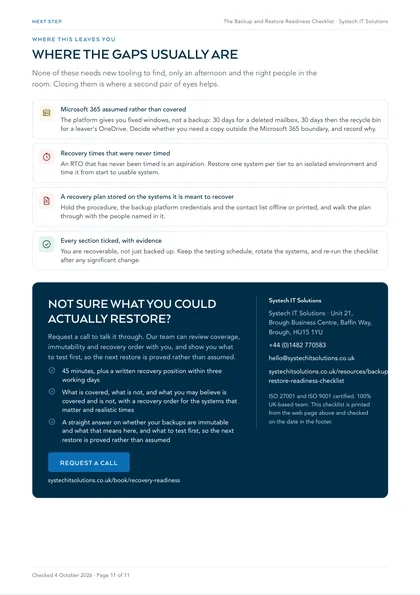
Where this leaves you
Most estates that work through this honestly find their gaps in the same places: Microsoft 365 assumed rather than covered, recovery times that were never timed, and a recovery plan stored on the systems it is meant to recover. None of those needs new tooling to find, only an afternoon and the right people in the room. Closing them is where a second pair of eyes helps: our backup and recovery review looks at coverage, immutability and recovery order with you, and shows you what to test first.
Microsoft 365 assumed rather than covered
The platform gives you fixed windows, not a backup: 30 days for a deleted mailbox, 30 days then the recycle bin for a leaver's OneDrive. Decide whether you need a copy outside the Microsoft 365 boundary, and record why.
Recovery times that were never timed
An RTO that has never been timed is an aspiration. Restore one system per tier to an isolated environment and time it from start to usable system.
A recovery plan stored on the systems it is meant to recover
Hold the procedure, the backup platform credentials and the contact list offline or printed, and walk the plan through with the people named in it.
Every section ticked, with evidence
You are recoverable, not just backed up. Keep the testing schedule, rotate the systems, and re-run the checklist after any significant change.
This is one of a set. The rest are listed on all our free checklists and assessments.
What is the difference between having backups and being recoverable?
Recoverability is a tested property of the whole estate; a backup is one input to it. A job can complete every night and still be useless: it may capture a database without quiescing it, so what lands cannot be mounted; it may have stopped covering a server that was rebuilt; or it may be perfectly valid and take four days to restore over the link you have.
The questions worth asking are about the restore: how long, measured rather than estimated, who does it, and in what order.
Does Microsoft back up Microsoft 365?
Not in the way most people assume. Microsoft keeps the service available and resilient. What the platform gives you by default is a set of windows: a deleted user's mailbox can be recovered for 30 days, a deleted user's OneDrive is kept for 30 days by default (configurable) before moving to the recycle bin, and most deleted Microsoft Entra objects can be restored for 30 days. Some tenant configuration is hard-deleted immediately and cannot be restored by you or by Microsoft.
Microsoft now sells Microsoft 365 Backup, covering OneDrive, SharePoint and Exchange Online with a recovery window of three months to two years, but its copies sit inside the Microsoft 365 boundary, so it is fast rather than independent.
How do you set RPO and RTO without guessing?
Ask the business two questions per system and write the answers down. The recovery point objective is how much work you can afford to lose. The recovery time objective is how long the system can be unavailable before the consequence becomes serious. Both are business decisions.
Refuse to answer 'zero' for everything, rank systems into a few tiers, and then check the design meets the numbers by timing a real restore. An RTO that has never been timed is an aspiration.
What makes a backup ransomware-resistant?
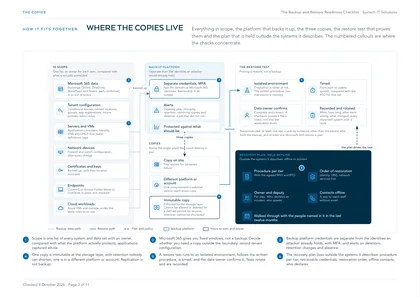
The NCSC's principles for ransomware-resistant cloud backups set the bar: backups resilient to destructive actions, a configuration that means an attacker cannot deny you all access, the ability to restore an earlier version even if later ones are corrupted, robust key management, and alerts on significant changes or privileged actions.
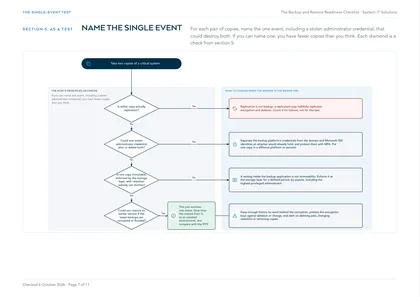
In practice the test is simple: for each pair of copies, name the single event, including a stolen administrator credential, that could destroy both. If you can name one, you have fewer copies than you think.
What does a real restore test look like?
It restores something to somewhere it can be used, and someone who knows the data confirms it is correct. A checksum proves a file is intact, not that the application will start.
A worthwhile test runs to an isolated environment, follows the written procedure rather than someone's memory, is timed, and rotates across systems so the important ones are each proven over a cycle. Record what was restored, how long it took and what went wrong: the problems are the useful output.
Frequently asked
Doesn't Microsoft back up Microsoft 365 for us?
Microsoft keeps the service available and resilient, and the platform has recycle bins, version history and retention with fixed windows. A deleted user's mailbox is recoverable for 30 days; a deleted user's OneDrive is kept for 30 days by default before moving to the recycle bin. After those windows, content is gone unless a hold, retention policy or backup kept it. Microsoft sells Microsoft 365 Backup as a separate, pay-as-you-go product; its copies stay inside the Microsoft 365 boundary.
Is Microsoft 365 Backup enough on its own?
It depends on what you are protecting against. It restores OneDrive, SharePoint and Exchange Online quickly, with a recovery window of three months to two years, and uses append-only storage. Microsoft also states that its backups can be deleted by the backup administrator through offboarding, with a 90-day grace period. If your requirement is a copy that sits outside the tenant and its administrators, you need a separate, independent copy as well.
What about our tenant settings, such as Conditional Access?
Back up or document them separately, because data backup does not cover them. In Microsoft Entra, users, Microsoft 365 groups, cloud security groups, app registrations, service principals, administrative units, Conditional Access policies and named locations can be restored for 30 days after deletion. Everything else is hard-deleted and must be recreated; Microsoft states that neither administrators nor Microsoft can restore hard-deleted items. A documented known-good state is the recovery route.
How often should we test a restore?
Often enough that every important system is proven within a cycle you can defend, and after any significant change to it. We recommend at least one test a year by someone other than the person who built the backup, and at least one Microsoft 365 restore a year, but the schedule is yours to agree with the business. The ICO's guidance notes that UK GDPR requires regularly testing, assessing and evaluating the effectiveness of security measures, and the ability to restore access to personal data in a timely manner.
Is replication the same as backup?
No. Replication keeps a second copy in step with the first, which is excellent for hardware failure and fast failover. It is no use against ransomware, corruption or deletion, because it replicates those too. Backup keeps historical points you can go back to. Most estates that need fast failover need both.
Do we need immutable backups for Cyber Essentials?
Cyber Essentials covers five technical control themes, and backup is not one of them. Immutable backups matter for ransomware resilience, insurance questionnaires and, where it applies, ISO 27001, which includes a control on information backup. Systech holds Cyber Essentials and ISO 27001 but is not a Cyber Essentials certification body; we help organisations prepare.