
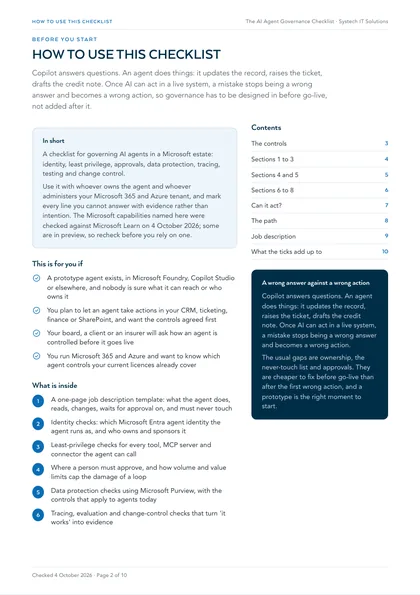
This is for you if
- A prototype agent exists, in Microsoft Foundry, Copilot Studio or elsewhere, and nobody is sure what it can reach or who owns it
- You plan to let an agent take actions in your CRM, ticketing, finance or SharePoint, and want the controls agreed first
- Your board, a client or an insurer will ask how an agent is controlled before it goes live
- You run Microsoft 365 and Azure and want to know which agent controls your current licences already cover
Agents have become easy to start and harder to run well. The common pattern is a promising prototype with broad access, no named owner and no record of what it did. That is fine in a demo. It feels very different the first time the agent touches a live customer record or an invoice. None of this is unusual: it is what happens when a new capability arrives faster than the controls around it.
This checklist is built from how we design AI agents before they are allowed to act in a live system. Use it with whoever owns the agent and whoever administers your Microsoft 365 and Azure tenant, and mark every line you cannot answer with evidence rather than intention.
It applies whether the agent was built in Microsoft Foundry, Copilot Studio or another platform. Some items depend on licences you may not hold; where that is the case, the line says so, so a gap is a decision rather than a surprise. The Microsoft capabilities named here were checked against Microsoft Learn on 4 October 2026, and some are in preview, so recheck before you rely on one.
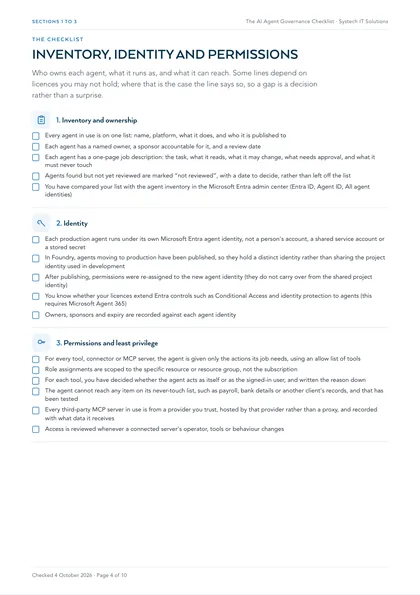
1. Inventory and ownership
- Every agent in use is on one list: name, platform, what it does, and who it is published to
- Each agent has a named owner, a sponsor accountable for it, and a review date
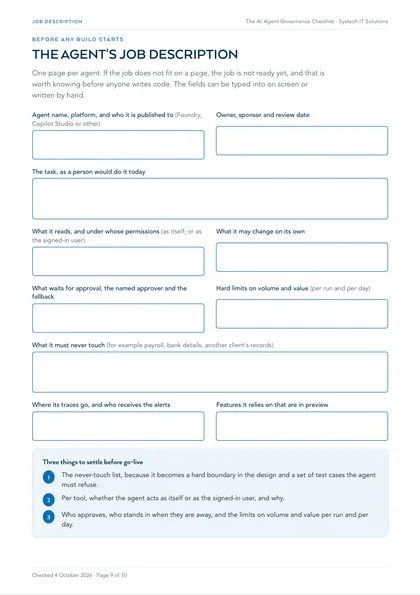
- Each agent has a one-page job description: the task, what it reads, what it may change, what needs approval, and what it must never touch
- Agents found but not yet reviewed are marked “not reviewed”, with a date to decide, rather than left off the list
- You have compared your list with the agent inventory in the Microsoft Entra admin center (Entra ID, Agent ID, All agent identities)
2. Identity
- Each production agent runs under its own Microsoft Entra agent identity, not a person's account, a shared service account or a stored secret
- In Foundry, agents moving to production have been published, so they hold a distinct identity rather than sharing the project identity used in development
- After publishing, permissions were re-assigned to the new agent identity (they do not carry over from the shared project identity)
- You know whether your licences extend Entra controls such as Conditional Access and identity protection to agents (this requires Microsoft Agent 365)
- Owners, sponsors and expiry are recorded against each agent identity
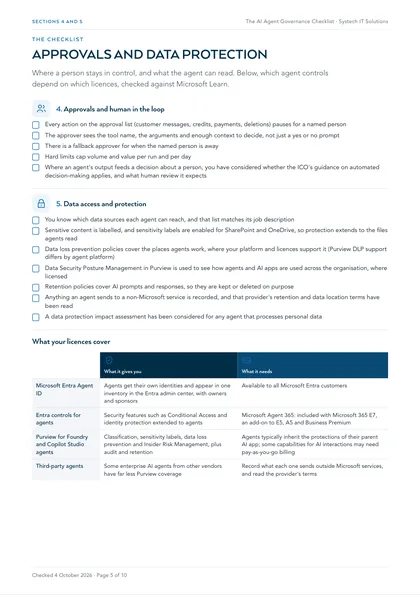
| What it gives you | What it needs | |
|---|---|---|
| Microsoft Entra Agent ID | Agents get their own identities and appear in one inventory in the Entra admin center, with owners and sponsors | Available to all Microsoft Entra customers |
| Entra controls for agents | Security features such as Conditional Access and identity protection extended to agents | Microsoft Agent 365: included with Microsoft 365 E7, an add-on to E5, A5 and Business Premium |
| Purview for Foundry and Copilot Studio agents | Classification, sensitivity labels, data loss prevention and Insider Risk Management, plus audit and retention | Agents typically inherit the protections of their parent AI app; some capabilities for AI interactions may need pay-as-you-go billing |
| Third-party agents | Some enterprise AI agents from other vendors have far less Purview coverage | Record what each one sends outside Microsoft services, and read the provider's terms |
3. Permissions and least privilege
- For every tool, connector or MCP server, the agent is given only the actions its job needs, using an allow list of tools
- Role assignments are scoped to the specific resource or resource group, not the subscription
- For each tool, you have decided whether the agent acts as itself or as the signed-in user, and written the reason down
- The agent cannot reach any item on its never-touch list, such as payroll, bank details or another client's records, and that has been tested
- Every third-party MCP server in use is from a provider you trust, hosted by that provider rather than a proxy, and recorded with what data it receives
- Access is reviewed whenever a connected server's operator, tools or behaviour changes
4. Approvals and human in the loop
- Every action on the approval list (customer messages, credits, payments, deletions) pauses for a named person
- The approver sees the tool name, the arguments and enough context to decide, not just a yes or no prompt
- There is a fallback approver for when the named person is away
- Hard limits cap volume and value per run and per day
- Where an agent's output feeds a decision about a person, you have considered whether the ICO's guidance on automated decision-making applies, and what human review it expects
5. Data access and protection
- You know which data sources each agent can reach, and that list matches its job description
- Sensitive content is labelled, and sensitivity labels are enabled for SharePoint and OneDrive, so protection extends to the files agents read
- Data loss prevention policies cover the places agents work, where your platform and licences support it (Purview DLP support differs by agent platform)
- Data Security Posture Management in Purview is used to see how agents and AI apps are used across the organisation, where licensed
- Retention policies cover AI prompts and responses, so they are kept or deleted on purpose
- Anything an agent sends to a non-Microsoft service is recorded, and that provider's retention and data location terms have been read
- A data protection impact assessment has been considered for any agent that processes personal data
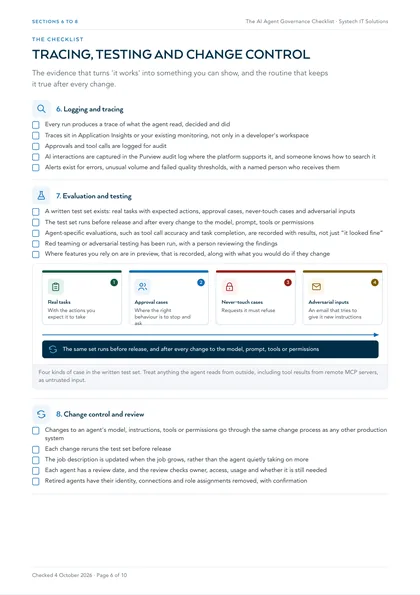
6. Logging and tracing
- Every run produces a trace of what the agent read, decided and did
- Traces sit in Application Insights or your existing monitoring, not only in a developer's workspace
- Approvals and tool calls are logged for audit
- AI interactions are captured in the Purview audit log where the platform supports it, and someone knows how to search it
- Alerts exist for errors, unusual volume and failed quality thresholds, with a named person who receives them
7. Evaluation and testing
- A written test set exists: real tasks with expected actions, approval cases, never-touch cases and adversarial inputs
- The test set runs before release and after every change to the model, prompt, tools or permissions
- Agent-specific evaluations, such as tool call accuracy and task completion, are recorded with results, not just “it looked fine”
- Red teaming or adversarial testing has been run, with a person reviewing the findings
- Where features you rely on are in preview, that is recorded, along with what you would do if they change
8. Change control and review
- Changes to an agent's model, instructions, tools or permissions go through the same change process as any other production system
- Each change reruns the test set before release
- The job description is updated when the job grows, rather than the agent quietly taking on more
- Each agent has a review date, and the review checks owner, access, usage and whether it is still needed
- Retired agents have their identity, connections and role assignments removed, with confirmation
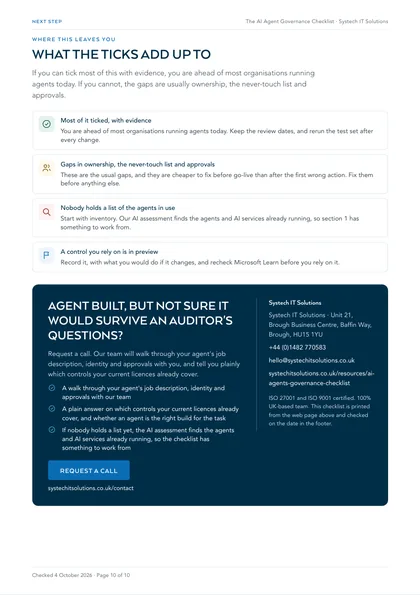
Where this leaves you
Most of it ticked, with evidence
You are ahead of most organisations running agents today. Keep the review dates, and rerun the test set after every change.
Gaps in ownership, the never-touch list and approvals
These are the usual gaps, and they are cheaper to fix before go-live than after the first wrong action. Fix them before anything else.
Nobody holds a list of the agents in use
Start with inventory. Our AI assessment finds the agents and AI services already running, so section 1 has something to work from.
A control you rely on is in preview
Record it, with what you would do if it changes, and recheck Microsoft Learn before you rely on it.
If you can tick most of this with evidence, you are ahead of most organisations running agents today. If you cannot, the gaps are usually ownership, the never-touch list and approvals, and they are cheaper to fix before go-live than after the first wrong action. Our AI agents service builds these controls into every agent from the job description onwards, and our AI assessment finds the agents and AI services already running if nobody holds a list yet.
This is one of a set. The rest, covering AI readiness, security, cost, compliance and device management in the same format, are listed on all our free checklists and assessments.
What makes an agent different from Copilot, for governance purposes?
An agent is AI with a job and the tools to do it. Microsoft 365 Copilot answers, summarises and drafts inside Microsoft 365. An agent goes further: it can look something up in your CRM, raise a ticket, update a record or prepare a finance entry, as part of a task you have defined.
That is why the governance question changes. An answer can be read and ignored. An action changes something in a live system, so it needs a narrower scope, a clear owner and, for anything consequential, a person in the loop. Microsoft's own definition of an agent describes software that makes decisions and acts on them autonomously using the tools available to it, with or without human intervention. The controls in this checklist exist to decide, in advance, where that autonomy stops.
Why start with a written job description rather than a policy?
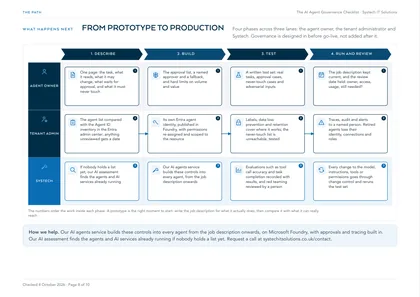
Because a policy written before you know what the agent does either forbids too little or blocks the useful part. One page per agent, written before any build starts, covers five things: the task as a person would do it today, what it reads and under whose permissions, what it may change on its own, what waits for approval, and what it must never touch.
The never-touch list is the part people skip, and it is the most useful. It becomes a hard boundary in the design and a set of test cases the agent must refuse before it is released. If the job does not fit on a page, the job is not ready yet, and that is worth knowing before anyone writes code.
What identity should an agent run under?
A Microsoft Entra agent identity, which Microsoft describes as an identity built specifically for AI agents, so that what an agent does can be distinguished from what people and ordinary applications do. In Microsoft Foundry, agents still in development share one project identity; publishing an agent gives it its own dedicated identity, and Microsoft's guidance is to treat the shared identity as a broader blast radius.
Agent identities appear in the Microsoft Entra admin center under Agent ID, alongside Copilot Studio agents and others, so you can hold one inventory with owners and sponsors. Agent ID is available to all Microsoft Entra customers. Extending Entra security features such as Conditional Access to agents requires Microsoft Agent 365, which Microsoft includes with Microsoft 365 E7 and offers as an add-on to E5, A5 and Business Premium. Check which of those controls your licences cover before the design depends on any of them.
Where does a person stay in control?
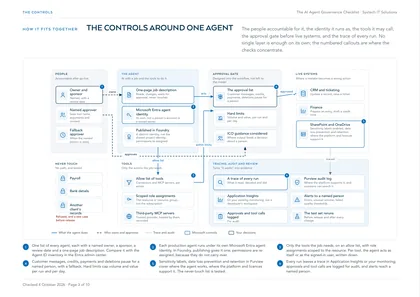
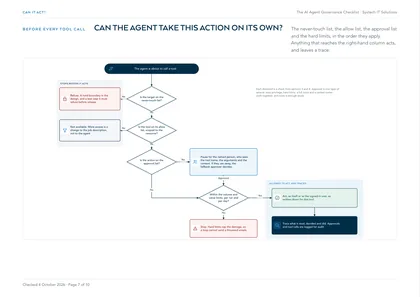
At the approval step, designed into the workflow rather than left to the model's judgement. Microsoft's guidance for agents that call MCP servers is to require approval for high-risk operations, especially tools that write data or change resources, to review the tool name and arguments before approving, and to log approvals and tool calls.
Approval is one layer of several. Least-privilege access keeps the agent to the records the job needs. Hard limits on volume and value stop a loop sending a thousand emails or approving a large refund. A full trace shows what the agent read, decided and did. A named owner and review date keep somebody accountable after go-live. None of these is enough alone, which is why the checklist asks about all of them.
How do you prove an agent is safe to release?
With a written test set, run before release and after every change: real tasks with the expected actions, cases where the right behaviour is to stop and ask, never-touch cases the agent must refuse, and adversarial inputs such as an email that tries to give the agent new instructions. Microsoft advises treating tool descriptions and results from remote MCP servers as untrusted input, because they can carry indirect prompt injection.
Microsoft Foundry provides evaluators for agent behaviour, including tool call accuracy and task completion, an AI red teaming agent, and tracing integrated with Azure Monitor Application Insights. Used together they let you show the agent passes rather than assert it, and the same traces become the operational record once it is live.
Frequently asked
Do we need Microsoft Agent 365 to govern agents?
Not to start. Microsoft Entra Agent ID, which gives agents their own identities and puts them in one inventory in the Entra admin center, is available to all Microsoft Entra customers. Extending Entra security features such as Conditional Access and identity protection to agents is what requires Microsoft Agent 365, which Microsoft includes with Microsoft 365 E7 and offers as an add-on to E5, A5 and Business Premium. Check your licences first and design the controls around what you have.
Should an agent act with its own permissions or the user's?
It depends on the job, so decide it per tool. Microsoft Entra supports agents acting on behalf of a user, limited to what that user is authorised for, or acting under their own identity with permissions assigned directly to the agent. An agent that should never reach more than the person asking should act as that person. An agent that runs in the background with no user present needs its own tightly scoped access. Write the choice into the job description.
Does Microsoft Purview protect what agents do?
Partly, and it depends on the platform. Microsoft states that agents typically inherit the Purview protections of their parent AI app. For Microsoft Foundry and Copilot Studio agents that includes data classification, sensitivity labels, data loss prevention and Insider Risk Management, plus compliance capabilities such as audit and retention. Some third-party enterprise AI agents have far less coverage, and some Purview capabilities for AI interactions may need pay-as-you-go billing enabled.
What stops an agent being tricked by an email or document it reads?
Several layers, because none is enough alone. Give the agent only the tools its job needs, make consequential actions wait for a person, cap volume and value, and treat anything the agent reads from outside, including tool results from remote MCP servers, as untrusted input. Then test it: include adversarial inputs in the test set, so you see how it behaves before your customers do.
We already have a prototype agent. Is it too late to apply this?
No, and a prototype is the right moment. Write the job description for what it actually does, check what identity and permissions it really has, and compare that with what the job needs. The gap between the two is usually the first thing to fix, and it is far easier before the agent is relied on than after.
Is there a UK law that governs AI agents?
The UK has no AI Act of its own. Existing law applies through existing regulators, and the ICO's guidance on AI and data protection applies wherever personal data is involved, including on automated decision-making and data protection impact assessments. The ICO notes that guidance is under review following the Data (Use and Access) Act. If you also sell into the EU, the EU AI Act may reach some uses; our AI assessment page explains when.