
This is for you if
- A governor, trustee or inspector has asked how you are doing against the standards and you do not have a defensible answer yet
- You are a trust inheriting schools with different networks, suppliers and contract end dates
- Filtering is in place and you are less confident about who reviews the monitoring alerts
The standards are rarely failed on the technology. They are failed on evidence: a control that is owned but never switched on, a backup nobody has restored, a monitoring report nobody read, an accountable leader who turns out not to exist.
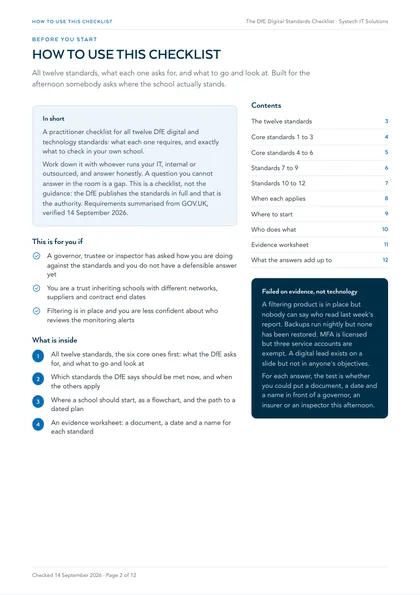
In short: The DfE digital and technology standards are the Department for Education's published guidance on the technology schools and colleges in England should have. There are twelve. Six are core, and the DfE says all schools and colleges should be working towards meeting those six by 2030. Filtering and monitoring should be met now.
How do you use this checklist?
Every standard below is two things and nothing else: what the DfE asks for, and what you go and look at to find out whether you have it. Work down it with whoever runs your IT, internal or outsourced, and answer honestly. A question you cannot answer in the room is a gap, and writing it down as one is more useful than a compliance claim nobody can evidence.
This is a checklist, not the guidance. The DfE publishes the standards in full and that is the authority; if you want the reasoning, the exact wording and the numbers behind any one of these, the full explanation of the DfE digital and technology standards sits alongside a post on each individual standard, linked underneath each entry here.
Which standards are core, and which are not?
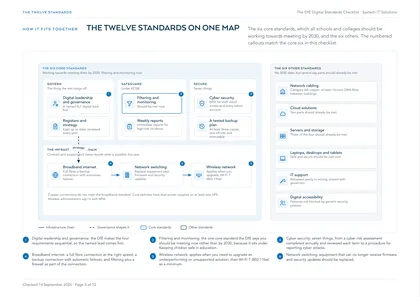
Six are core: broadband internet, wireless network, network switching, digital leadership and governance, filtering and monitoring, and cyber security. The DfE singles those out because meeting them gives you the infrastructure and governance the other six depend on. The remaining six carry no 2030 date, but several of them say at least one requirement should already be met, so treating them as optional is a mistake.
The order below is the order the standards make sense to work in rather than the order they are published in: govern first, then secure, then safeguard, then the infrastructure chain.
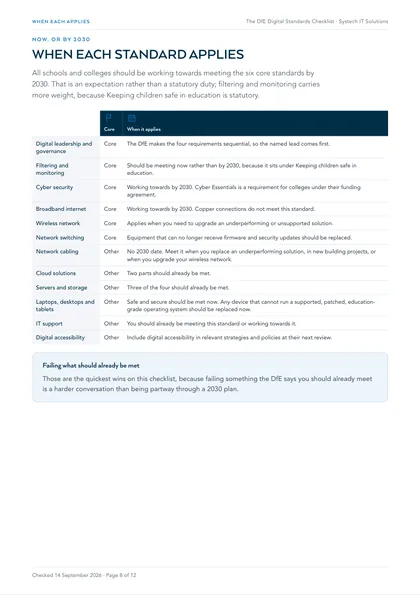
| Core | When it applies | |
|---|---|---|
| Digital leadership and governance | Core | The DfE makes the four requirements sequential, so the named lead comes first. |
| Filtering and monitoring | Core | Should be meeting now rather than by 2030, because it sits under Keeping children safe in education. |
| Cyber security | Core | Working towards by 2030. Cyber Essentials is a requirement for colleges under their funding agreement. |
| Broadband internet | Core | Working towards by 2030. Copper connections do not meet this standard. |
| Wireless network | Core | Applies when you need to upgrade an underperforming or unsupported solution. |
| Network switching | Core | Equipment that can no longer receive firmware and security updates should be replaced. |
| Network cabling | Other | No 2030 date. Meet it when you replace an underperforming solution, in new building projects, or when you upgrade your wireless network. |
| Cloud solutions | Other | Two parts should already be met. |
| Servers and storage | Other | Three of the four should already be met. |
| Laptops, desktops and tablets | Other | Safe and secure should be met now. Any device that cannot run a supported, patched, education-grade operating system should be replaced now. |
| IT support | Other | You should already be meeting this standard or working towards it. |
| Digital accessibility | Other | Include digital accessibility in relevant strategies and policies at their next review. |
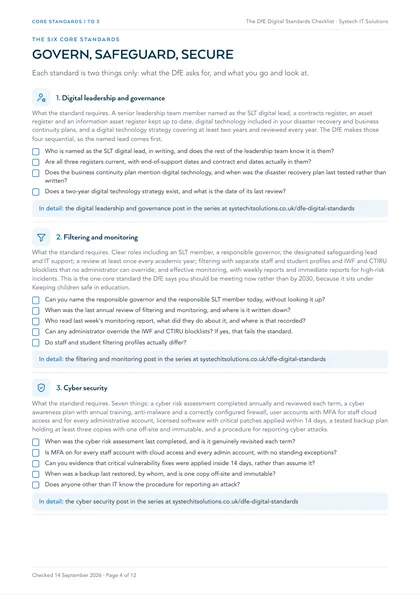
The six core standards: what each requires, and what to check.
1. Digital leadership and governance
What the standard requires. A senior leadership team member named as the SLT digital lead, a contracts register, an asset register and an information asset register kept up to date, digital technology included in your disaster recovery and business continuity plans, and a digital technology strategy covering at least two years and reviewed every year. The DfE makes those four sequential, so the named lead comes first.
- Who is named as the SLT digital lead, in writing, and does the rest of the leadership team know it is them?
- Are all three registers current, with end-of-support dates and contract end dates actually in them?
- Does the business continuity plan mention digital technology, and when was the disaster recovery plan last tested rather than written?
- Does a two-year digital technology strategy exist, and what is the date of its last review?
In detail: Digital leadership and governance: the DfE standard most schools skip, and why it comes first
2. Filtering and monitoring
What the standard requires. Clear roles including an SLT member, a responsible governor, the designated safeguarding lead and IT support; a review at least once every academic year; filtering with separate staff and student profiles and IWF and CTIRU blocklists that no administrator can override; and effective monitoring, with weekly reports and immediate reports for high-risk incidents. This is the one core standard the DfE says you should be meeting now rather than by 2030, because it sits under Keeping children safe in education.
- Can you name the responsible governor and the responsible SLT member today, without looking it up?
- When was the last annual review of filtering and monitoring, and where is it written down?
- Who read last week's monitoring report, what did they do about it, and where is that recorded?
- Can any administrator override the IWF and CTIRU blocklists? If yes, that fails the standard.
- Do staff and student filtering profiles actually differ?
3. Cyber security
What the standard requires. Seven things: a cyber risk assessment completed annually and reviewed each term, a cyber awareness plan with annual training, anti-malware and a correctly configured firewall, user accounts with MFA for staff cloud access and for every administrative account, licensed software with critical patches applied within 14 days, a tested backup plan holding at least three copies with one off-site and immutable, and a procedure for reporting cyber attacks.
- When was the cyber risk assessment last completed, and is it genuinely revisited each term?
- Is MFA on for every staff account with cloud access and every admin account, with no standing exceptions?
- Can you evidence that critical vulnerability fixes were applied inside 14 days, rather than assume it?
- When was a backup last restored, by whom, and is one copy off-site and immutable?
- Does anyone other than IT know the procedure for reporting an attack?
In detail: The DfE cyber security standard for schools and colleges: the seven requirements, explained
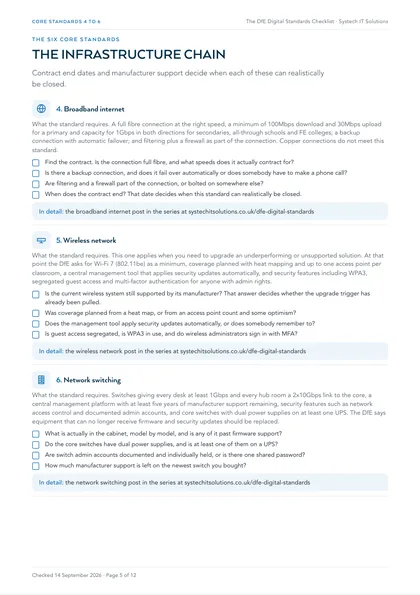
4. Broadband internet
What the standard requires. A full fibre connection at the right speed, a minimum of 100Mbps download and 30Mbps upload for a primary and capacity for 1Gbps in both directions for secondaries, all-through schools and FE colleges; a backup connection with automatic failover; and filtering plus a firewall as part of the connection. Copper connections do not meet this standard.
- Find the contract. Is the connection full fibre, and what speeds does it actually contract for?
- Is there a backup connection, and does it fail over automatically or does somebody have to make a phone call?
- Are filtering and a firewall part of the connection, or bolted on somewhere else?
- When does the contract end? That date decides when this standard can realistically be closed.
In detail: The DfE broadband standard: full fibre, the right speed for your phase, and a backup line
5. Wireless network
What the standard requires. This one applies when you need to upgrade an underperforming or unsupported solution. At that point the DfE asks for Wi-Fi 7 (802.11be) as a minimum, coverage planned with heat mapping and up to one access point per classroom, a central management tool that applies security updates automatically, and security features including WPA3, segregated guest access and multi-factor authentication for anyone with admin rights.
- Is the current wireless system still supported by its manufacturer? That answer decides whether the upgrade trigger has already been pulled.
- Was coverage planned from a heat map, or from an access point count and some optimism?
- Does the management tool apply security updates automatically, or does somebody remember to?
- Is guest access segregated, is WPA3 in use, and do wireless administrators sign in with MFA?
6. Network switching
What the standard requires. Switches giving every desk at least 1Gbps and every hub room a 2x10Gbps link to the core, a central management platform with at least five years of manufacturer support remaining, security features such as network access control and documented admin accounts, and core switches with dual power supplies on at least one UPS. The DfE says equipment that can no longer receive firmware and security updates should be replaced.
- What is actually in the cabinet, model by model, and is any of it past firmware support?
- Do the core switches have dual power supplies, and is at least one of them on a UPS?
- Are switch admin accounts documented and individually held, or is there one shared password?
- How much manufacturer support is left on the newest switch you bought?
In detail: The DfE network switching standard: what your switches need to do, and when to replace them
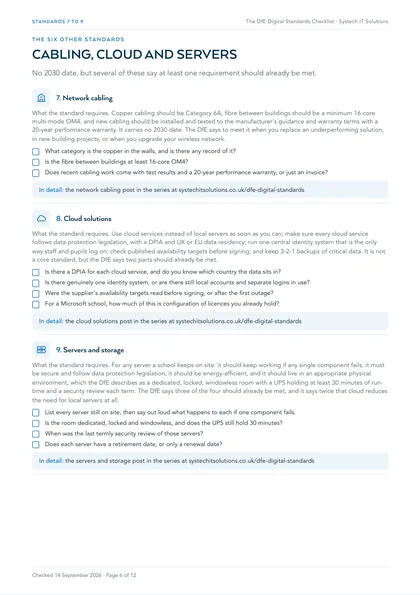
The six other standards: what each requires, and what to check.
7. Network cabling
What the standard requires. Copper cabling should be Category 6A, fibre between buildings should be a minimum 16-core multi-mode OM4, and new cabling should be installed and tested to the manufacturer's guidance and warranty terms with a 20-year performance warranty. It carries no 2030 date. The DfE says to meet it when you replace an underperforming solution, in new building projects, or when you upgrade your wireless network.
- What category is the copper in the walls, and is there any record of it?
- Is the fibre between buildings at least 16-core OM4?
- Does recent cabling work come with test results and a 20-year performance warranty, or just an invoice?
In detail: The DfE network cabling standard: Cat 6A, OM4 fibre and a 20-year warranty
8. Cloud solutions
What the standard requires. Use cloud services instead of local servers as soon as you can; make sure every cloud service follows data protection legislation, with a DPIA and UK or EU data residency; run one central identity system that is the only way staff and pupils log on; check published availability targets before signing; and keep 3-2-1 backups of critical data. It is not a core standard, but the DfE says two parts should already be met.
- Is there a DPIA for each cloud service, and do you know which country the data sits in?
- Is there genuinely one identity system, or are there still local accounts and separate logins in use?
- Were the supplier's availability targets read before signing, or after the first outage?
- For a Microsoft school, how much of this is configuration of licences you already hold?
In detail: The DfE cloud solutions standard: moving off local servers without losing control of your data
9. Servers and storage
What the standard requires. For any server a school keeps on site: it should keep working if any single component fails, it must be secure and follow data protection legislation, it should be energy-efficient, and it should live in an appropriate physical environment, which the DfE describes as a dedicated, locked, windowless room with a UPS holding at least 30 minutes of run-time and a security review each term. The DfE says three of the four should already be met, and it says twice that cloud reduces the need for local servers at all.
- List every server still on site, then say out loud what happens to each if one component fails.
- Is the room dedicated, locked and windowless, and does the UPS still hold 30 minutes?
- When was the last termly security review of those servers?
- Does each server have a retirement date, or only a renewal date?
In detail: The DfE servers and storage standard: resilience, a 30-minute UPS and a room that is not a cupboard
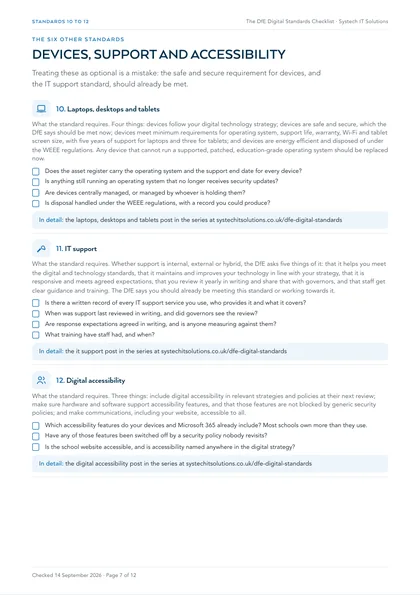
10. Laptops, desktops and tablets
What the standard requires. Four things: devices follow your digital technology strategy; devices are safe and secure, which the DfE says should be met now; devices meet minimum requirements for operating system, support life, warranty, Wi-Fi and tablet screen size, with five years of support for laptops and three for tablets; and devices are energy efficient and disposed of under the WEEE regulations. Any device that cannot run a supported, patched, education-grade operating system should be replaced now.
- Does the asset register carry the operating system and the support end date for every device?
- Is anything still running an operating system that no longer receives security updates?
- Are devices centrally managed, or managed by whoever is holding them?
- Is disposal handled under the WEEE regulations, with a record you could produce?
11. IT support
What the standard requires. Whether support is internal, external or hybrid, the DfE asks five things of it: that it helps you meet the digital and technology standards, that it maintains and improves your technology in line with your strategy, that it is responsive and meets agreed expectations, that you review it yearly in writing and share that with governors, and that staff get clear guidance and training. The DfE says you should already be meeting this standard or working towards it.
- Is there a written record of every IT support service you use, who provides it and what it covers?
- When was support last reviewed in writing, and did governors see the review?
- Are response expectations agreed in writing, and is anyone measuring against them?
- What training have staff had, and when?
In detail: The DfE IT support standard: what good support looks like, and how to review yours
12. Digital accessibility
What the standard requires. Three things: include digital accessibility in relevant strategies and policies at their next review; make sure hardware and software support accessibility features, and that those features are not blocked by generic security policies; and make communications, including your website, accessible to all.
- Which accessibility features do your devices and Microsoft 365 already include? Most schools own more than they use.
- Have any of those features been switched off by a security policy nobody revisits?
- Is the school website accessible, and is accessibility named anywhere in the digital strategy?
What counts as evidence, and what does not?
The standards are rarely failed on the technology. They are failed on evidence. A filtering product is in place but nobody can say who read last week's report. Backups run nightly but none has been restored. MFA is licensed but three service accounts are exempt. A digital lead exists on a slide but not in anyone's objectives.
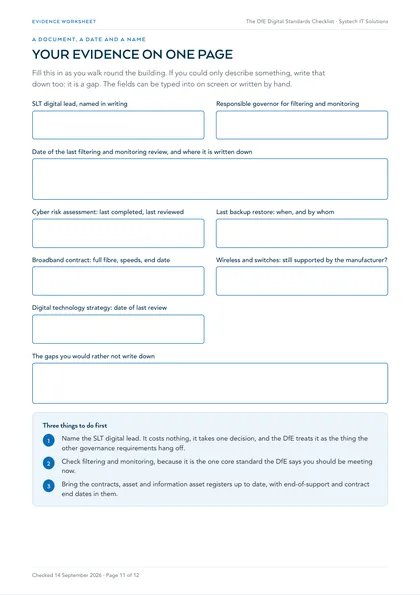
For each answer above, the practical test is whether you could put a document, a date and a name in front of a governor, an insurer or an inspector this afternoon. If you could, that standard is evidenced. If you could only describe it, it is not, and that is a cheap thing to fix in advance and an expensive one to fix during an inspection or an incident.
Where should a school start?
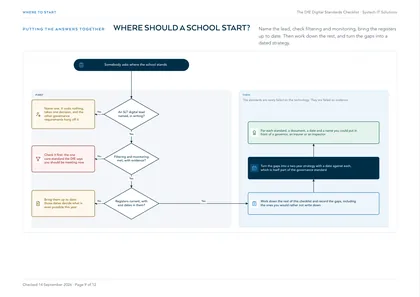
- Name the SLT digital lead. It costs nothing, it takes one decision, and the DfE treats it as the thing the other governance requirements hang off.
- Check filtering and monitoring, because it is the one core standard the DfE says you should be meeting now.
- Bring the contracts, asset and information asset registers up to date, with end-of-support and contract end dates in them. Those dates decide what is even possible this year.
- Work down the rest of this checklist and record the gaps, including the ones you would rather not write down.
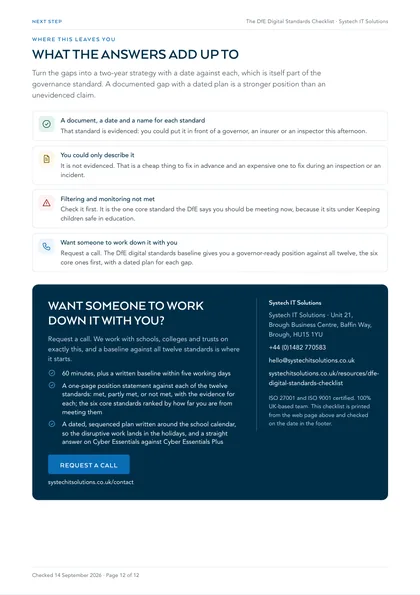
- Turn the gaps into a two-year strategy with a date against each, which is itself part of the governance standard.
A document, a date and a name for each standard
That standard is evidenced: you could put it in front of a governor, an insurer or an inspector this afternoon.
You could only describe it
It is not evidenced. That is a cheap thing to fix in advance and an expensive one to fix during an inspection or an incident.
Filtering and monitoring not met
Check it first. It is the one core standard the DfE says you should be meeting now, because it sits under Keeping children safe in education.
Want someone to work down it with you
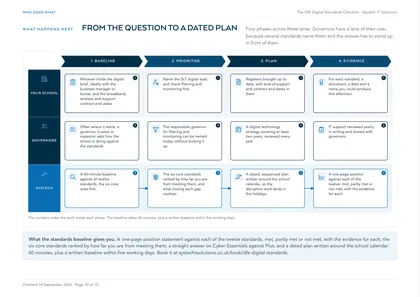
Request a call. The DfE digital standards baseline gives you a governor-ready position against all twelve, the six core ones first, with a dated plan for each gap.
We work with schools, colleges and trusts on exactly this. See how we support IT for schools, colleges and trusts, and what a baseline against all twelve standards involves.
Frequently asked
How many DfE digital and technology standards are there?
Twelve topic areas. Six are core: broadband internet, wireless network, network switching, digital leadership and governance, filtering and monitoring, and cyber security. The other six cover network cabling, cloud solutions, servers and storage, laptops, desktops and tablets, IT support, and digital accessibility. Each area breaks down into individual standards with a stated reason, who needs to be involved and how to meet it.
Are the DfE digital standards mandatory for schools?
The DfE's wording is that all schools and colleges should be working towards meeting the six core standards by 2030. That is an expectation rather than a statutory duty, and it is worth saying so plainly in front of governors rather than overstating it. Two parts carry more weight than the rest. Filtering and monitoring is described as a standard you should be meeting now, because it sits under Keeping children safe in education, which is statutory. And the cyber security standard states that Cyber Essentials is a requirement for colleges under their funding agreement.
Which DfE standards should we be meeting now, rather than by 2030?
Filtering and monitoring is the only core standard the DfE words that way. Outside the core six, several standards say at least one requirement should already be met: the IT support standard, two parts of the cloud solutions standard, the safe and secure requirement in the laptops, desktops and tablets standard, and three of the four requirements in the servers and storage standard. Those are the quickest wins on this checklist, because failing something the DfE says you should already meet is a harder conversation than being partway through a 2030 plan.
What counts as evidence that a school meets a standard?
Something dated, written down, and produced by someone other than the person claiming it. The standards are rarely failed on technology. They are failed on evidence: a control that is owned but never switched on, a backup nobody has restored, a monitoring report nobody read, an accountable leader who turns out not to exist. For each standard on this checklist, the useful test is whether you could put a document, a date and a name in front of a governor, an insurer or an inspector this afternoon.